©2018 SwellPro All Rights Reserved
26
Camera
The camera, combined a high-precision waterproof gimbal, which facilitates the cameras
ability to capture smooth and real-time videos and photos in a high-speed environment. The
camera supports 24 frames per second 4K videos.
1. Please open the small water tight hatch on the top of the camera, insert the Micro SD card
in the correct direction.
2. Close and Fasten the sealing hatch.
The Splash Drone 3 supports Micro SD cards with a maximum capacity of 64GB.
Because the camera requires fast reading and writing capability for high stream video
data, please use a card with a minimum of Class 10 or UHS-1, or better.
Before turning on the camera WiFi, turn the camera control switch on the remote
control into the PREVIEW mode, otherwise WiFi will not be enabled.
Do not insert or pull out the Micro SD card during flight operations, this could damage
or destroy the data file.
In order to ensure the stability of the camera system, the maximum single video length
limit is 15 minutes.
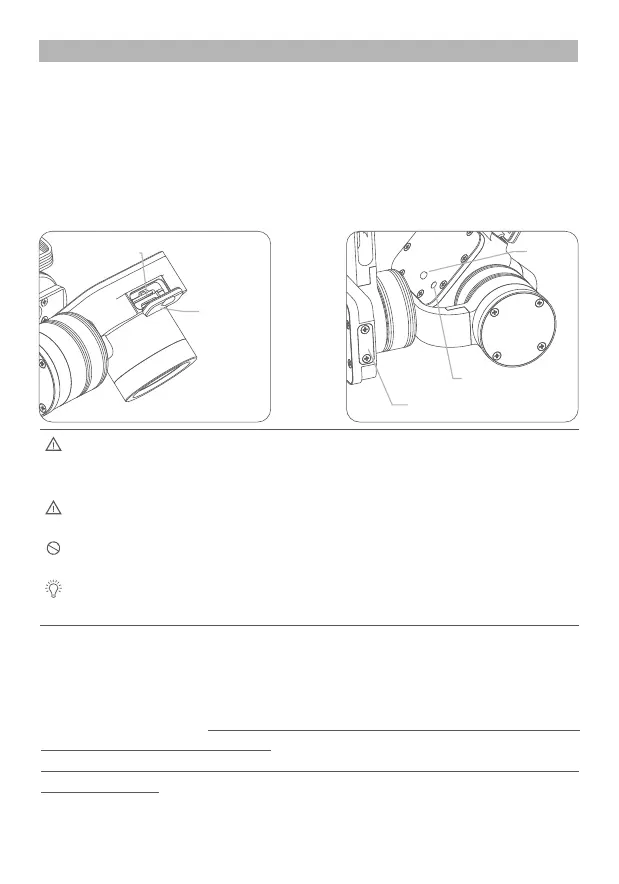
Micro SD card
sealing hatch
Gimbal firmware upgrade USB port
Camera working indicator
Wifi switch
Wifi switch: Short press ON, press OFF again again.
Micro SD card slot
Installing the micro SD card
1.APP installation: iOS systems, for apple devices, please find the SwellCam APP in the apple
store, or on the Swellpro Website,- download section, then install the APP.
Android systems can download the APK installation on the www.swellpro.com site
2. Camera WIFI connection: Please Note, the WiFi is used for preight setup purposes only,
and must be disabled prior to take o.
Power on the remote controller, when started, please switch the photo switch to the
“Preview” position.
Power on the drone, the camera will power on automatically, switch on the camera WIFI, the
red indicator lights up indicating the camera is on.
Camera settings and use














 To Next Page