ELECTRICS
78
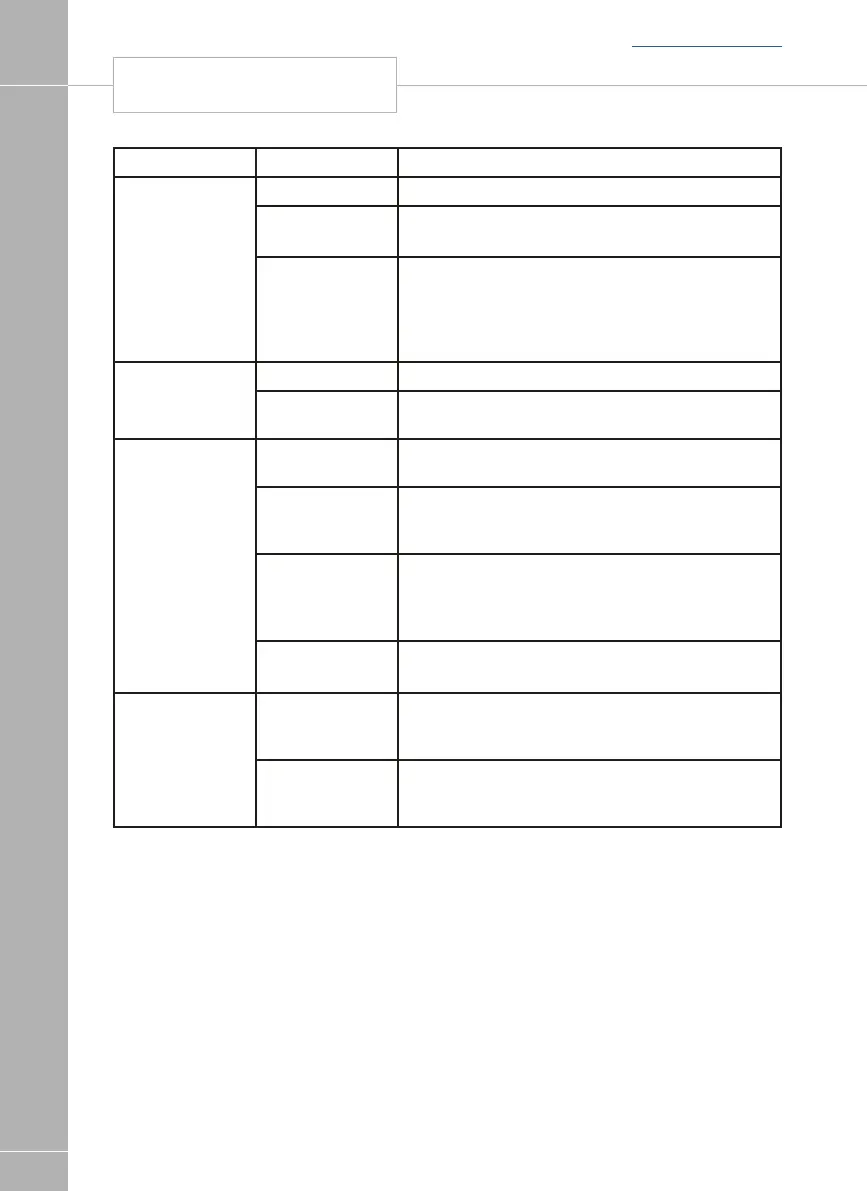
Fault Possible Cause Proposed Fix
Pump not
working
Fuse blown Replace fuse with correct value as per fuse table.
Pump turned off Turn pump on by pressing the pump button at the
control panel.
Both the internal and external pump feeds are
controlled from the control panel. To alter the setting
of the pump switch see section 3.8. Ensure the
setting matches your desired requirement.
Setting incorrect
Lights not
working
Fuse/s blown Replace fuse with correct value as per fuse table.
Lights turned off Turn Lights on by pressing the lights button, use
dimmer at the control panel.
Bluetooth
Communications
not working
Bluetooth not
paired
Using System Settings menu, select Bluetooth Pair
option
Bluetooth not
active on Device
Ensure that the handheld device has Bluetooth
switched on and that the device supports the
Bluetooth 4 standard (BLE)
Ensure the handheld device is within 7M of the
middle of the caravan/motorhome switch see
section 3.8. Ensure the setting matches your desired
requirement.
Bluetooth out of
range
Bluetooth
connection issue
See App user guide for further details
Remote
Communications
not working
Account details
not entered on
App
Enter details in Account page of App settings menu
Account not
registered at time
of vehicle delivery
Check with supplying dealer or Sargent Electrical that
an account has been registered.
SYSTEM WARNINGS
Back to section menu






 To Next Page