14
8. Audio
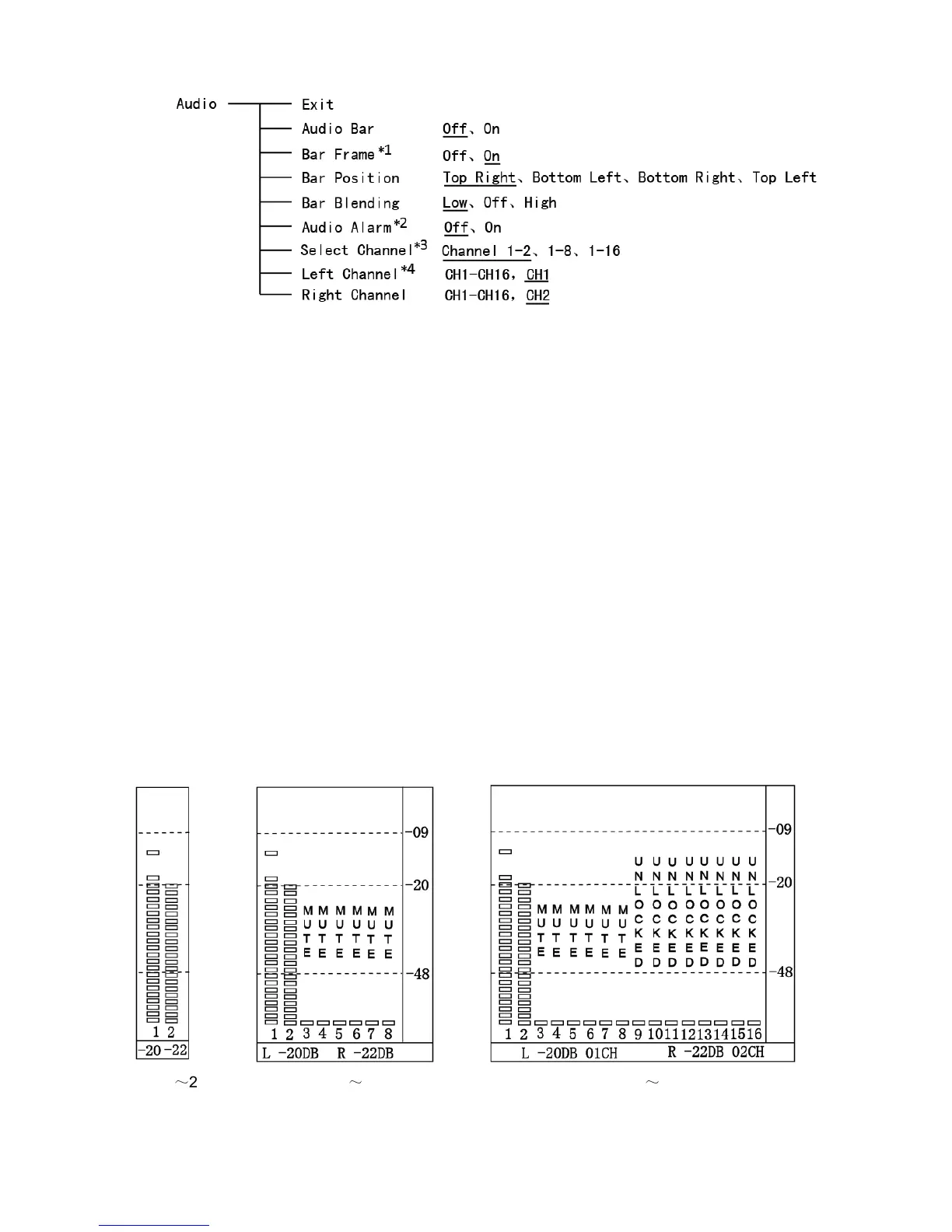
*1 When “Bar Frame” is set to “Off”, only the audio meter will be displayed. When “Bar Frame” is set to
“On”, frame and real-time audio value will be displayed.
*2 When “Audio Alarm” is set to “On”, if no embedded audio is detected, the audio bar will display
“UNLOCKED”. If the audio value is too low, the audio bar will display “MUTE”.
*3 Select Channel
Under analog signal, only channel1-2 can be displayed.
Under HDMI signal, channel1-2 and 1-8 can be selected.
Under SDI signal, channel 1-2, 1-8 and 1-16 can be selected.
*4 Audio channels can be selected to output according to the requirements.
When the current “Select Channel” is set to “Channel1-2”, the left channel and right channel output
can be selected from Channel1 or channel2.
When the current “Select Channel” is set to “Channel1-8”, the left channel and right channel output
can be selected from Channel1 to channel8.
When the current “Select Channel” is set to “Channel1-16”, the left channel and right channel
output can be selected from Channel1 to channel 16.
In audio bar, the left channel information will be in green, and the right channel information will be
in red.
CH 1
~
2 CH 1
~
8 CH 1
~
16



 To Next Page