13
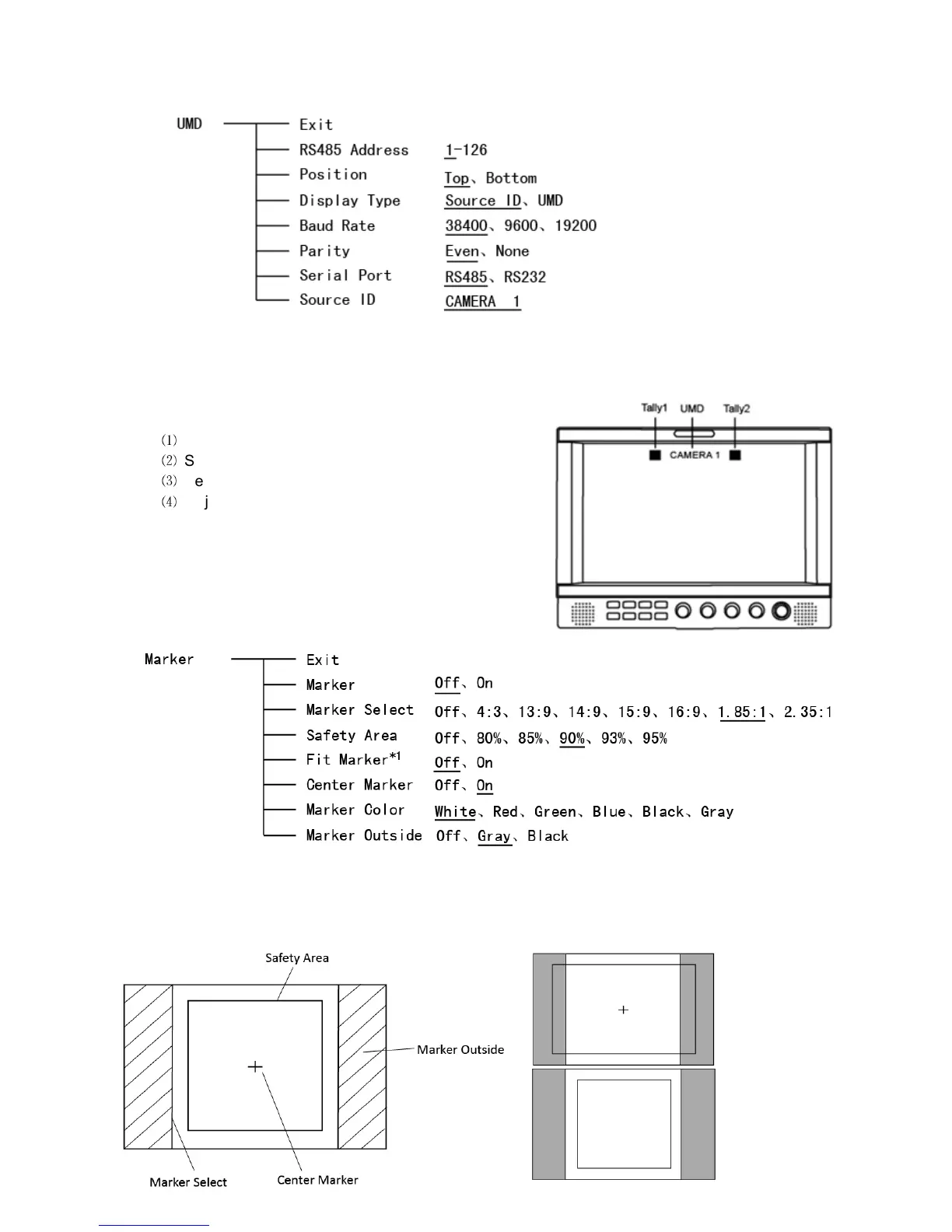
6. UMD
Support “TSL UMD Protocol-V4.0” provided by Television System LTD
Source ID Setup:
Select “Source ID”, revolve “MENU/ENTER” to select the letters and press “MENU/ENTER" to
input. Max 8 letters are supported. Select “Exit” to quit and save settings, the source ID will be
displayed on top or bottom of the screen.
UMD setup:
⑴
Connect the external control equipment;
⑵
Set “Display Type” to “UMD”;
⑶
Set “address”, “Baud Rate” and “Parity”
⑷
Adjust the external control equipment and send
UMD command, the monitor will display as:
User can set the character and color of the UMD and
the color of Tally1 and Tally2.
Please see “5. GPI” to check the”RS485 pin sequence
and definition:
7. Marker
*1 When “Fit Marker” is “Off”, the size of safety area is benchmarked against the actual display screen,
accounting for 80% ~ 95% of actual display screen. When “Fit Marker” is “On”, the size of safety area
is benchmarked against the area inside the scales marker, accounting for 80% ~ 95% of the area
inside the scales marker.
Example:
Fit Marker Off
Fit Marker On



 To Next Page