EasyManua.ls Logo

SY Electronics OMEGA 3 - User Manual

SY Electronics OMEGA 3
12 pages
Print Icon
To Next Page IconTo Next Page
Loading...
SY Electronics Ltd., 7 Worrall Street, Salford, Greater Manchester, M5 4TH, UK
Tel: +44 (0)161 868 3450 – Web: sy.uk
OMEGA 3
User Manual
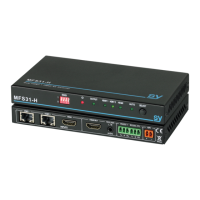
MFS31-H
Multi-format Switcher
with dual HDBaseT and a HDMI 2.0 inputs
2x HDBaseT and 1x HDMI inputs, with HDMI output
Supporting:
HDMI 2.0, Down-Scale, EDID & HDCP control, Test-Pattern,
Audio de-embed, CEC & Temperature control, Diagnostics, iPoC
Question and Answer IconNeed help?

Do you have a question about the SY Electronics OMEGA 3 and is the answer not in the manual?

Summary

Installation Precautions

Connectors and Controls Overview

Using the MFS31-H

RS232 Command Reference

Output HDCP Commands

Commands to manage HDMI output HDCP modes.

Diagnostic Commands

Tools for checking cable length, link status, and signal errors.

CEC Commands

Commands to control display functions like power and volume via CEC.

Safety Temperature Control

Commands to configure and manage unit safety temperature handling.

RJ-45 Wiring and HDBaseT Connectivity

Product Specifications

Safety Instructions

Overview

The SY Electronics OMEGA 3 MFS31-H is a multi-format switcher designed for professional AV installations, supporting HDMI 2.0 and HDBaseT inputs with an HDMI output. It is engineered to facilitate system integration, validation, and maintenance with a comprehensive set of features.

Function Description:

The MFS31-H acts as a central hub for managing and switching between various video sources. It features two HDBaseT inputs and one HDMI input, with a single HDMI output for display devices. The unit also provides de-embedded audio outputs via S/PDIF optical Mini-Toslink and analogue L/R (3.5mm stereo jack). A key feature is its ability to pass-through RS232 protocol with the selected HDBaseT transmitter, alongside a dedicated RS232 port for controlling the MFS31-H itself. The device supports iPoC (Power over Cable) functionality, allowing it to power remote HDBaseT transmitters (e.g., SY-HDBT-70-SP-T) via its 48V power supply, eliminating the need for separate power adapters for the transmitters.

Important Technical Specifications:

  • HDMI Version: HDMI 2.0, supporting HDR (10, 12 bits) and HBR.
  • Max Bandwidth:
    • HDMI Input: 18 Gbps (4K60 4:4:4)
    • HDBaseT Input: 10.2 Gbps (4K60 4:2:0, 4K30 4:4:4)
    • HDMI Output: 18 Gbps (4K60 4:4:4)
  • HDCP Compliance:
    • Input HDCP: 1.4 and 2.2
    • Output HDCP: Fully controlled (Pass, 1.4, 2.2, Cascade mode)
  • HDBaseT Cable Length: Up to 70m at 1080p, and 40m at 4K.
  • RS232 (Control Commands): 57600 baud, 8 data bits, 1 stop bit, no parity.
  • RS232 (Pass-Through): Any baud rate up to 115200.
  • Video Formats Supported: All VESA resolutions up to 4096x2160p, and all 3D formats. Examples include 4096x2160p (24/25/30/50/60Hz), 3840x2160p (24/25/30/50/60Hz), 2560x1440 (50/60Hz), 1920x1080p (24/25/30/50/60Hz), and various PC resolutions up to 1920x1200 (60Hz).
  • Colour Space: RGB, YCbCr 4:4:4, 4:2:2, 4:2:0.
  • Colour Depth: 8, 10, 12 bits.
  • Audio Format Supported: 2.0 / 5.1 / 7.1 channel LPCM, Dolby, AC3, DTS.
  • Audio Output (de-embed):
    • L/R Analogue: 3.5mm Stereo Jack, 20Hz – 20kHz, 1.5Vrms max.
    • Mini-Toslink: Optical S/PDIF Audio Output.
  • Power Supply: 48V/0.5A (supply voltage range 24-48V) via a two-way 3.5mm phoenix connector.
  • Power Consumption: 9W max.
  • Operating Temperature Range: 0 to +40°C (+32 to +104 °F).
  • Operating Humidity Range: 10 to 90% RH (non-condensing).
  • Dimensions (L x W x H): 163 x 90 x 20 mm (excluding connectors).
  • Mass (Main Unit): 0.5kg.
  • Package Contents: MFS31-H unit, two 3-pin female captive screw connectors, 48V/0.5A Power Adapter with interchangeable fittings for UK, EU, and US.

Usage Features:

  • EDID Control: The MFS31-H offers flexible EDID management through a 4-position DIP switch on the front panel, allowing users to select from various predefined EDID settings (e.g., auto, 4K60-2.0, 1080P60-2.0, etc.) or a manual mode.
  • HDCP Control: Users can control the HDMI output HDCP modes via RS232 commands, with options such as FOLLOW-INPUT (default), FORCE-1.4, FORCE-2.2, and FORCE-OFF.
  • Auto/Manual Switching: The device supports both automatic and manual input switching modes. In manual mode, inputs are selected by briefly pressing the "Select" button. In auto mode, the switcher automatically selects a new active input when detected, and if the currently selected input video is lost, it will switch to the next available active input.
  • Video Keep-Alive (VKA): This feature addresses scenarios where there is no signal from the selected input. Users can configure the device to either output a current Test Pattern (maintaining a video stream) or have no timing output (resulting in video drop-out).
  • Test Patterns: The MFS31-H includes a test pattern generator useful for testing the HDMI output to the display device. Users can select various patterns (BLACK, RED, GREEN, BLUE, WHITE, RAMP patterns, PRBS, STRIPE, CHECKER-BOARD) and resolutions (4K60, 4K30, 1080P60, 720P60) via RS232 commands.
  • 4K Down-Scale: The switcher supports 4K down-scaling, allowing it to adapt higher resolution inputs to lower resolution displays.
  • Audio De-embed: Audio can be extracted from the HDMI stream and outputted via optical Mini-Toslink or analogue L/R, providing flexibility for external audio systems.
  • CEC Control: The MFS31-H can send CEC commands to compatible display devices, enabling control over functions like display power (ON/OFF), volume (increase/decrease/mute), and status checks (connection, power). This is particularly useful when direct RS232 connection to the display is impractical.
  • RS232 Control: All features and settings of the MFS31-H can be controlled via RS232 commands, providing a robust interface for integration into larger control systems. Commands are ASCII-based and terminated with a carriage-return character.
  • Front Panel Indicators: LEDs on the front panel provide visual feedback on power status, HDMI output activity, and the currently selected HDBaseT or HDMI input. An "AUTO" LED indicates when auto source selection is active.
  • RJ-45 Wiring: Emphasizes the importance of using shielded Cat6, Cat6a, or Cat7 cables with 4 pairs of 23AWG solid copper wires for HDBaseT connections, wired identically to the T568B standard. HDBaseT signals will not pass through standard Ethernet devices.

Maintenance Features:

  • Diagnostic Commands: A suite of RS232 diagnostic commands is available to assist with installation, fault finding, and troubleshooting. These include:
    • Cable Length: Reports HDBaseT cable length (20-70m).
    • Link/Signal Status: Indicates HDBaseT link and signal activity (on/off).
    • Signal Error: Provides an indication of Cat6 signal line quality.
    • Input Signal Details: Offers detailed information about the selected input video signals (resolution, refresh rate, colour depth, HDR setting, audio setting, HDCP, etc.).
    • Pulse HPD: Forces the HDMI Hot Plug Detect (HPD) line low for 200ms, simulating an HDMI cable disconnection/reconnection to resolve display issues.
    • Voltage Value: Reports power supply voltage level measurements.
    • Temperature Read: Allows reading the internal temperature of the device, which is crucial for monitoring and preventing overheating.
  • Over-temperature Control and Protection: The MFS31-H incorporates safety temperature handling. Users can set thresholds for power off, warning, and re-power temperatures via RS232 commands to protect the device from thermal damage. This feature can also be enabled or disabled.
  • SY-PCTools: A dedicated software tool (SY-PCTools) is available for easy control and diagnostics of enhanced features, simplifying the management of the device.
  • Installation Precautions: The manual stresses the importance of placing the unit away from heat sources and ensuring adequate ventilation to maintain reliable operation and long service life. It also advises precautions against spikes, surges, lightning, and static discharges, and recommends routing cables away from noisy sources and mains cables.
  • After Sales Service: SY Electronics provides a two-year standard warranty from the date of purchase. The manual outlines the information required when contacting technical support and specifies conditions that void the warranty (e.g., incorrect usage, unauthorized repairs, mistreatment).

SY Electronics OMEGA 3 Specifications

General IconGeneral
BrandSY Electronics
ModelOMEGA 3
CategorySwitch
LanguageEnglish