10
PREPARATION
' £_..... _ ......
Before you connect:
Be sure your antenna or other device is connected properly
before plug<ling in the AC power cord.
Antenna Connection
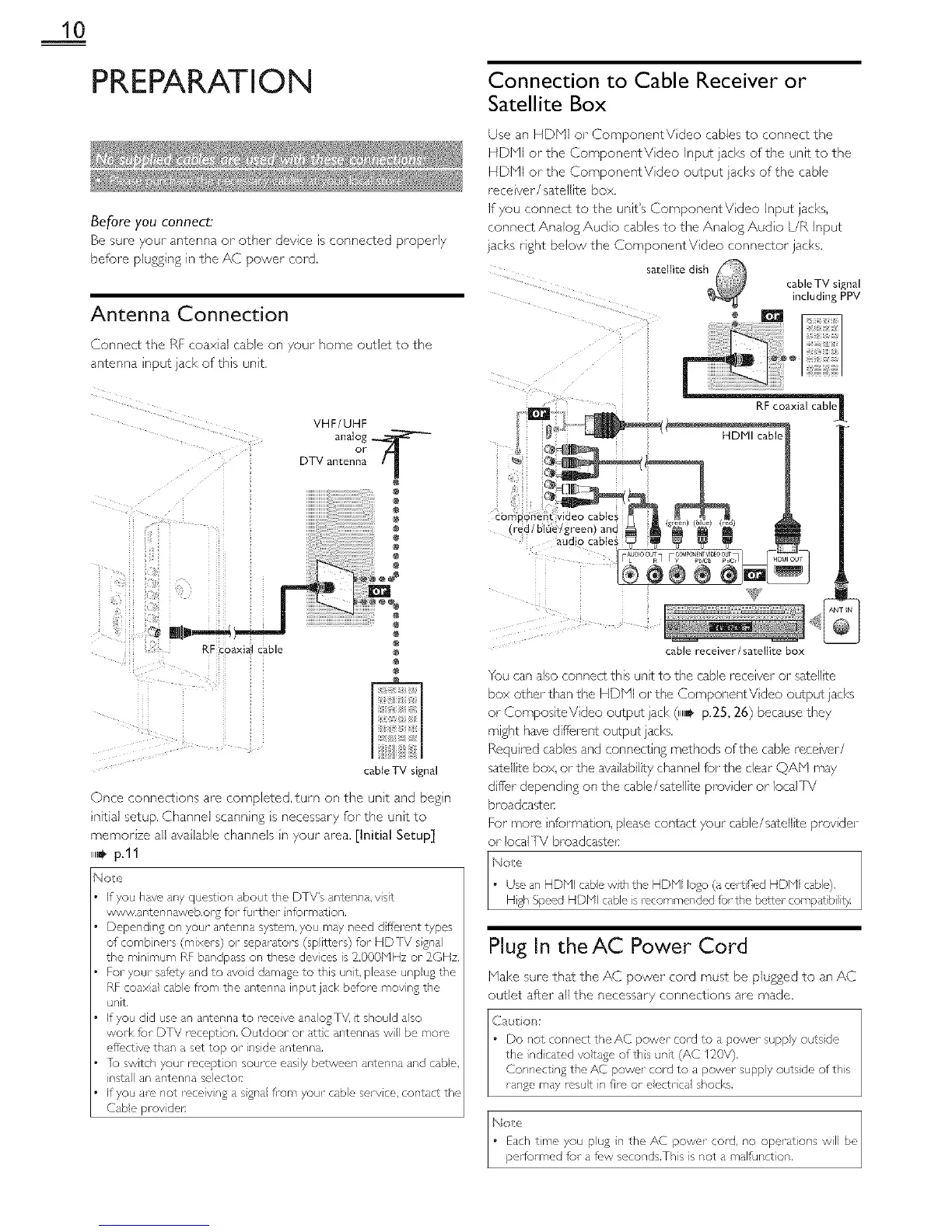
Connect the Ri coaxial cable o ,our home outlet to the
:_riTenn8 IRDUT _(K OTl_lls unit
VHF/UHF
analog
°rt l
DTV antenna
RF coaxialcable
cable TV signal
Once connections are completed,turn on the unt and begn
nitia) setup. Channel scann ng s necessary for the unit to
memorize all ava )able channels n your area. [Initial Setup]
i1,_ p.11
Not:r,
If you have any quest)on about the DTV's antel, na, VSlt
www,antennaweb,org for furthel nformation,
Depending on your antenna system, you may need d fic,_nt types
of comb hers (mixers) or separators (sp ittel s) fur HD [V sgna
the rain mum RF bandpass on these devces is 2,000blHz or 2OHz,
re1 your safety and to dyed damage to this unit, please unpug the
RF coaxa cable fl_m the antenna input jack before movng the
unit
If you did use an antenna to mceve anaog I\/, t should aso
wolk for DTV mcept on, Outdoor or attc al,tennas w be more
efi_,ct vc than a sot top or inside antenna,
]b switch your mcept on source easily botween antenna and cabe,
nstall an antel_na selectols
If you are not roceiv ng a sgna from your cable serv ce, contact the
(-abe prov det:
Connection to Cable Receiver or
Satellite Box
Use an HDbql or ComponentV dee cables to connect the
HDMI or the ComponentV dee Input jacks of the unit to the
HDMI or the ComponentV dee output }acks of the cable
rece vet/satellite box.
If you connect to the unit's ComponentVideo Input jacks,
connect Analog Audio cables to the Analog Audo UR input
}acl<s right below the ComponentVideo connector jacks.
satellite dish
RF coaxial cable II
cable receiver/satellite box
cable TV signal
including PPV
You can also connect this unit to the cable receiver or sate)ite
box other than the HDMI or the Component V dee output jacks
or CompositeVideo output jack (llla_p.25, 26) because they
might have diff:erent output jacks.
Requ red cables and connecting methods of the cable receiver/
satellite box, or the ava lability channel for the dear QAbq may
dffer depend ng on the cable/satellite provider or local ] V
broadcastel:
For tools nformation, please contact your cable/satellite provider
or IocalTV broadcaste_
_,_o:e
• Use an HDPll cabe w£h the HDPll logo (a ce_SifiedHDb_I cable).
Hgh Speed HDMI cable s recommended for the better compat bi it}4
Plug In theAC Power Cord
Make sure that the AC power cord must be plugged to an AC
outlet after ali the necessary connections are made.
Caution:
Do not connect the AC powe_- cold to a power suppy outs de
the nd cated votage ofths unit (AC 120V),
Gonnect}ng the AC power cord to a power suppy outs de of this
range may resut in fire or eectr ca shocks,
Edch time you pug n the AC power cord, no operstions will
performed for afr, w seconds,This is not a malfunct on,



 To Next Page