14
TV Screen Information
You can d splaythe currently selected channel or other
nformation such as the audio mode on theTV screen,
In the digtal mode. the detaled broadcast ng nformation
for the current offthe air channel such as program ttie and
program gudes are displayed.
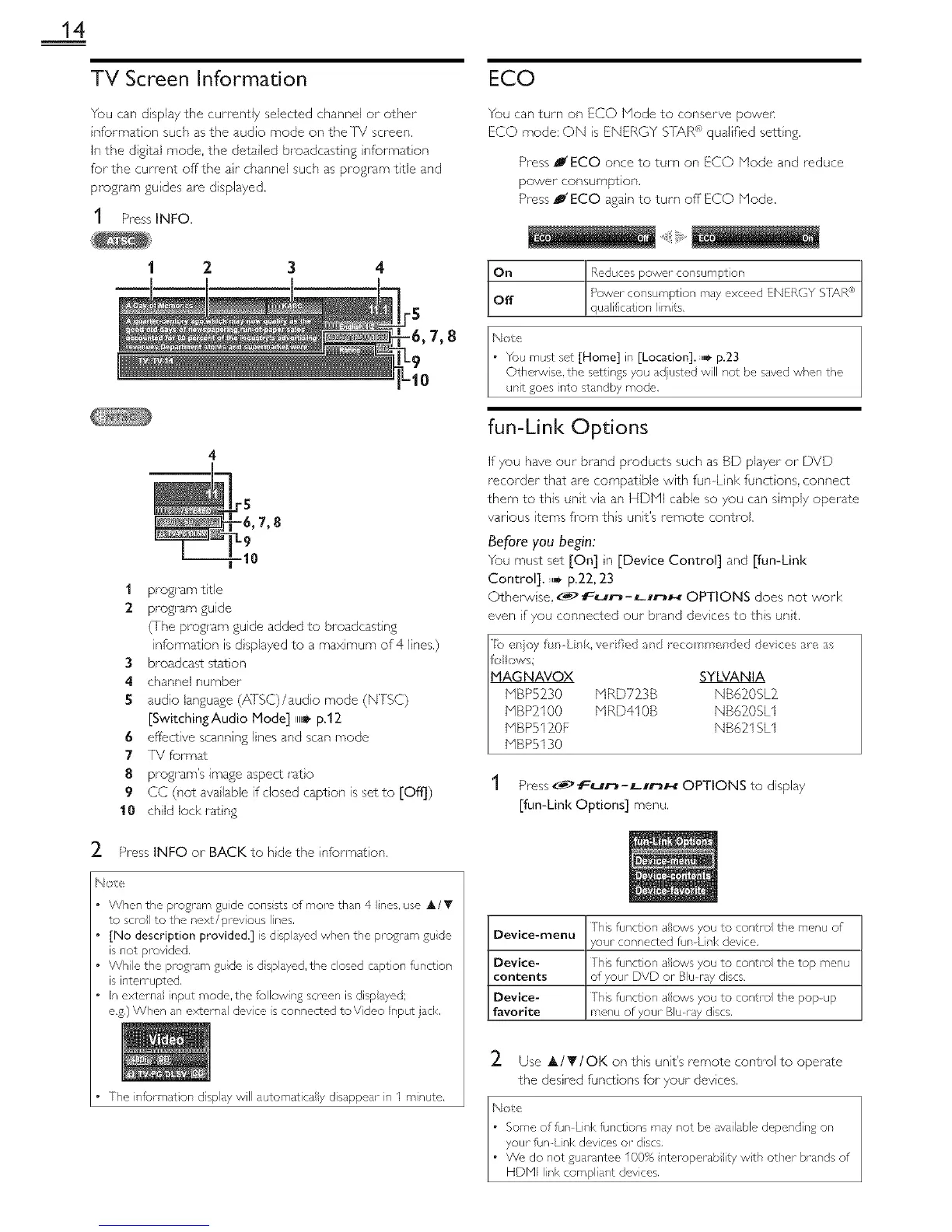
1 PressINFO.
1 2
1 program tale
2 program guide
(Ihe program guide added to broadcasting
infom]ation is d splayed to a max mum of 4 lines,)
3 broadcast station
4 channeJ number
5 audio language (AISC)/audo mode (N]SC)
[SwitchindAudio Mode] ,,_ p.12
6 effective scanning lines and scan mode
7 IV format
8 program's image aspect rato
9 CC (not avalable if dosed caption is set to [Off])
10 chld lock ratng
2. Press INFO or BACK to hde the nformat on.
Note
When the pro%am gude cons sts of more than 4 nes. use A/V
to scl_ to the next/prcvious Ines.
[No description provided.] is displayed when the proglam gude
is not provided.
While the program gude is d splayed, the closed caption function
is inten upted.
in externa input mode, the follow n£ screen is disp syed;
e.g.) When an external devce s connected to Video Input jack.
The informer on d splay will automatica y disappear n I m nute.
ECO
You can turn on ECO Node to conserve povven
ECO mode: ON s ENERGY S]}A,R*_ qualified sett rig.
Press P'ECO once to turn on ECO Node and reduce
power consumption.
Press B'ECO again to turn off ECO Mode.
N£:!
• You must set [Home] in [Location].u,_, p.23
OthenMse. the sett}ngs you adjusted will not be saved when the
unit goes into standby mode.
fun-Link Options
If you have our brand products such as BD player or DVD
recorder that are compatible with fun Link funct ons. connect
them to this unt via an HDNI cable so you can simply operate
various terns fi'om ths unit's remote controk
Before you begin:
You must set [On] n [Device Control] and [fun-Link
Control]. ,,,,_p.22, 23
Othe_, se. _> fun-LnnH OPTIONS does not work
even f you connected our brand devces to this unt.
fo c _s;
MAGNAVOX SYLVANIA
NBP5230 NRD72_3B NB6}_0SL}_
NBP}_100 NRD410B NB6}_0SL1
NBP512_01 NB621 SL1
NBP5130
1 Press_# _ur'J-LunH OPTIONS to display
[fun-Link Options] menu,
Device-menu This function aows you to contro the menu of
,ouc connected fun-Link device.
Device-
contents
Device-
favorite
This funct on allows you to control the top menu
of your DVD or Blu ray discs.
This function aows you to contro the popup
menu of youl_ Blu ray discs.
2. Use A/T/OK on ths unit's remote control to operate
the desired funct ons for your devices.



 To Next Page