CONNECTING DEVICES
Before you connect:
Be sure other device s connected properly before plugg ng n
the AC power cord.
External Device Connection
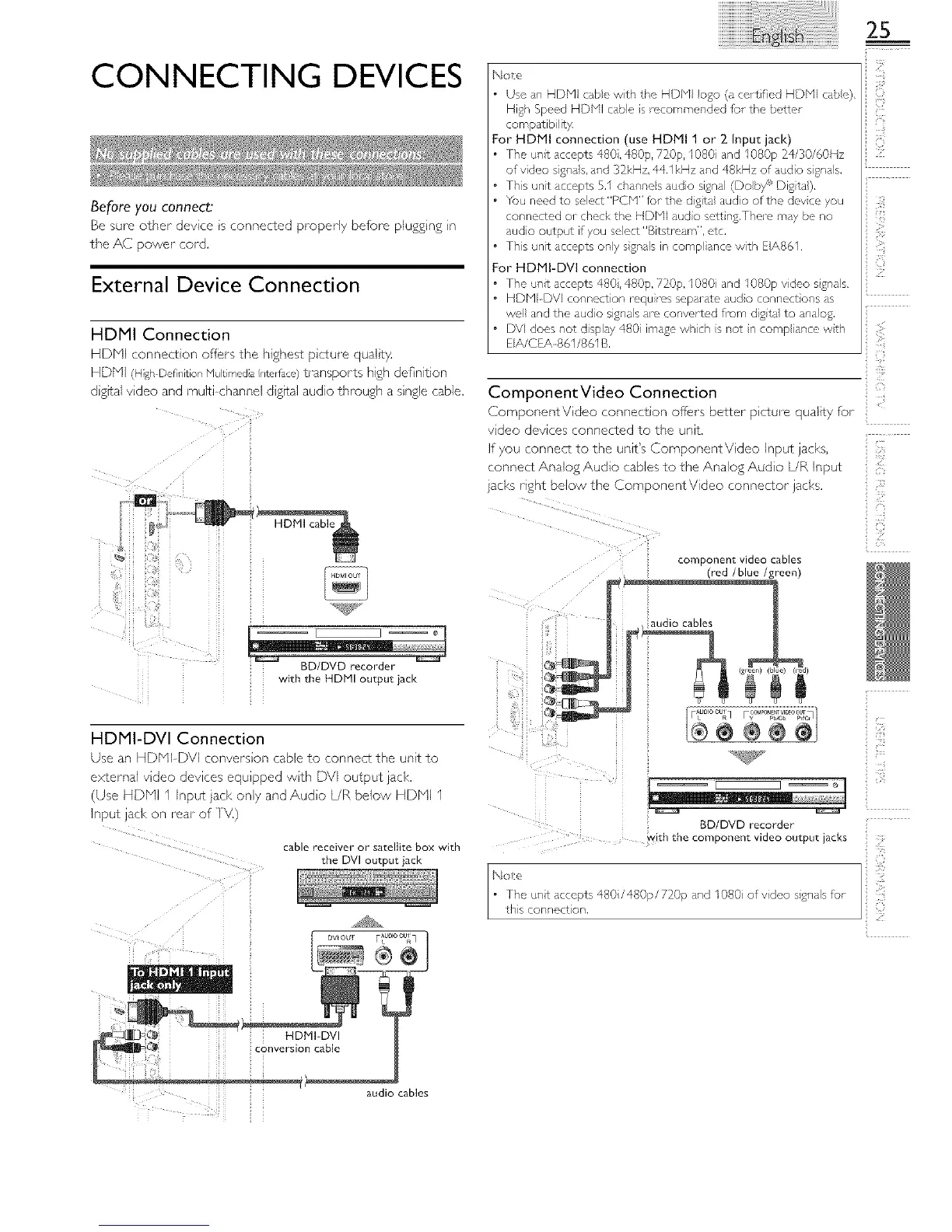
HDMI Connection
HDN (c qnect_on offers the nlgne_ p_<ure quu,_ 7
_DM lgr Def]nlt op [Vu [l_]c, dla nL_llace) transpor% high deBntlon
31gFal vlaeo ana rnu tucnannel c gffal aud o through a single cable.
BD/DVD recorder
with the HDMI output jack
HDMI-DVI Connection
alSO 4r HDNI DVI onverslc q cable to connect the unit to
2xcerna vlaec aevl_es eaUlDDea wl_n DVI output lack,
Use HDbq nDUT laCK Or/I_, _nd Au@c L/R below HDNI I
nDUT a_l< OT reaF oT
cable receiver or satellite box with
the DVI output jack
N(;le
25
The unit accepts 480,480p, 720p, I080 and I080p 24/30/60Hz
of video sgna s, and 3_kHz, 44.1 kHz and 48kHz of audio signals.
Th}s unit accepts 5.1 chspne s audio signl (Dob/5_ Dig}ta).
You need to select "PCN" for the digita audo of the devce you
connected or check the HDbll audo sett}ng.Thel_ may be no
audio output if you select'Bitstream', etc.
Ths unit accepts ony sgnals in comp ante with EIA861.
or HDMI-DVI connecuon
The u_t accepts 480,480p, 720£ I080 and I080p video s£na s.
HDPll DVI connection mqu}ms separate audo connect}ons _s
we and the audo signas are convortc, d fi-om digta to naog.
DV] does not d splat 480 image whch s not n comp ante wth
EIA/CEA_861/861 B.
ComponentVideo Connection
ComponentV dee connect on off;ers better p cture quality for
vdeo devices connected to the unit.
If you connect to the unit's ComponentVideo Input jacks,
connect Analog Audio cables to the Analog Audo L/R input
}ad<s right below the ComponentVideo connector jacks.
.(ii I
ii{_iiii
@ -
]
component video cables
(red /blue /green),
i
_qg_y
<(
[ C
_i if"i
ii ¸ •
BD/DVD recorder
....... _ith th ...... p........ id..... put jacks
audio cables





 To Next Page