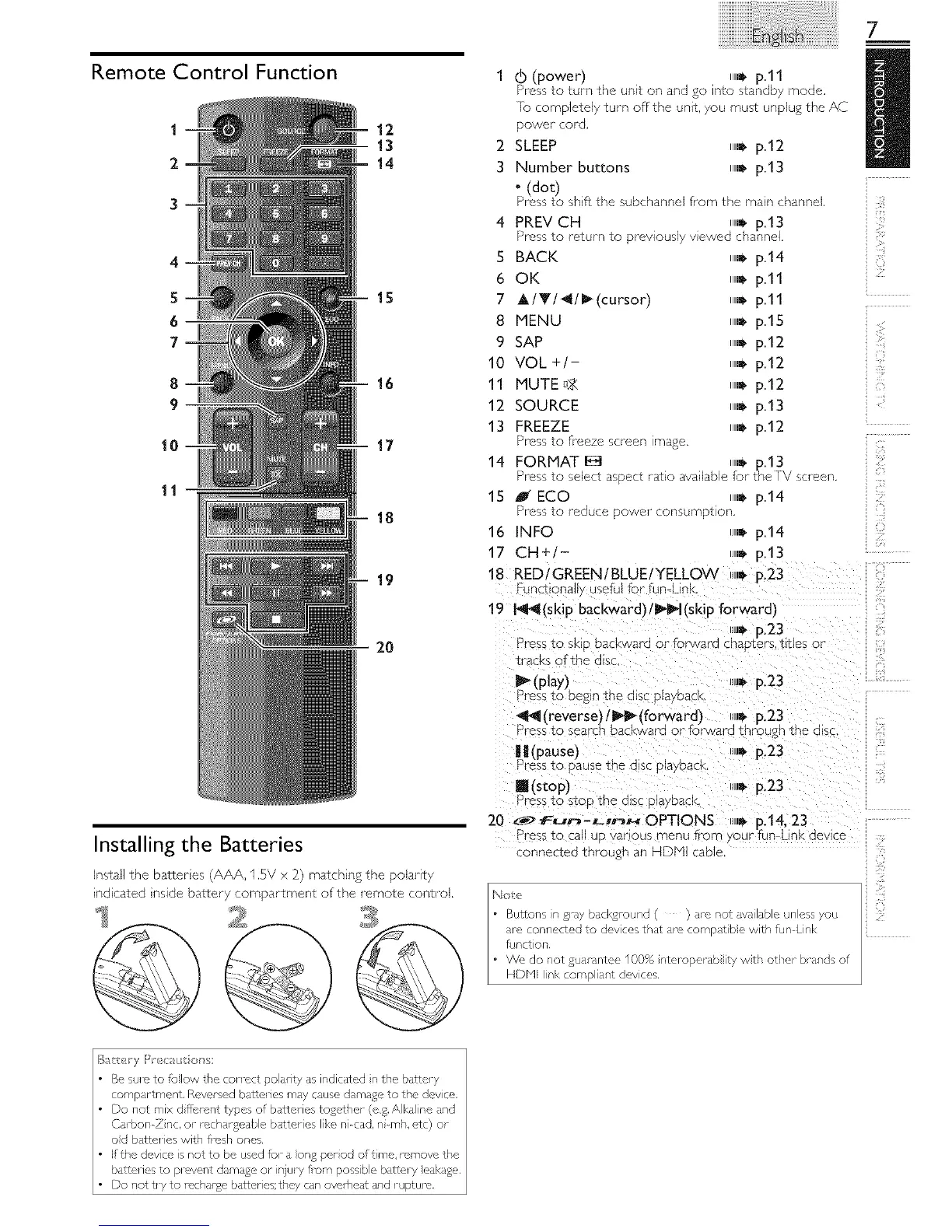
Remote Control Function
1
2
3
4
5
6
7
8
9
10
1 4) (power) ,,,_p.ll
Pressto turn the unit on and go into standby mode.
]o completely turn off the unit. you must unpJug the AC
12 power cord.
13 2 SLEEP _D p.12
14 3 Number buttons _D p.13
o(dot)
Pressto shift the subchanne from _ne naln nanne
4 PREV CH _,_ p.13
_FQSS TO I'GTUFN IO DFeVIOUSIM lowed cha]']Nel,
S BACK _D p.14
6 OK _D p.ll
15 7 A/Y/4/_lcursorl _D p.ll
8 MENU _D p.15
9 SAP _D p112
10 VOL + - _D p.12
16 11 MUTE_)_ _D p.12
12 SOURCE _D p.13
13 FREEZE _D p.12
17 _ress to freeze screen mage
14 FORMAT E_ ,_ p.13
_ress to se_e_ asPeCtratio available for the ,_ s_reet
15 J ECO _D p.14
_ _rebs to Ieob _e Dower consuifl 3Tlon
16 INFO _D p.14
17 CH+ - D p.13
19 18 RED/GREEN/BLUE/YELLOW _J,_p.23
unalonalw useful for fun Lit
19 I_l_l(skip backward)/_l(skip forward_
.w* p.23
_[0 - _ess to s p DaC ward or £o_a_'d chapters, titles or
Tracksof the a_sc
I_ (play} n,bp.23
tess to begir the c sc Dla DaC
*_11(reverse)/I1_ (to rward) _,w*p.23
_ress to search backward or forwa dt_ _ough The(llSC
U (pause) .D p.23
_ess to }au%e _ne GISt DlaYDaCl
Ill(stop) i,_ p.23
Press to StOD Tile (31SC DlaVDaCl
20 _ fun"_-_,nH OPTIONS _,_ p.14, 23
_ress to call UDvarious menu frorr _our fun link device
'":-mstamn_the Batteries .............. gnanHDM.....
install the battenes (AAA. 1.5V x ?_)matching the polanty
_ndlcated _nsldebal¢ery compartment of the remote control. [No*o
2
_3_-_----_s • Bul?ons n _ ay bad<_roupd ( ) are not dva abe un ess you
_ are connected to dov ces that are compat be vv th fumL nk
/
@
funct or',
• We do not _uarantee 100% _nteroperab ty wth other brands of
HDbqlI_nkcomp _nt devces.
7








 To Next Page