9
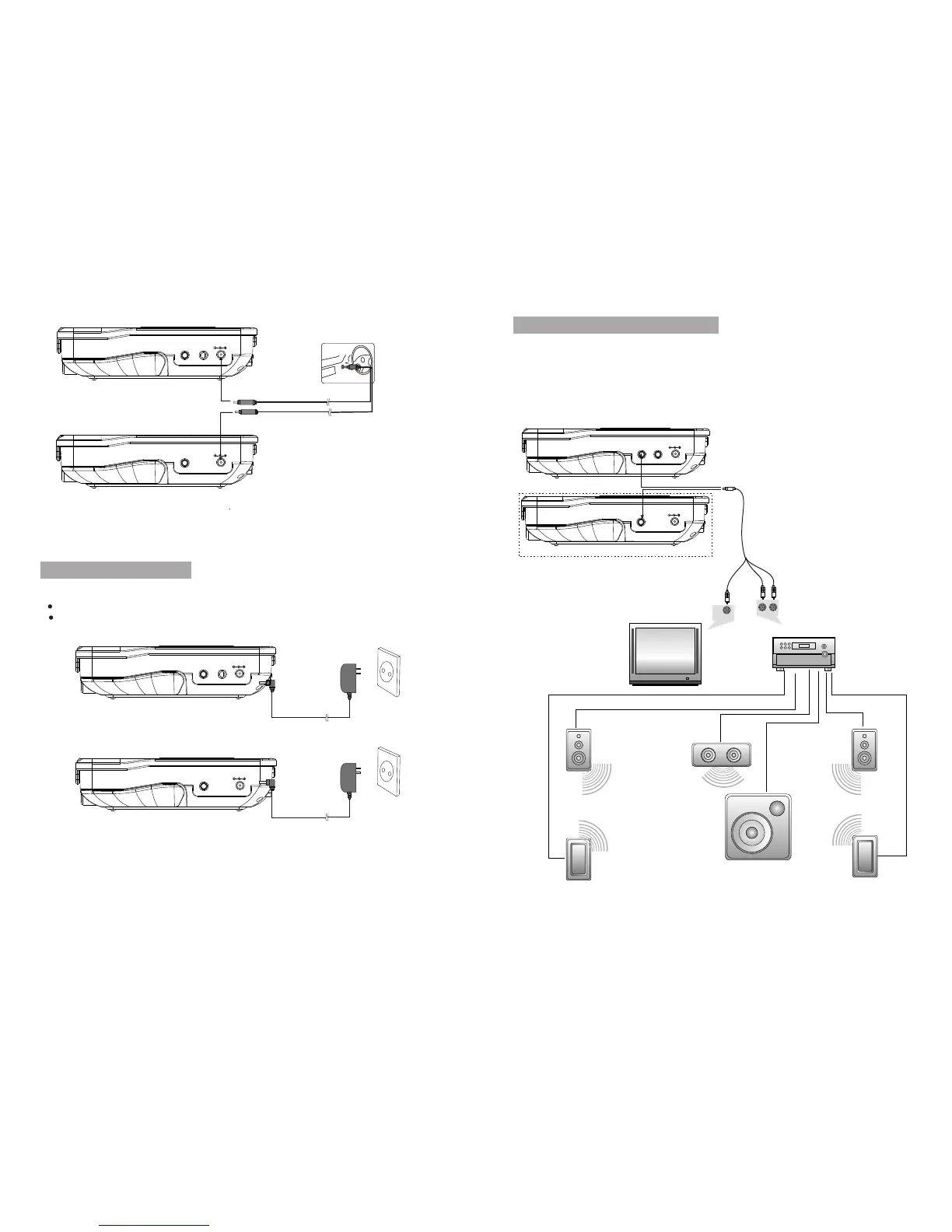
DC IN 9-12V
AV O UT
A unit
Connecting DC Adaptor
AV O UT
DC IN 9-12V
AV I N
B unit
1. Connect the AC adapter cable to:
the DC IN jack on the A unit or B unit .
The power outlet
AMPLIFIER
TV
SUBWOOFER
Left front speaker
Right front speaker
Center speaker
Left rear speaker
Right rear speaker
Notice:There is no 5.1 channel in the unit, however, after connecting to APM it is available to
output audio in 5.1 channel
AUDIO IN
VIDEO IN
DC IN 9-12V
AV OUT
A unit
B unit
DC IN 9-12V
AV IN
AV OUT
Connect additional equipment
Caution:t urn off your player before connecting to any additional equipment.
You ca n co nn ec t th e pl ay er t o a TV o r an am pli fie r to e nj oy DV Ds o r Ka ra ok e.
Match the color of the AV cables.
with the jacks: the yellow cable is for the yellow video jack, the red/white
cable is for t h e r ed/white audio jacks.
Car cigar ette lighter
DC IN 9-12V
AV O UT
A unit
AV O UT
DC IN 9-12V
AV I N
B unit
8


 To Next Page