7 - 12 Symbol DS6708 Digital Scanner Product Reference Guide
Hardware Handshaking (continued)
•
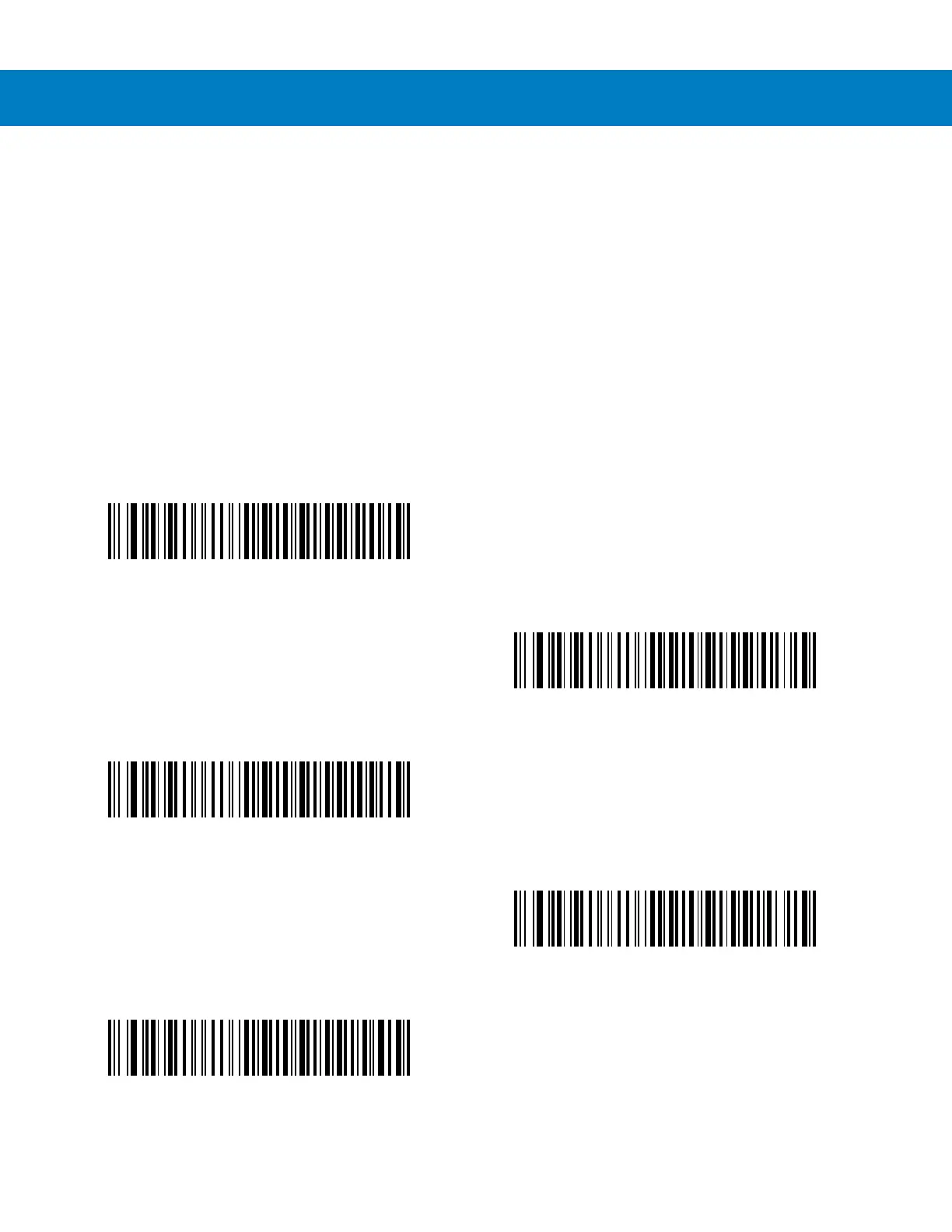
None: Scan this bar code to disable hardware handshaking.
•
Standard RTS/CTS: Scan this bar code to select Standard RTS/CTS Hardware Handshaking.
•
RTS/CTS Option 1: If you select RTS/CTS Option 1, the digital scanner asserts RTS before transmitting and
ignores the state of CTS. The digital scanner de-asserts RTS when the transmission completes.
•
RTS/CTS Option 2: If you select Option 2, RTS is always high or low (user-programmed logic level).
However, the digital scanner waits for CTS to be asserted before transmitting data. If CTS is not asserted
within Host Serial Response Time-out (default), the digital scanner issues an error indication and discards
the data.
•
RTS/CTS Option 3: If you select Option 3, the digital scanner asserts RTS prior to any data transmission,
regardless of the state of CTS. The digital scanner waits up to Host Serial Response Time-out (default) for
CTS to be asserted. If CTS is not asserted during this time, the digital scanner issues an error indication and
discards the data. The digital scanner de-asserts RTS when transmission is complete.
*None
Standard RTS/CTS
RTS/CTS Option 1
RTS/CTS Option 2
RTS/CTS Option 3



 To Next Page