6 LS7708
Attaching the Mounting Bracket
Freestanding Configuration
Use this method if the scanner will not be secured to a mounting surface.
1. Invert the scanner so that its bottom is facing up and the connections are
visible.
2. Connect all interface and power cables to the scanner. Refer to the LS7708
Product Reference Guide for detailed information.
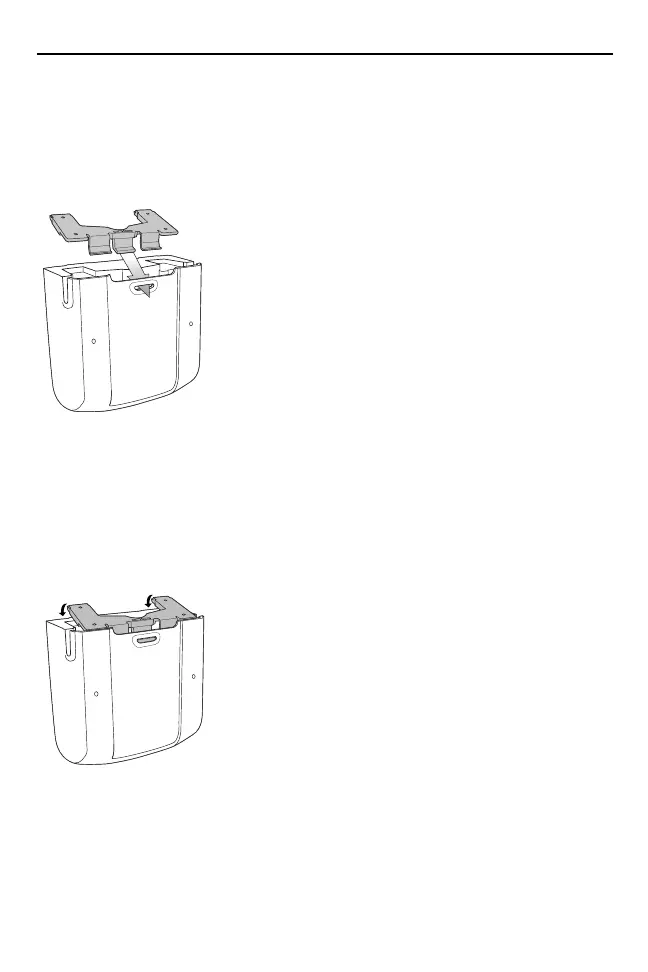
3. Orient the mounting bracket so that the plastic tab is facing downward and
toward the slot on the back of the scanner. The square cushion on the
mounting bracket should be positioned above the power cable.
6953007a.fm Page 6 Wednesday, April 15, 2015 3:23 PM



 To Next Page