13
• The water portion must be manually interrupted (by pressing the "STOP" key)
• This portion cannot be recorded in conjunction with the calculating systems
• The pump is switched off after a maximum of 90s in order to protect it from being damaged.
Possible sources of faults:
• Water supply is interrupted.
• Coffee grounds are too fine which prohibits water flow.
• The flowmeter is blocked as a result of calcification and therefore no longer emits pulses.
• The input of the flowmeter to the Sabre Duo/Quattro Electronics is interrupted.
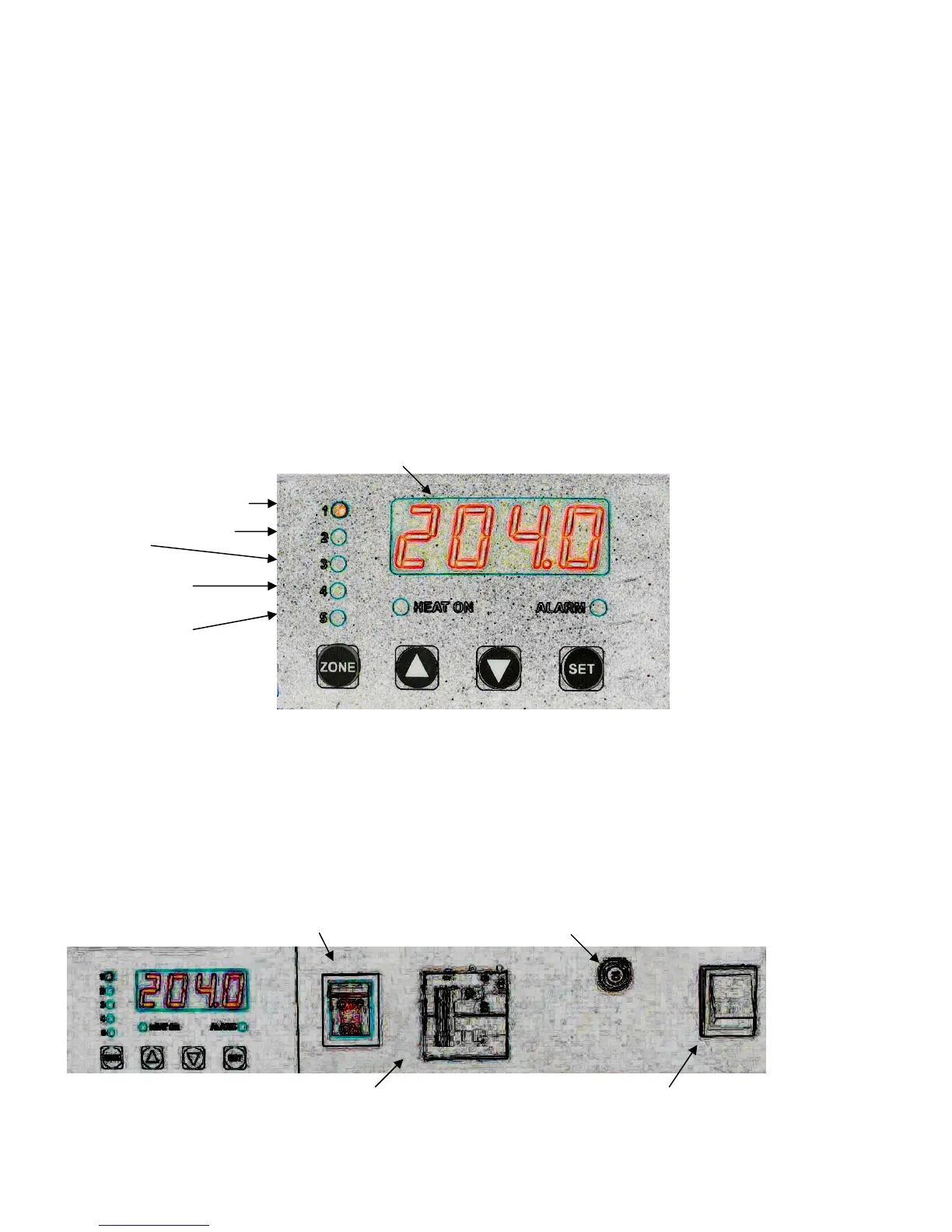
DigiZone
™
Controls
A custom PID Electronics System
The 5 Zone Control System for 2 & 3
Group Models
Temperature readout for selected Zone
1
st
Group (Brew Tank)
2
nd
or Center Group
3
rd
Group
(3 group models only)
Steam Tank 4
(Controls 1
st
Element)
Steam Tank 5
(Controls 2
nd
Element)
The 2 Zone Control System for 1 Group Models:
#1 LED is the brew tank; # 4 LED is the steam tank
The Electronics Box, Located Under the Machine
• CAUTION: Disconnect from Power Source before opening this box
• Unauthorized work in this box may void the warranty
Turn On/Off Electronics Only (Red Rocker) Pump Reset Switch
On/Off (1/0) Heating Elements Breaker Manual Water Fill Switch


 To Next Page
 Loading...