机床产品/Machine Tool Products – 60CA/60CB Simple-Type Wood Cutting Machine Operation Manual
How to Operate 60 Series Controller– 121
•
•
•
•
•
•
a.
•
•
b.
•
c.
•
•
d.
•
•
e.
•
f.
•
g.
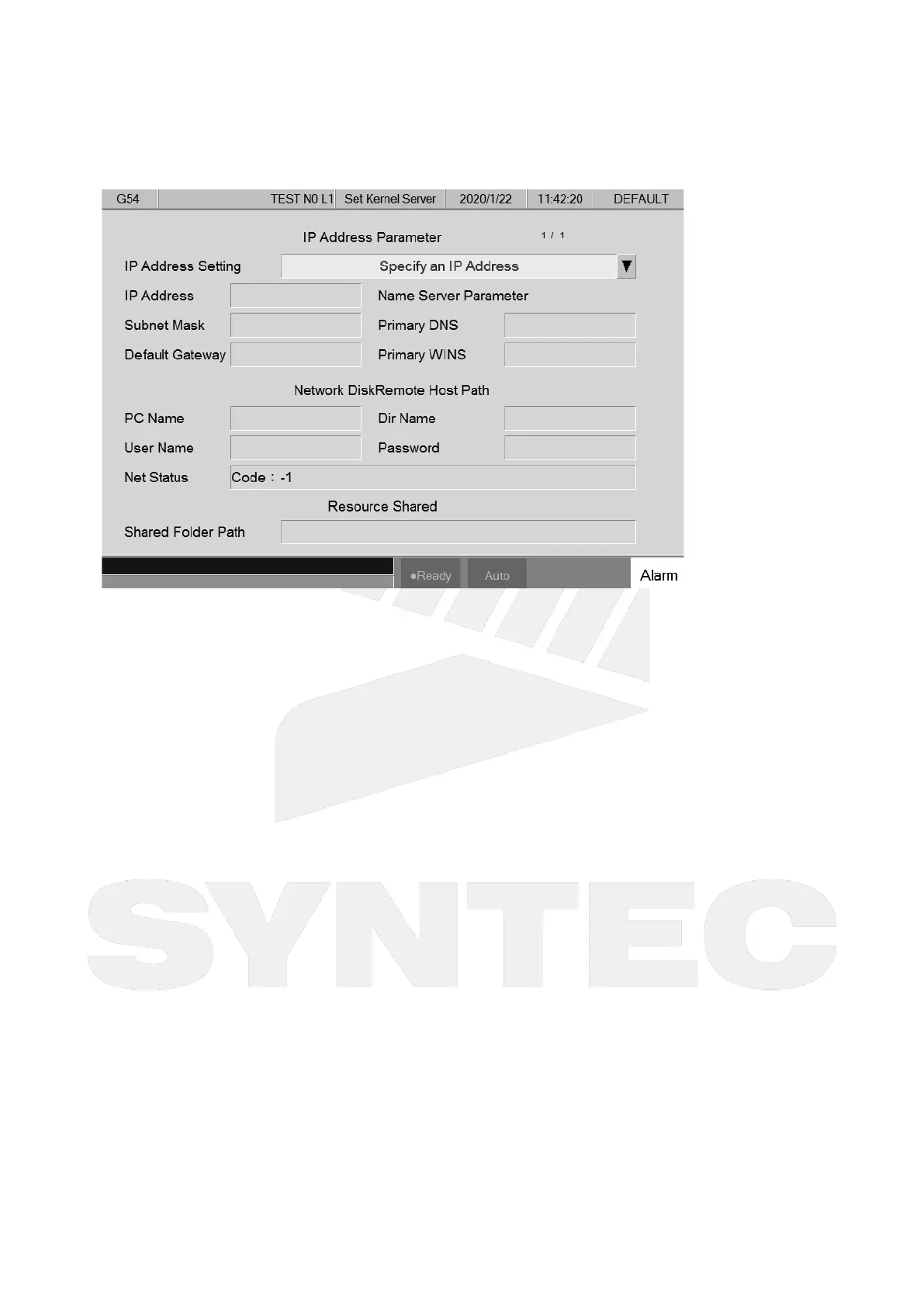
5.4.6 Network Setting
Path
5 key, 8 key: F5 Maintain → F2 Set Kernel Server
10+8 key: G5 Maintain → F2 Set Kernel Server
Explanation
Set up the system network
Parameters
IP Address Setting
Select "Specify an IP Address" when using a crossover cable
Select "Obtain an IP Address via DHCP" when using a normal cable, "IP Address" and
"Subnet Mask" can then be skipped
IP Address
Enter the applicable IP address in the domain
Subnet Mask
Enter the subnet mask of the IP address
Should be the same as the setting at PC end
PC Name
Name of the connecting PC
Should be the same as the setting at PC end
Dir Name
Name of the shared folder at PC end (should be the same as the setting at PC end).
User Name
Can be skipped if no account and password is set to protect the folder shared by the
Internet disk; if do, set the corresponding account and password.
Password



 To Next Page