49
XV. Transfer your flights
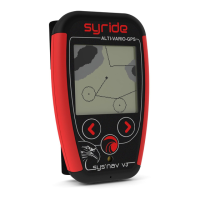
1. Be sure you’ve installed the SYS-PC-
Tool software on your computer
(https://www.syride.com/en/software
)
2. Turn on and connect your instrument
with the USB cable.
3. Click on Account configuration icon.
4. The IGC/GPX and KML files are
systematically duplicated on your
computer.
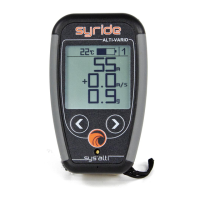
To use the advanced flight analyzer on
syride.com, you must enter your email
and password of your Syride account
(create one on http://www.syride.com
)
Make sure "Use the advanced logbook
from Syride.com” is selected to upload
your flights and click “OK”.


 To Next Page