Need help?
Do you have a question about the SystemBase C510xr and is the answer not in the manual?
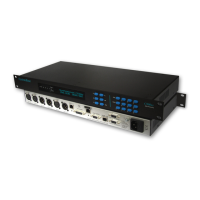
A 2-line display showing unit configuration and current status.
Digital VU meters for monitoring audio levels and peak hold.
Buttons for navigating menus, selecting, editing, and backspacing.
Initiates ISDN dialing and access to the Keypad Dial menu.
Enables users to input ISDN numbers and sub-addresses via the keypad.
Displays unit serial number and ISDN channel status information.
Shows incoming caller ISDN number and channel disconnection cause codes.
Reports audio format, data rate, and allows patch loading.
Allows modification of settings associated with a selected patch.
Enables renaming of selected patch configurations up to 24 characters.
Configures parameters related to ISDN audio operation.
Selects the audio encoding/decoding format for ISDN connections.
Configures mixing of Left/Right audio signals for mono output.
Sets priority between audio bandwidth and stereo image.
Configures automatic call format detection and G711 reception.
Adjusts parameters for individual ISDN B Channels.
Configures remote and local ISDN addresses and sub-addresses.
Configures X21 audio formats and automatic reserve site dialing.
Manages automatic ISDN backup, threshold, and restore time.
Selects audio source and configures ISDN, X21, or Backup modes.
Configures fixed ISDN lines and auxiliary data port.
Manages alarm outputs, headroom levels, and global system settings.
Selects country-specific parameters and international ISDN standards.
Sets up remote management via the Ethernet port.
Enables or disables DHCP for automatic IP address assignment.
Sets the unit's IP address on the Ethernet network.
Configures the subnet mask for the Ethernet IP address.
Sets the default gateway for the Ethernet network connection.
Lists commands for remote configuration and status checking via terminal.
Electrical characteristics of balanced XLR audio interfaces.
Electrical characteristics of AES3 XLR digital audio interfaces.
Details the RJ45 LAN port and supported Ethernet standards.
Details unit dimensions, weight, power, and environmental conditions.
Covers product warranty, CE compliance, and export regulations.
 General
| Brand | SystemBase |
|---|---|
| Model | C510xr |
| Category | Conference System |
| Language | English |


 To Next Page