Page 17
Need help? Visit
or call T-Mobile customer service at
T-Mobile 5G Gateway User Guide
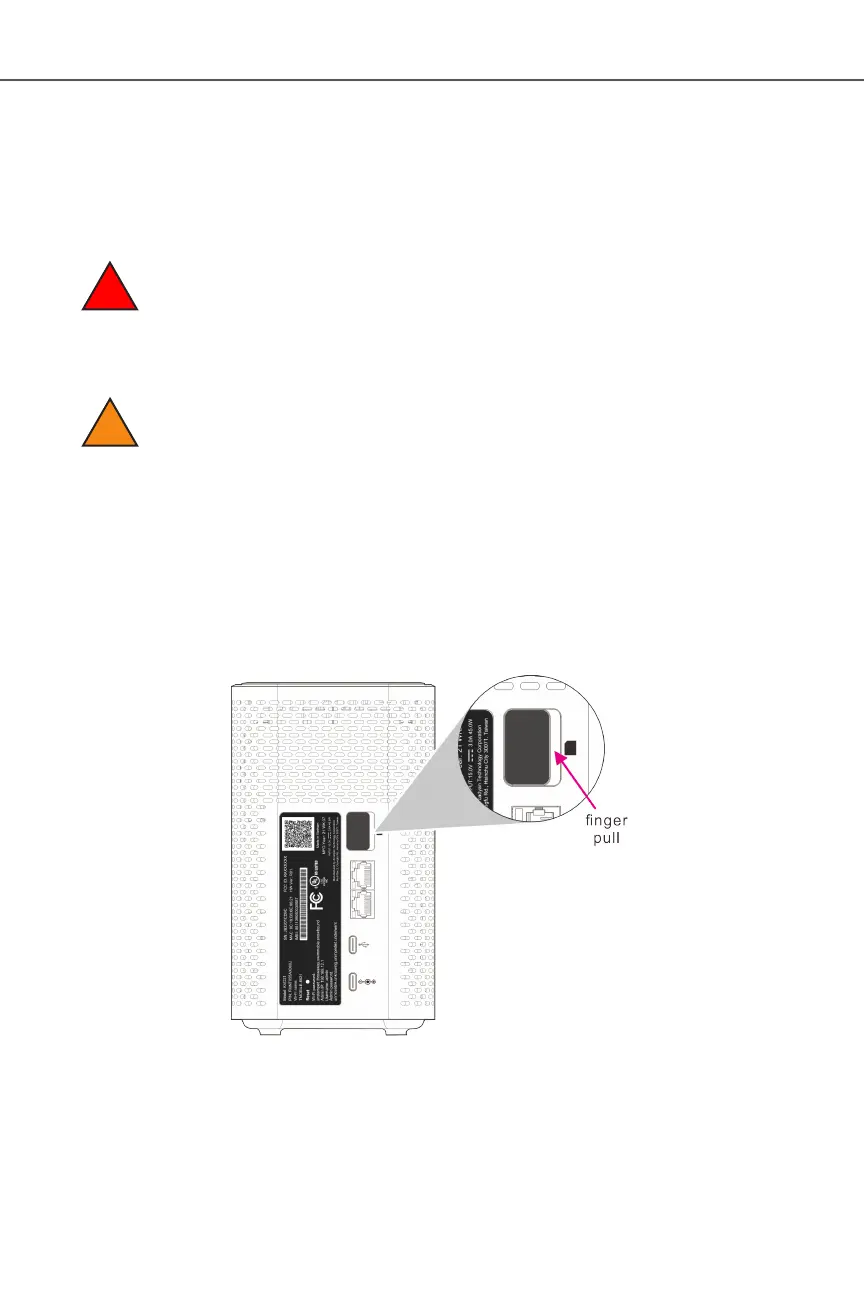
The gateway comes with a pre-installed SIM card. You can replace the SIM card by pressing the
card into the card slot.
Before replacing the SIM card, please read the following safety information.
Danger 1: Hazardous electrical voltages and currents can cause serious physical harm or
death. Always use insulated tools and follow proper safety precautions when connecting
or disconnecting power circuits.
Danger 2: Ensure the gateway’s power supply is unplugged from the power strip or wall
outlet before proceeding.
Caution: Keep indoor devices out of direct sunlight. Prolonged exposure to direct
sunlight can damage the device.
Refer to the section for the gateway’s operating temperature
ranges.
Access the SIM card from the backside of the gateway.
1. Power off the gateway by removing the power cable from the gateway and from the electrical
outlet
2. Remove any Ethernet cables connected to the gateway’s LAN ports (LAN1 and LAN 2)
3.
4. The SIM card socket supports push-in and push-out installation
!
!


 To Next Page