Need help?
Do you have a question about the T-Mobile 5G21-12W-A and is the answer not in the manual?
Describes the physical ports and buttons of the T-Mobile High-Speed Internet Gateway.
Guides users to set up the gateway using the mobile app for the easiest experience.
Details criteria for selecting the optimal placement location for the gateway.
Explains how to connect wireless devices using the gateway's Wi-Fi SSID and password.
Describes connecting devices via Ethernet ports for those without Wi-Fi.
Provides instructions on how to access the gateway's web-based graphical user interface.
Details the status of the cellular connection, gateway, and connected devices.
Shows the amount of data downloaded and uploaded since last reset.
Displays statistics for each LAN port, including status, bytes, and packets.
Shows statistics related to cellular network usage like bytes, packets, and errors.
Provides statistics for 2.4GHz, 5GHz Low, and 5GHz High Wi-Fi frequencies.
Allows configuration of general and SSID settings for the 2.4GHz Wi-Fi network.
Allows configuration of general and SSID settings for the 5GHz Wi-Fi networks.
Explains how to restart the gateway to refresh its connection and settings.
Details how to restore the gateway to its factory default settings.
Addresses issues related to the gateway not connecting to the cellular network.
Provides guidance on ensuring proper ventilation and preventing the gateway from overheating.
Solutions for when the gateway fails to power on.
Tips for improving overall internet performance.
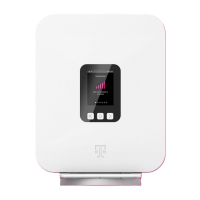
Explains how the LCD displays signal strength using bars.
Describes how the LCD shows the number of connected devices.
Details how the LCD displays the internal battery's charge level.
Describes gateway alerts, their severity, and recommended actions.
 General
| Model | 5G21-12W-A |
|---|---|
| Category | Gateway |
| 5G Support | Yes |
| Wi-Fi Standard | Wi-Fi 6 |
| Wi-Fi Bands | 2.4 GHz, 5 GHz |
| Ethernet Ports | 2 |
| Device Type | 5G Gateway |
| Cellular Technology | 5G |


 To Next Page