EasyManua.ls Logo

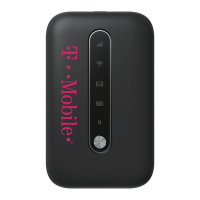
T-Mobile SONIC - User Manual

T-Mobile SONIC
10 pages
Print Icon
To Next Page IconTo Next Page
Loading...
Question and Answer IconNeed help?

Do you have a question about the T-Mobile SONIC and is the answer not in the manual?

Summary

Getting to Know Your Sonic 2.0 LTE Mobile Hotspot

Device Components and Controls

Identifies key physical components and controls of the Mobile HotSpot device.

Understanding Indicators

Network and Connectivity Indicators

Explains icons for network type, signal strength, internet connection, and Wi-Fi status.

Message and Battery Indicators

Details icons for message status (new, full) and battery power level.

Setting Up Your Sonic 2.0 LTE Mobile Hotspot

Initial Setup and Power On

Steps for initial setup including SIM card installation and powering on.

Charging Your Mobile HotSpot

Instructions on how to charge the device using a wall outlet or computer.

Connecting and Going Online

Connecting Wi-Fi Devices

Steps to connect your Wi-Fi enabled devices to the Mobile HotSpot.

Handling the Activation Page

Guidance on what to do if the T-Mobile Activation Page appears.

Managing Your Sonic 2.0 LTE Mobile Hotspot

Accessing T-Mobile webConnect

Instructions for accessing the web interface via browser or companion application.

Changing T-Mobile webConnect Admin Password

Procedure to modify the administration password for T-Mobile webConnect.

Changing Hotspot Network Name (SSID)

Steps to change the Network Name (SSID) for the Wi-Fi hotspot.

Changing Hotspot Wi-Fi Password

Steps to modify the Wi-Fi password for the hotspot.

Additional Information and Help

Important Information

Details on Wi-Fi security, messaging/data charges, plan types, and coverage.

Additional Help Resources

Provides the Mobile HotSpot URL and customer support contact information.

Summary

Getting to Know Your Sonic 2.0 LTE Mobile Hotspot

Device Components and Controls

Identifies key physical components and controls of the Mobile HotSpot device.

Understanding Indicators

Network and Connectivity Indicators

Explains icons for network type, signal strength, internet connection, and Wi-Fi status.

Message and Battery Indicators

Details icons for message status (new, full) and battery power level.

Setting Up Your Sonic 2.0 LTE Mobile Hotspot

Initial Setup and Power On

Steps for initial setup including SIM card installation and powering on.

Charging Your Mobile HotSpot

Instructions on how to charge the device using a wall outlet or computer.

Connecting and Going Online

Connecting Wi-Fi Devices

Steps to connect your Wi-Fi enabled devices to the Mobile HotSpot.

Handling the Activation Page

Guidance on what to do if the T-Mobile Activation Page appears.

Managing Your Sonic 2.0 LTE Mobile Hotspot

Accessing T-Mobile webConnect

Instructions for accessing the web interface via browser or companion application.

Changing T-Mobile webConnect Admin Password

Procedure to modify the administration password for T-Mobile webConnect.

Changing Hotspot Network Name (SSID)

Steps to change the Network Name (SSID) for the Wi-Fi hotspot.

Changing Hotspot Wi-Fi Password

Steps to modify the Wi-Fi password for the hotspot.

Additional Information and Help

Important Information

Details on Wi-Fi security, messaging/data charges, plan types, and coverage.

Additional Help Resources

Provides the Mobile HotSpot URL and customer support contact information.

T-Mobile SONIC Specifications

General IconGeneral
Network Technology4G LTE
Max Theoretical Downlink Speed150 Mbps
Compatible CarriersT-Mobile
TypeMobile
ModelSONIC
SecurityWPA2

Related product manuals