EasyManua.ls Logo

Tactacam 6.0 - User Manual

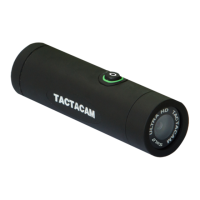
Tactacam 6.0
24 pages
Print Icon
To Next Page IconTo Next Page
Loading...
INSTRUCTION MANUAL
TACTACAM.COM
Question and Answer IconNeed help?

Do you have a question about the Tactacam 6.0 and is the answer not in the manual?

Summary

QUICK START GUIDE

microSD Card Requirements

Details microSD card requirements, including speed class, capacity, and format.

CHARGE YOUR TACTACAM

POWERING ON AND RECORDING

QUICK CHANGE MODES

Quick Change Video Modes

Explains three pre-set video modes: Green (Standard), Blue (Zoom), and Light Blue (Slow Motion).

CUSTOMIZABLE MODES

Mode 1: General Filming and Low Light

Optimal setting for general filming, high resolution, and low light conditions.

Mode 2: Zoom Mode

Optimal for subjects at a distance, with the camera set at 8x zoom.

Mode 3: Slow-mo

Optimized for high-speed action, recording at 120fps for smooth playback.

REMOTE CONTROL

REFORMATTING YOUR SD CARD

REFORMATTING YOUR SD CARD - MAC;PC

CONNECT TO THE TACTACAM APP

WiFi Connectivity

Explains how to connect the camera to a phone via WiFi for mobile remote connection and LED indicators.

PLAYING BACK CONTENT

CHARGING;BATTERY INFO

TROUBLESHOOTING

Camera Unresponsive; Wont Power On

Solutions for when the camera doesn't respond to buttons or fails to power on, including reset and charging.

SD Card Requirements and Recommendations

Details the necessary SD card specifications and recommends specific brands for optimal performance.

Camera Freezing or Vibrating Continually

Explains that freezing or continuous vibration is often due to a full or incompatible SD card.

Wi-Fi Connection Issues

Provides solutions for Android and iPhone users when the camera fails to connect to Wi-Fi.

Summary

QUICK START GUIDE

microSD Card Requirements

Details microSD card requirements, including speed class, capacity, and format.

CHARGE YOUR TACTACAM

POWERING ON AND RECORDING

QUICK CHANGE MODES

Quick Change Video Modes

Explains three pre-set video modes: Green (Standard), Blue (Zoom), and Light Blue (Slow Motion).

CUSTOMIZABLE MODES

Mode 1: General Filming and Low Light

Optimal setting for general filming, high resolution, and low light conditions.

Mode 2: Zoom Mode

Optimal for subjects at a distance, with the camera set at 8x zoom.

Mode 3: Slow-mo

Optimized for high-speed action, recording at 120fps for smooth playback.

REMOTE CONTROL

REFORMATTING YOUR SD CARD

REFORMATTING YOUR SD CARD - MAC;PC

CONNECT TO THE TACTACAM APP

WiFi Connectivity

Explains how to connect the camera to a phone via WiFi for mobile remote connection and LED indicators.

PLAYING BACK CONTENT

CHARGING;BATTERY INFO

TROUBLESHOOTING

Camera Unresponsive; Wont Power On

Solutions for when the camera doesn't respond to buttons or fails to power on, including reset and charging.

SD Card Requirements and Recommendations

Details the necessary SD card specifications and recommends specific brands for optimal performance.

Camera Freezing or Vibrating Continually

Explains that freezing or continuous vibration is often due to a full or incompatible SD card.

Wi-Fi Connection Issues

Provides solutions for Android and iPhone users when the camera fails to connect to Wi-Fi.

Tactacam 6.0 Specifications

General IconGeneral
WiFiYes
WaterproofYes
Battery LifeUp to 2.5 hours
ConnectivityUSB
StorageMicroSD card (up to 128GB)
Resolution4K
Field of ViewWide (FOV varies depending on resolution)

Related product manuals