KIPTRACK
20
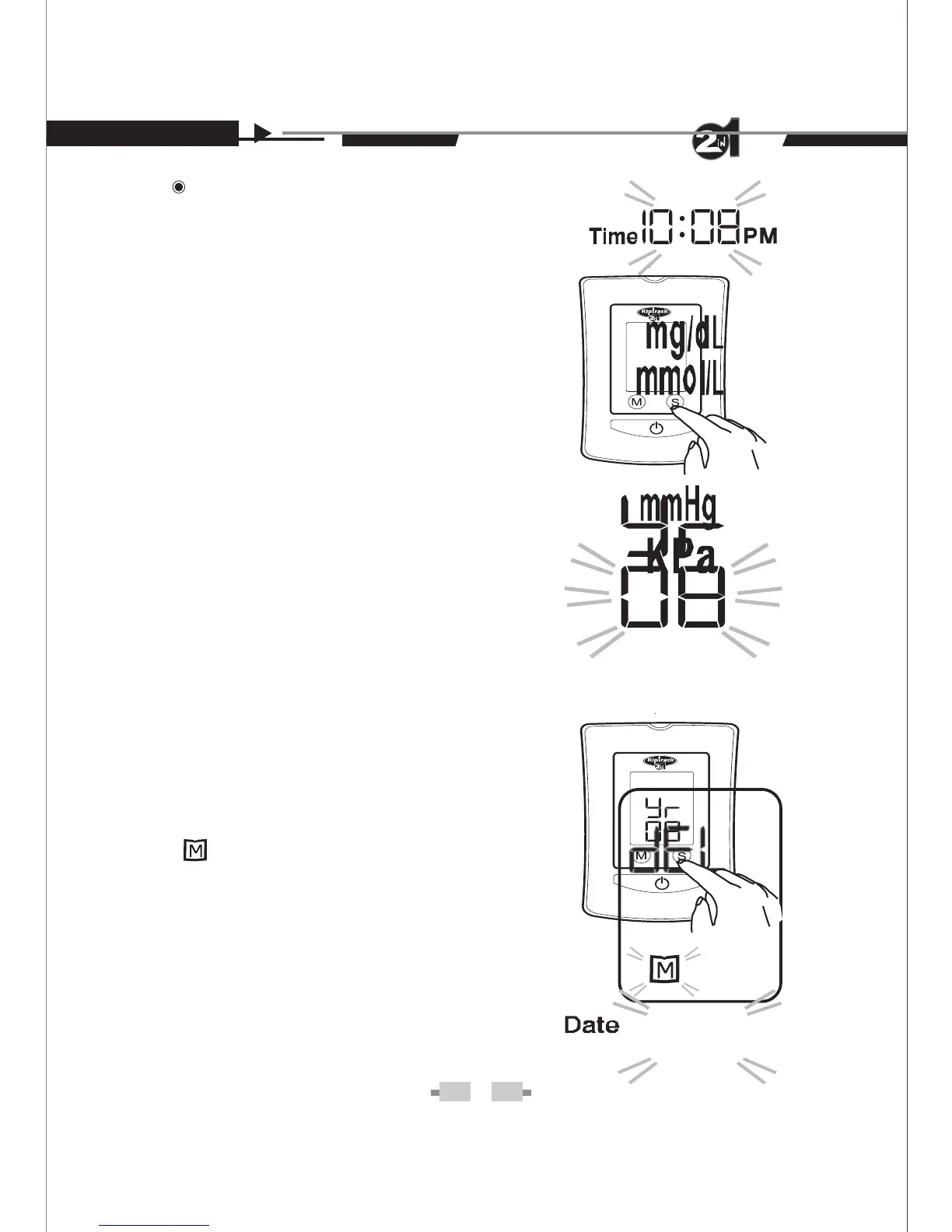
Step 5. Time flashes. Follow
Step 3 for changes.
Step 6. Unit of glucose concen-
3
tration* flashes. Follow Step 3
for changes.
Step 7. Unit of blood pres-
sure flashes. Follow Step 3 for
changes.
Step 8. Unit of ambient temperature
flashes. Follow Step 3 for
changes.
Step 9. While “dEL” and a flashing
“ ” symbol appears on the display,
if you do not wish to delete the saved
results, press S button to skip this
step. If you wish to delete ALL the
results, press M button
C / F
o
o
Press and Hold the S
19
Setting the Monitor
Time, date, units and alarm can be set in the monitor.
Two keys are involved: S button and M button.
Step 1.
Step 2. Year flashes first.
Step 3. Press the M button to
make changes. Press the S
button to move to next step.
Step 4. Date flashes. Follow
Step 3 for changes.
7- 11
button for some seconds to start setting


 To Next Page