KIPTRACK
30
Testing Your Blood Glucose
Wash and dry your hands first before starting. To test your
blood glucose, you will need: the monitor, test strips, the lancing
device, and lancets.
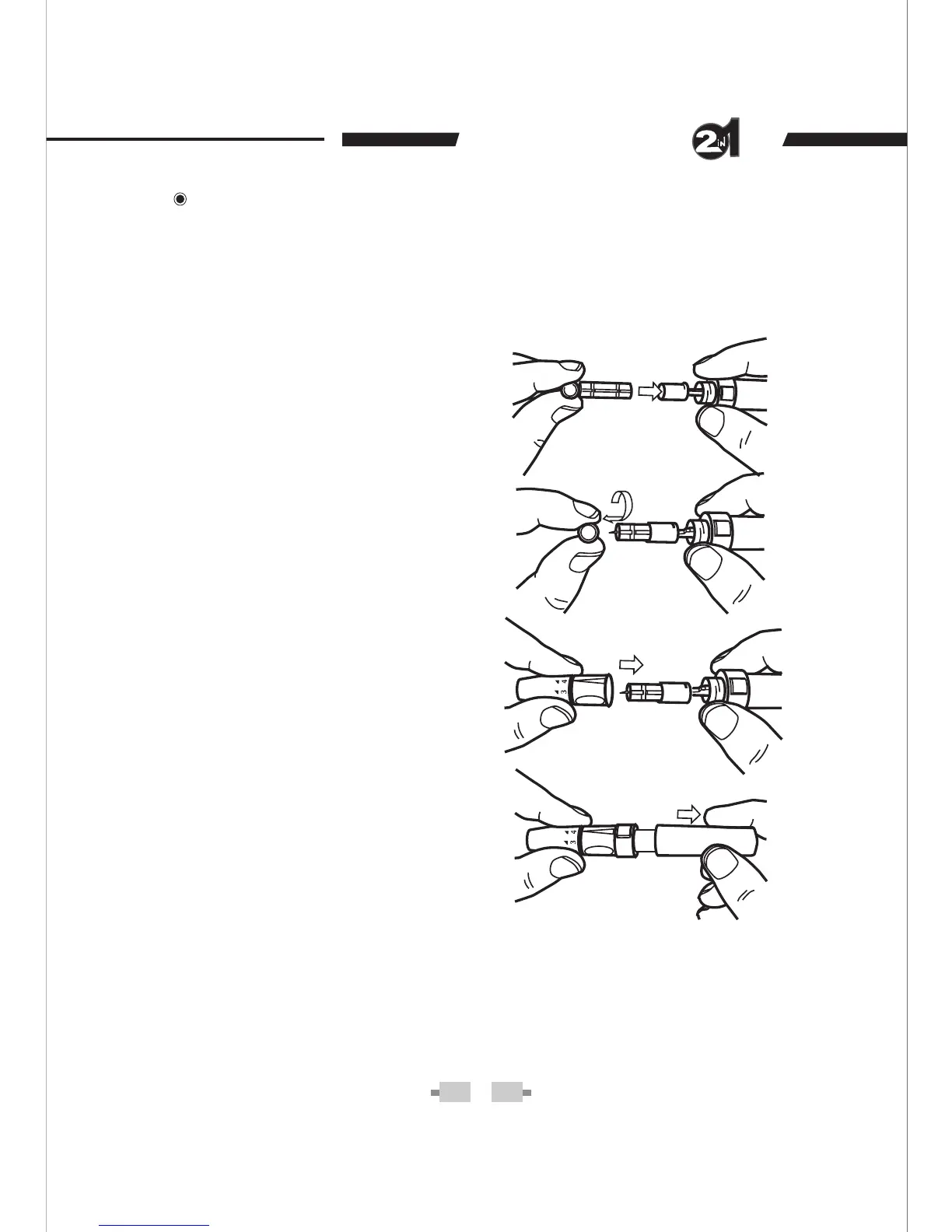
STEP 1- Set the lancing device.
Remove the cap of the lancing
device. Insert a lancet into the
lancet holder and push down
firmly until it is fully seated.
Remove the protective disk. Re-
place the Lancing Device cap.
Replace and screw the lancing
device cap until it is snug but not
too tight. Adjust depth of penetra-
tion: 1-2 for soft or thin skin, 3 for
average skin, 4-5 for thick or cal-
loused skin.
Slide the ejection/cocking con-
trol back until it clicks. If it does
not click, the lancing device may
have been cocked when the lan-
cet was inserted.
WARNING
To reduce the chance of infection:
Never share a lancet or the lancing device with anyone. •
Always use a new, sterile lancet. Lancets are for single use •
only.
Avoid getting hand lotion, oils, dirt, or debris in or on the lan-•
cets and the lancing device.


 To Next Page