KIPTRACK
28
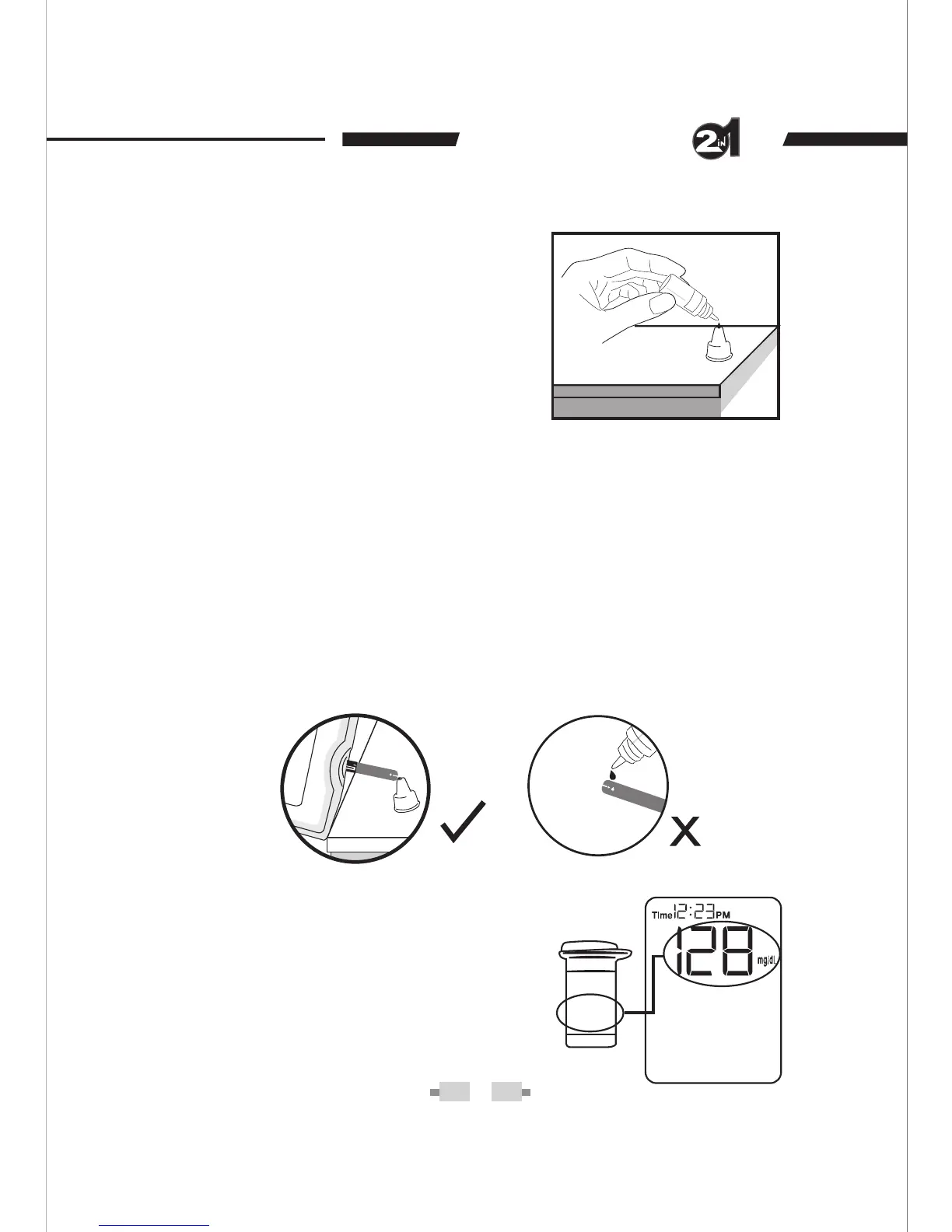
STEP 3- Obtain control solution.
Shake the control solution vial well.
Remove the cap from the control
solution bottle.
Place cap on flat
surface. Squeeze the vial, discard
the first drop,
and wipe off the dis-
penser tip to prevent contamination.
Squeeze the vial again to get anoth-
er drop and apply the drop to the
top of the cap.
STEP 4- Apply Control Solution.
Hold the monitor to meet the absorbent hole of the test strip and
the drop will be automatically drawn into the test strip. Make sure
the confirmation window fills
completely.The monitor begins to
count down.
To avoid contaminating the control solution with the content of
the test strip, you have to place a drop of control solution on a
clean surface. Do not directly apply control solution onto a strip.
STEP 5- Read and Compare the Result.
After counting to 0, the test result of
control solution is shown on the screen.
Compare this result with the range
printed on the test strip vial. It should fall
within this range.
Normal
109 165-


 To Next Page