KIPTRACK
32
WARNING
Choose a different spot each time you test. Repeated punc-
•
ture in the same spot may cause soreness and calluses.
Since the first drop of blood usually contains tissue fluid
and
•
serum, which may affect the test result, it is recommended to
be discarded.
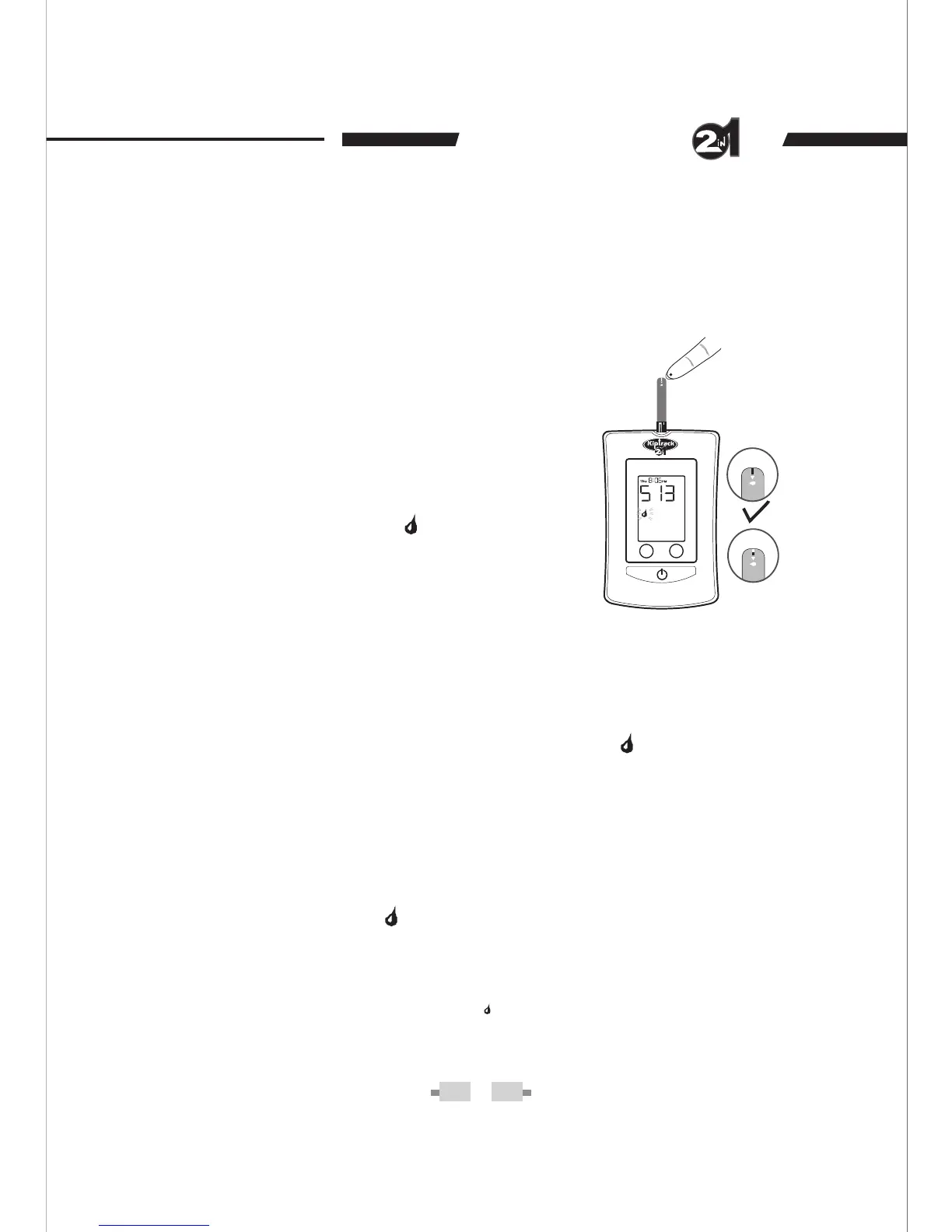
STEP 4. Applying blood onto the test strip.
If the test is to be done in a fasting mode (no food intake for
at least 8 hours), press M button once while “ ” appears on
the display. “AC” will appear. Allow your blood to touch the
absorbent hole of test strip until the confirmation window is
completely filled.
If the test is to be done in 2-hours- after-meal mode, press
M button twice while “ ” appears on the display. “PC” will
appear. Allow your blood to touch the absorbent hole of test
strip until the confirmation window is completely filled.
NB. Pressing M button three times after “ ” appears on the display, takes you
to the “QC” (Quality Control) mode. This mode is used for quality control test
only. Refer to page 27.
If the blood glucose test is to be done in a
General mode (without regards to time
since last meal), while “ ” is flashing on
the display, allow your blood to touch the
absorbent hole of test strip until the
confirmation window is completely filled.
Do not press the M button.
Doing The Blood Glucose Test In General Mode
Doing The Blood Glucose Test In Fasting Mode
Doing The Blood Glucose Test In Mode2-hours- After-meal


 To Next Page