5
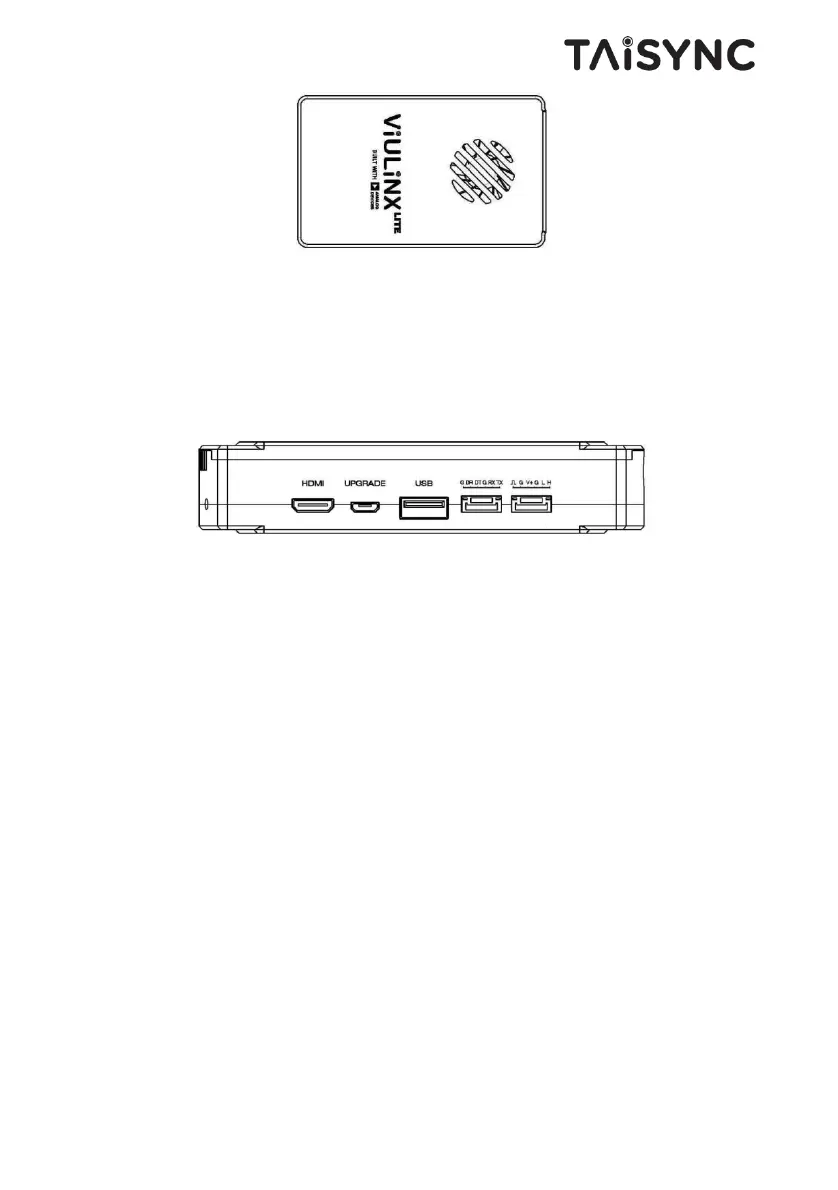
① Fan Ventilation Outlet
Don’t block this fan ventilation outlet to ensure effective cooling.
2.3.Ground Unit Interfaces
① HDMI Port
Connect this mini HDMI output port to the HDMI input port of a display device using the
supplied Mini HDMI to HDMI cable.
② Micro USB Port
Connect this port to the USB port of a PC or Laptop, and use the Taisync PC program to
upgrade firmware and set parameters on the air unit.
③ USB Port
Connect this port to the Lightning port of an iPhone, or to the USB port of an android phone and
use ViULinxTM cell phone APP to watch live video play and set parameters of the air and
ground unit. Video output interface can be connected to mobile phones or tablets for video play.
QGC is also supported.
④ Serial Port (UART)
Connect this port to the telemetry port of a remote controller, or the serial port of a ground
control station to setup a telemetry link between the drone and the remote controller or the
ground control station. UART singal: LVCMOS-3.3V.
⑤ Remote Control Port (RC)


 To Next Page