GB
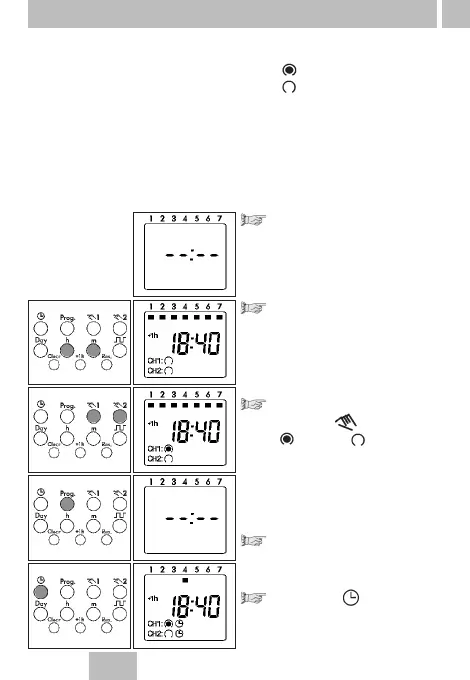
Select free memory location:
Press the Prog key as often as
necessary until – –:-– – appears.
Set the switching times:
With the m key – minutes
With the h key – hours
For weekday adjustment, see:
Block formation of weekdays, Point 8
You determine the switching times and the switching state for the relevant
switching output (channel.)
Symbol:
CH1: (ON) = Channel 1
CH2: (OFF) = Channel 2
These assignments are possible:
• Switching commands only for channel 1
• Switching commands only for channel 2
• The same switching commands for channel 1 and channel 2
(the switching time and switching state are identical)
• The same switching time for channel 1 and channel 2 but with
a different switching state.
11
7. Standard switching commands
Set the switching state:
With the key
(ON) or (OFF)
Note:
The switching state for CH1 or
CH2 can be deactivated.
No symbol – no switching.
Press the Prog key once. The input has
ended.
A free memory location is
displayed – for other settings or
Press the key once. The input
is ended.
The display shows the current time.



 To Next Page