EasyManua.ls Logo

Talento 472 - Assembly, Putting into Operation, and Connection; 3.2 Putting into Operation; 3.3 Connection

Default Icon
21 pages
Print Icon
To Next Page IconTo Next Page
To Previous Page IconTo Previous Page
Loading...
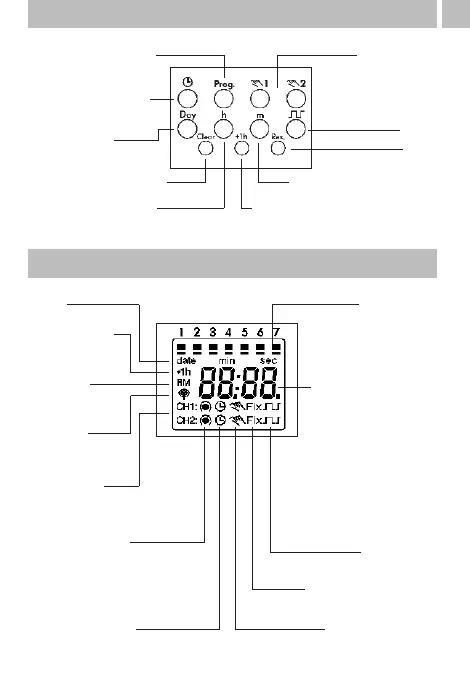
3. Control elements
4
Start program input
Set time,
end program input
Select day(s)
of the week
Delete switching time
Set hours, day, year
Hand switch
Enter pulse/
cycle
Reset
Set minutes, month, year
Summer time/winter time switchover
4. Display
Date
Summer time
display
AM/PM
display
DCF 77
reception
Channel 1
Channel 2
Switching state
Automatic mode
1234567 =
days of the week
1 = Monday
Hours - current time
Calendar day
- current date
- start/end
summer time
Minutes - current time
Month - current date
- start/end
summer time
Year - day/month
Pulse/cycle
Continuous operation
Manual operation