23
Factory Self-Calibration:
If the customer self-calibration will not be helping to
maintain the machine to have satisfactory balancing
stability, we recommend that you proceed Factory
Self-Calibration procedure. Below you would find the
detailed instruction:
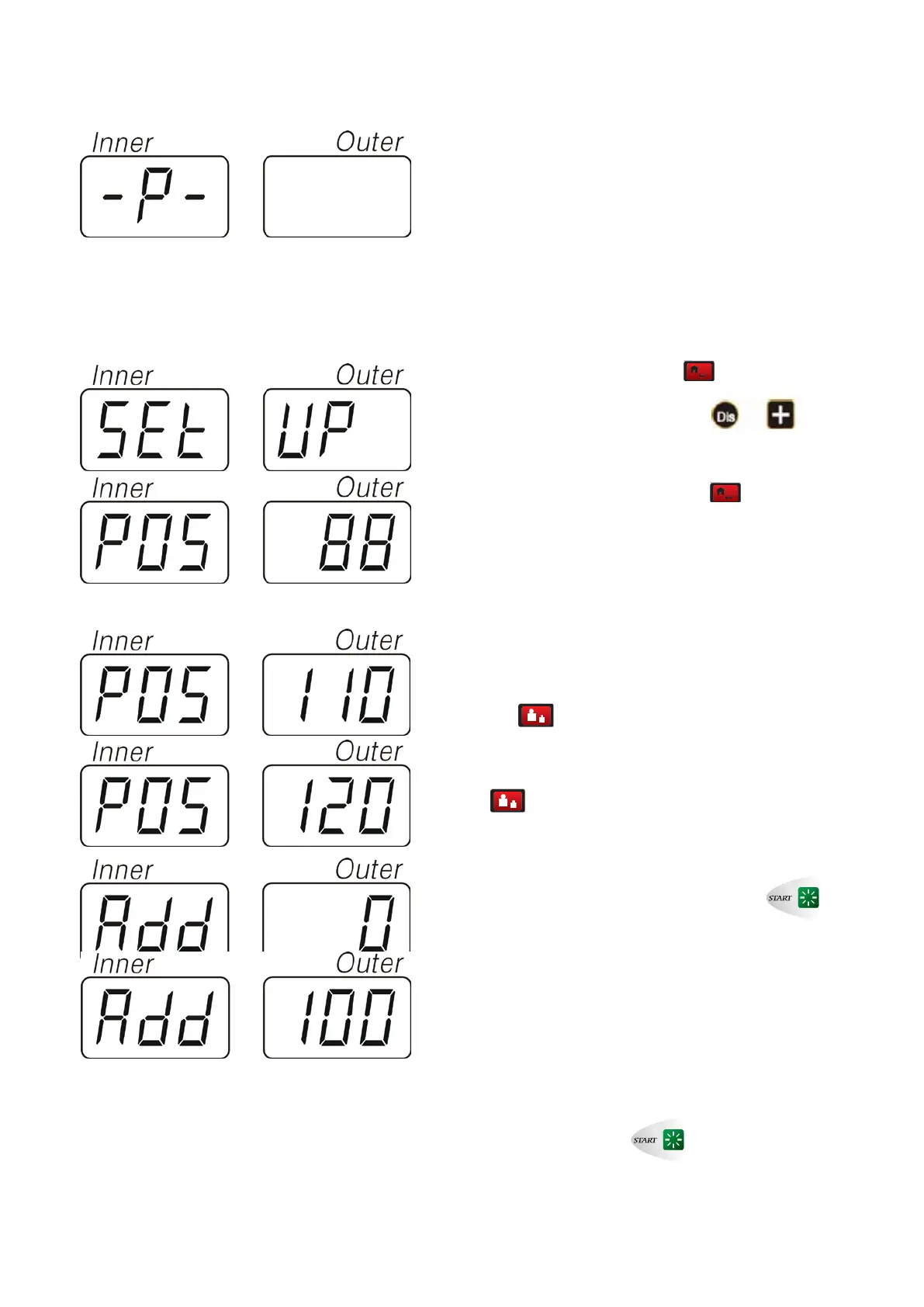
Press “Home button” one time ,and it displays
“[
P ]”, press “DIS + button” one time , and
you will see “[
SET ]-[ UP ]”
Press “Home button” two times
, and it dispalys
[
POS—XXX], pull the wheel by hand( clock-wise or
anti-clock-wise) slowly.
When it displays [POS]—[110] press ‘Fine button”
one time
,then continue to pull the wheel slowly
until it displays [
POS]—[120] Press “ Fine button” one
time
.
The screen displays [ADD]-[ 0 ], press to
start rotation of the machine.
When machine stops rotation, it displays[ADD]—[100] ,
at this moment, please pull the wheel until the outer
indicating lights are all illuminating, clamp 100g
calibration standard weight on the outside rim at 12
o’clock position. Press
to start rotation of the
machine.


 To Next Page