36
Table 4.2 Operation instructions
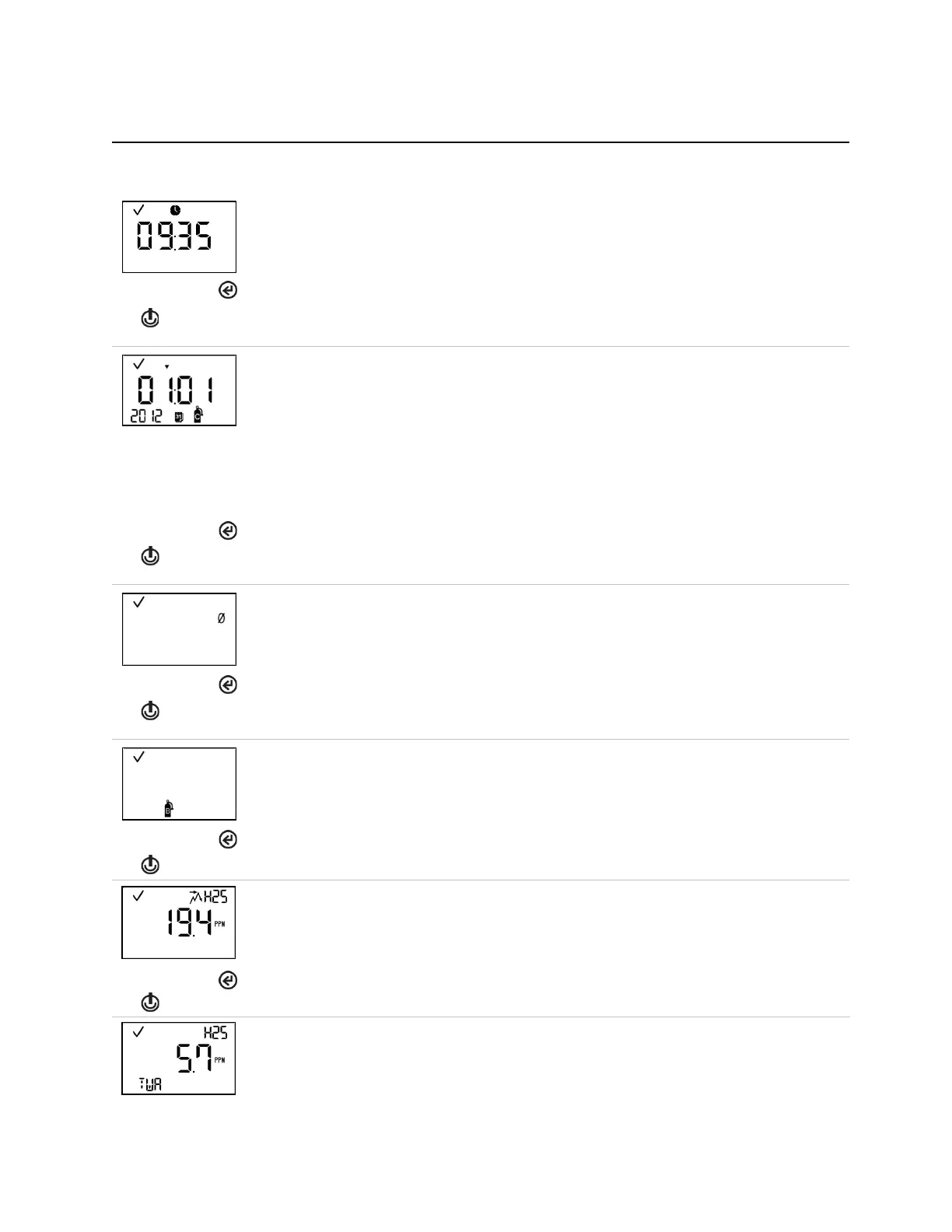
Screen
Buttons
Screen description
Button effects
This screen displays the current time and also features the check mark and clock icons.
Displays current time. Pressing again activates the next enabled operation-mode screen.
This screen features the calibration, calendar, and check mark icons, an up or down arrow, and a
date value.
When the up arrow (▲) displays, the next calibration date is displayed. When the down arrow (▼)
displays, the last calibration date is displayed.
Values:
Date: XX (day) and XX (month)
Year: XXXX
Activates the next enabled operation-mode screen.
This screen displays when operation-mode zeroing is enabled. It features the check mark and zero
icons.
Starts the zero process (see "Zero, Calibration, Bump Test").
Activates the next enabled operation-mode screen.
This screen displays when operation-mode bump testing is enabled. The screen features the check
mark and bump test icons.
Starts the bump test process (see "Zero, Calibration, and Bump Testing").
Activates the next enabled operation-mode screen.
Peak reading
This screen features the check mark, peak, and sensor-type icons, and the most recent peak
reading.
Activates the next enabled operation-mode screen.
This screen displays when the TWA reading is enabled in operation-mode. The screen features the
check mark, sensor-type, and TWA icons, and the current TWA reading.



 To Next Page