45
Warnings persist until the event is resolved. In some cases, an unresolved warning will become more
urgent in frequency. For example, a low-battery warning that is not resolved will change to alarm status
indicating a critical low-battery condition.
As with alarm events, warning events are distinguished from one another on the instrument display screen
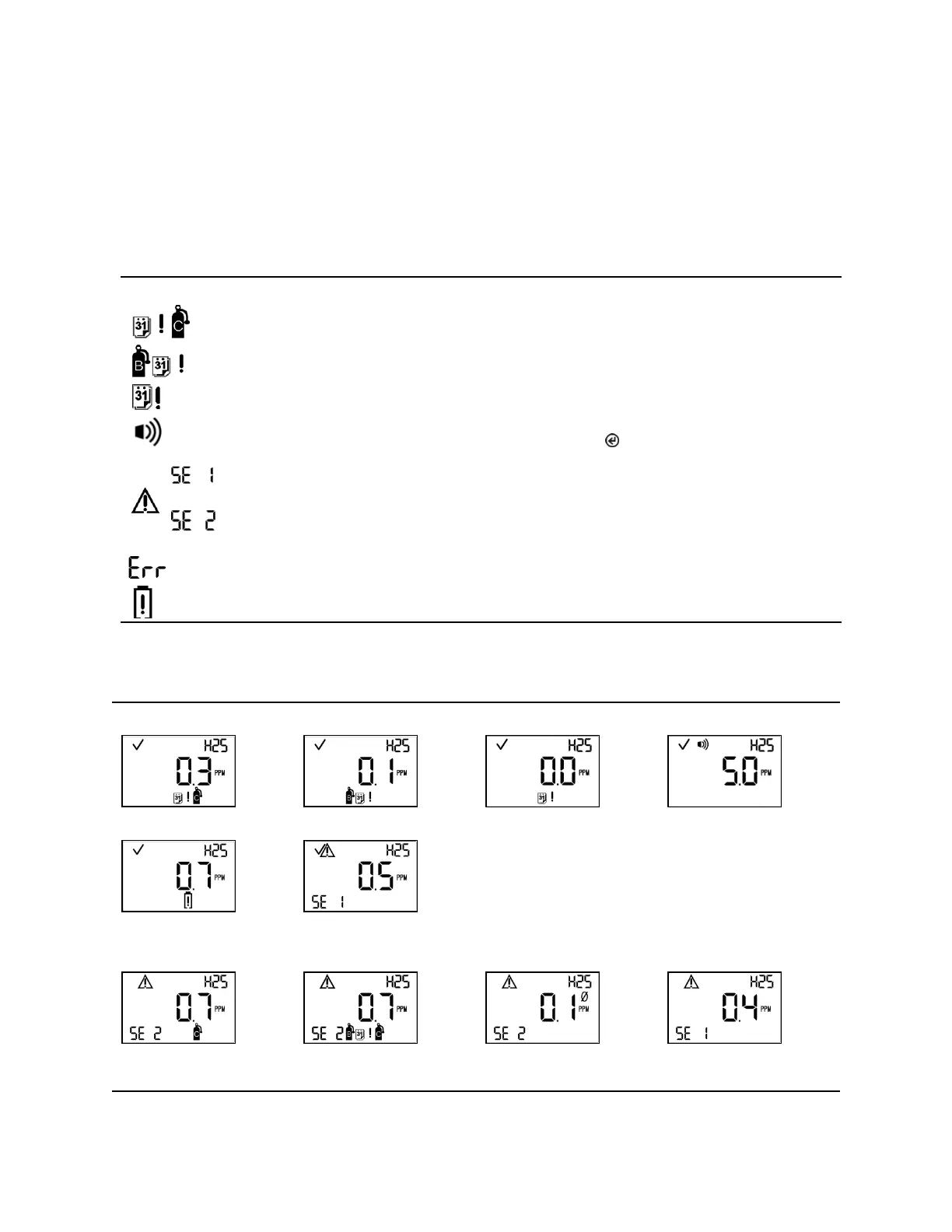
using different symbols. Table 5.2 lists the symbols used for different warning events.
Table 5.2 Warning events
a
The instrument requires calibration.
Bump test due
a
The instrument requires a bump test.
a
The instrument requires docking.
Gas-alert
a
A detected gas concentration may be approaching alarm levels. To turn off
the warning signals, press and hold .
Sensor 1
Single sensor data failure
Sensor 1 or Sensor 2 is not installed or is in data failure.
Sensor 2
A critical error has occurred; a three-digit number code will be displayed.
The instrument’s battery is low.
a
Signals (visual, audible, and vibration) vary based on instrument settings.
Table 5.3 Warning and failure screens
Warnings
a
a
a
— —
Low-battery warning
b
One sensor Installed
Failures
Single sensor calibration
failure
Single sensor bump failure
with calibration overdue
Single sensor zero failure
Single sensor data failure
a
Signals (visual, audible, and vibration) vary based on instrument settings.



 To Next Page