14
Before Operation-VCR part
How to use the main menu
This DVD+VCR can easily be programmed by using the
menus displayed on screen.
The menus are controlled by the Remote Control
Handset.
1. Switch on your TV set and DVD+VCR by pressing the
POWER button.
2. Press i button.
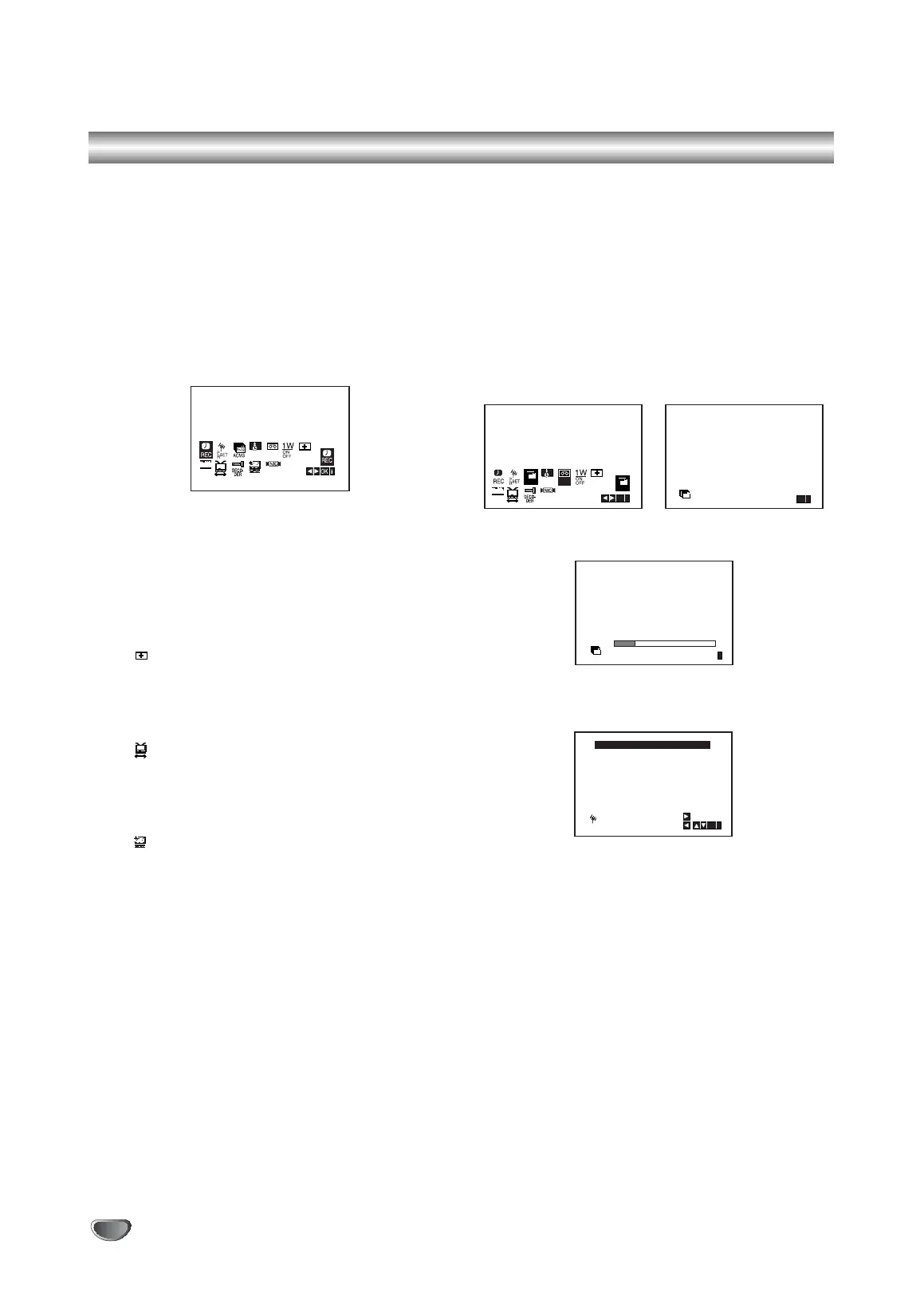
The main menu will appear on the TV screen.
REC - Timer recording setting (see p. 24).
PR SET - Manual tuning setting (see p. 15).
ACMS - ACMS (Automatic Channel Memory
System) (see p. 14).
SET - Date & clock setting (see p. 13).
SYS - To set the Colour TV System (see p. 13).
1 W ON/OFF - Power Save Mode (see p. 27).
(Dr.) - To check a problem with your VCR
(see p. 27).
F.OSD ON/OFF - To display the operational
mode of your VCR
(see p. 26).
(16:9/4:3) - To select the aspect ratio of your
TV (see p. 27).
DECODER - To use a pay-TV decoder
(or Satellite) with your VCR
(
see p. 26
).
(OPR) - To improve the playback picture
(see p. 21).
Appear when playback only.
O NIC -
To activate or deactivate the NICAM digital
sound (
see p. 26
).
Tip
You can change the menu language on the DVD setup
menu. (See the Menu Language on page 18.)
3. Press 1 and 2 to select the desired menu.
Press ENTER/OK and use 3 or 4 to select.
4. Press i to return to a TV picture.
Tuning in TV Stations Automatically
If the TV broadcast signal is weak your DVD+VCR may
not detect the necessary information and will not be able
to store them correctly. To overcome this problem please
turn to the MANUAL TUNING section on page 15.
1. Press POWER to turn on your DVD+VCR.
2. Press i button.
The main menu will appear on the TV screen.
Press 1 or 2 to select the ACMS.
Press ENTER/OK.
3. Press OK to again to start the automatic tuning
process.
4. The TV STATION TABLE will appear when tuning is
completed.
Press i to save your settings.
Notes:
Please note currently only a limited number of TV
companies transmit the Programme Delivery Control
(PDC) signal which enables your DVD+VCR to suc-
cessfully identify and store them. If your DVD+VCR has
difficulty in identifying a TV station please turn the page
to find out how to manually tune in and name a TV sta-
tion. While automatic tuning is taking place the time and
date will set automatically.
If - - :- - appears in the DVD+VCR display it means that
the broadcast signal is weak and the clock was not set.
Please turn to CLOCK SET section of this book on
page 13.
SYS
12
SET
OSD
ON
OFF
OSD
f
ACMS
Pr-12
ACMS
Pr-12
OK
i
OK
i
,DELETE :
MOVE :
P
SET
R
02 C03 00
03 C04 00
04 C05 00
05 C06 00
06 - - - -
07 - - - -
08 - - - -
01 C02 00
BBC2
ITV
CH4
CH5
- - - - -
- - - - -
- - - - -
BBC1
01 C02 00
02 C03 00
03 C04 00
ES
i
Pr-12
ACMS
BBC1
BBC2
ITV
V1503P1Z.NA6ITTA_S_38U 12/09/2007 12:07 PÆgina 14


 To Next Page