Introduction
7
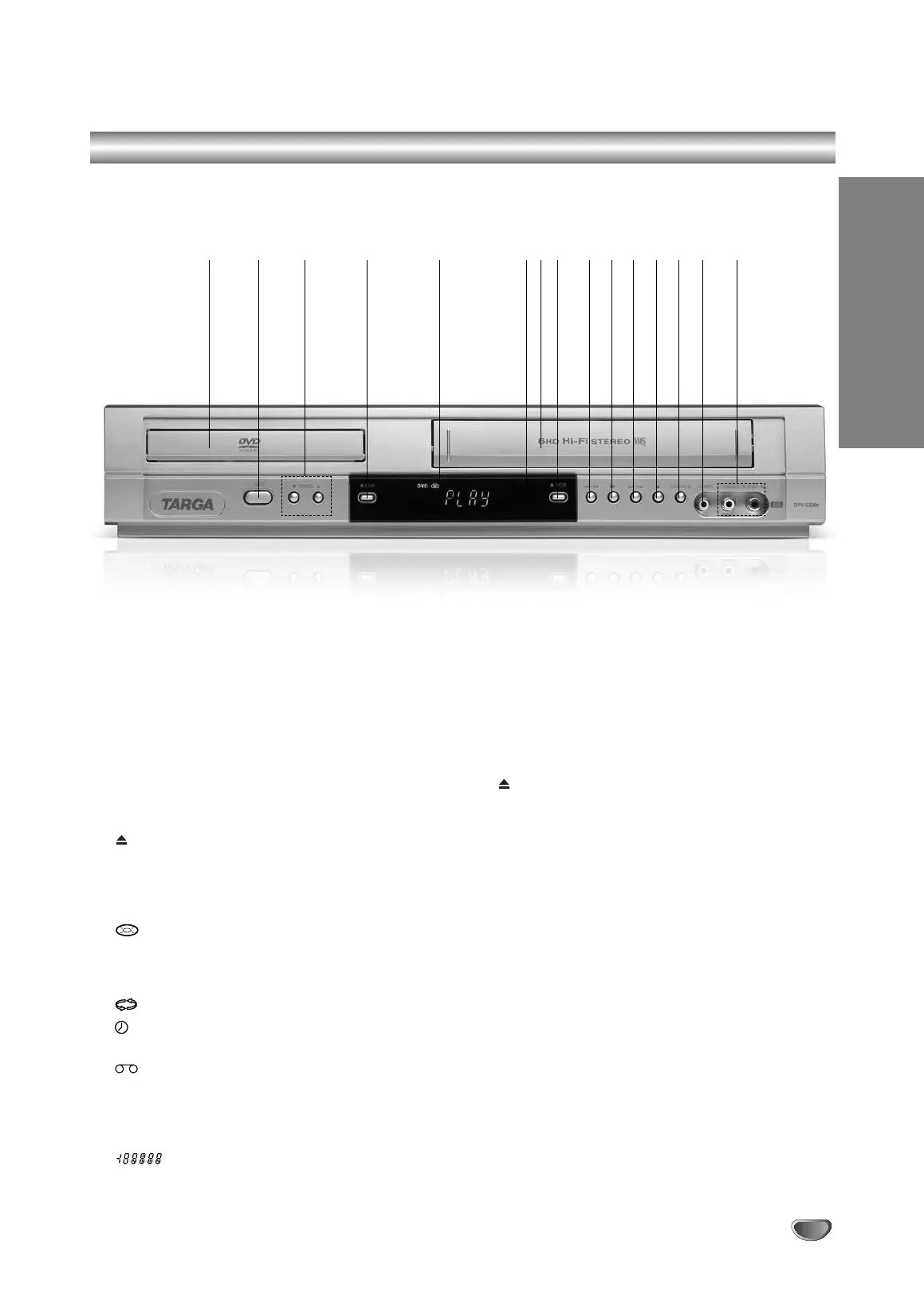
Front Panel
1. Disc Tray
Insert a disc here.
2.
1/
I
Switches the unit to ON or OFF.
3. PROG. (V
/v)
Channel Programme Selectors
.
4. DVD
Opens or closes the disc tray.
5. Display window
Shows the current status of the unit.
DVD: The DVD drive has been selected.
:
the DVD drive contains a disc.
The DVD icon blinks if no DVD/CD disc has been
inserted into the drive.
[P]: Indicates the Progressive Scan is set to On mode.
:
Indicates repeat mode.
:
DVD+VCR is in timer recording or a timer
recording is programmed.
:
the VCR drive contains a disc.
VCR: The VCR drive has been selected.
REC:
VCR recording is engaged.
DVD to VHS copy is in progress.
TV: Indicates TV mode.
(See Notes on page 22.)
:
Indicates total playing time/elapsed
time/current time.
6. Remote Sensor
Point the remote control here.
7. Tape Compartment
8. VCR
Tape Eject
9.
./m
Go to beginning of current chapter/track or to
PREVIOUS chapter/track.
For backward search, press and hold for 2 seconds.
Rewinds the tape.
10.
N
Starts playback.
11.
M/>
Go to NEXT chapter/track.
For forward search, press and hold for 2 seconds.
Winds the tape forwards.
12.
x
Stops playback.
13. DVD/VCR
DVD/VCR Selector
14. Cinch Video-in
15.
Cinch Audio-in (L/R)
1 2 3 4 5 6 7 8 9 10 11 12 13 14 15
V1503P1Z.NA6ITTA_S_38U 12/09/2007 12:07 PÆgina 7


 To Next Page