24
Operation with tape
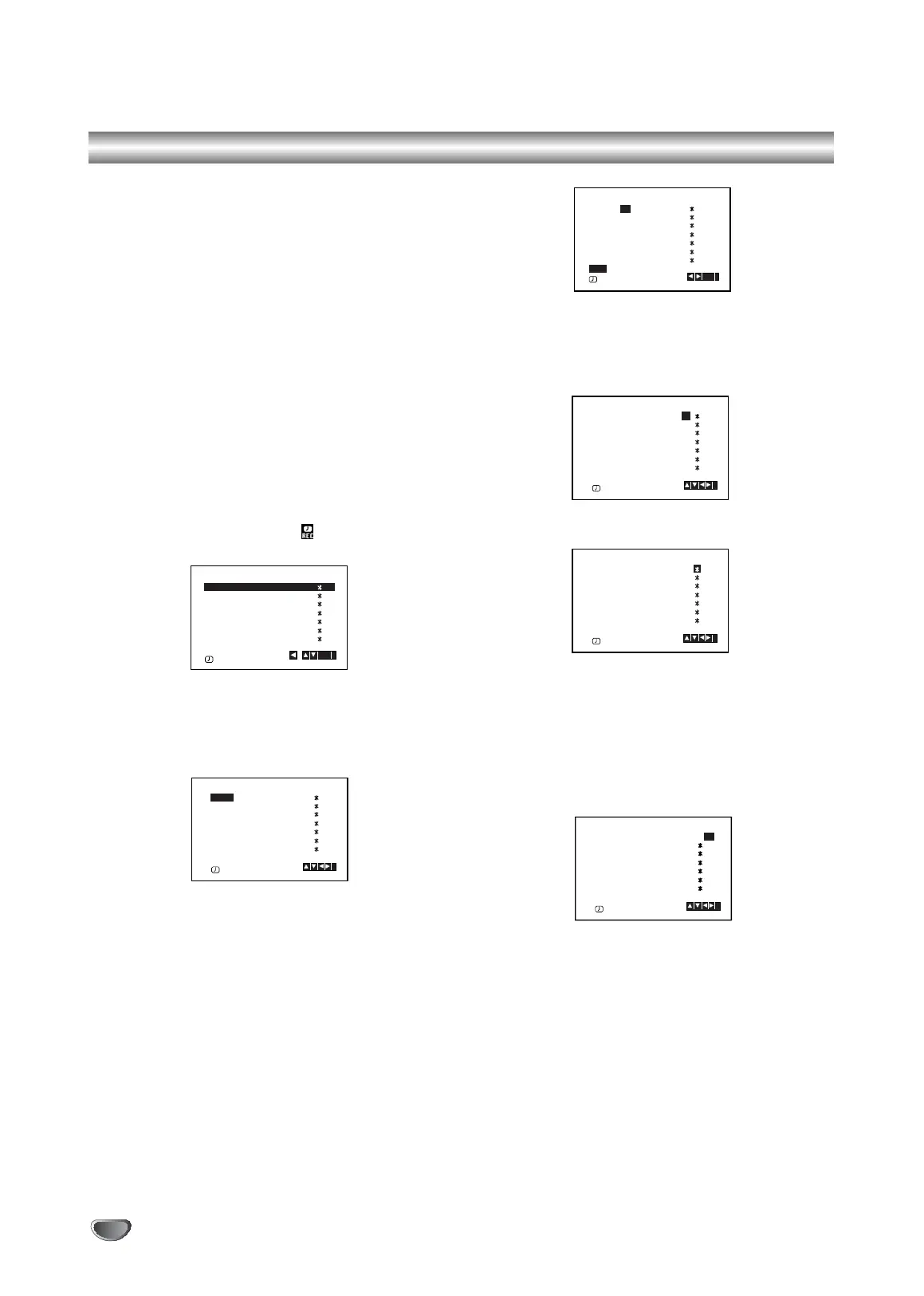
Timer recording using On Screen
Display
You may set up to seven timer record events
within one month of the current date.
Note:
Before setting the timer make sure that you have
set the DVD+VCR clock correctly and you know
which stations you have tuned TV stations on your
DVD+VCR.
1. Insert a video cassette with protection tab into your
DVD+VCR.
The video cassette should have the window side
facing up and the arrow facing away from you.
2. Press i.
Press 1 or 2 to select REC ( ).
Press ENTER/OK.
3. Press ENTER/OK to start setting the timer record
event.
4. Use the PR/TRK (v/V) to enter the station that you
wish to record then press 2.
Note:
If all timer record events are full press v or V to select
the event that you wish to remove and replace.
Press b to delete the event.
5. Use the PR/TRK (v/V) to enter the date of the
programme.
If you press ENTER/OK before entering the date
you may select one of the following automated
recording features.
Press 1 or 2 to select, then press ENTER/OK to
confirm.
DLY To record every day (except Saturday and
Sunday) at the same time.
SU~SA To record at the same time every week.
6. Use v/V/1/2 buttons to enter the recording start and
end times of the programme that you wish to record.
Please note your DVD+VCR uses a 24 hour clock.
e.g. 1pm will be displayed as 13:00.
7. Press B and press v or V to switch PDC on or off.
8. Press B to select the recording speed.
Press v or V to select the desired tape speed (SP,
IP, or LP).
IP mode determines how much tape is left and
switches speed from SP to LP, if necessary, to com-
plete recording the program. IP mode is not selected
when PDC is ON.
PR DATE
T I M E
- - - -
- -
SP
- - - - SP
- - - - SP
- - - - SP
- - - - SP
- - - - SP
- -
- - - - - - - -~::
- - - - - - - -~::
- - - - - - - -~::
- - - - - - - -~::
- - - - - - - -~::
- - - - - - - -~::
- - - - - - - -~::
SP
i
OK
,
DELETE:
PR DATE
T I M E
- - - -
- -
SP
- - - - SP
- - - - SP
- - - - SP
- - - - SP
- - - - SP
PR-03
- - - - - - - -~::
- - - - - - - -~::
- - - - - - - -~::
- - - - - - - -~::
- - - - - - - -~::
- - - - - - - -~::
- - - - - - - -~::
SP
i
PR DATE
T I M E
- - - - SP
- - - - SP
- - - - SP
- - - - SP
- - - - SP
- - - - SP
PR-03 4
- - - - - - - -~::
- - - - - - - -~::
- - - - - - - -~::
- - - - - - - -~::
- - - - - - - -~::
- - - - - - - -~::
- - - - - - - -~::
SP
i
OK
DLY SU MO TU WE TH FR SA
41400 1530~::
PR DATE
T I M E
- - - - SP
- - - - SP
- - - - SP
- - - - SP
- - - - SP
- - - - SP
PR-03
- - - - - - - -~::
- - - - - - - -~::
- - - - - - - -~::
- - - - - - - -~::
- - - - - - - -~::
- - - - - - - -~::
SP
i
41400 1530~::
PR DATE
T I M E
- - - - SP
- - - - SP
- - - - SP
- - - - SP
- - - - SP
- - - - SP
PR-03
- - - - - - - -~::
- - - - - - - -~::
- - - - - - - -~::
- - - - - - - -~::
- - - - - - - -~::
- - - - - - - -~::
i
SP
41400 1530~::
PR DATE
T I M E
- - - - SP
- - - - SP
- - - - SP
- - - - SP
- - - - SP
- - - - SP
PR-03
- - - - - - - -~::
- - - - - - - -~::
- - - - - - - -~::
- - - - - - - -~::
- - - - - - - -~::
- - - - - - - -~::
SP
i
PDC : ON
V1503P1Z.NA6ITTA_S_38U 12/09/2007 12:07 PÆgina 24


 To Next Page