16
4:3 PS
4:3 LB
16:9 Wide
Press SETUP to exit Current selection
Press SETUP to exit
0
New Password(8 chars)
4:3 PS
4:3 LB
16:9 Wide
Press SETUP to exit Current selection
Press SETUP to exit
Set Password
Parental Control Set
Choose Rating
Choose Country
4:3 PS
4:3 LB
16:9 Wide
Press SETUP to exit Current selection
Parental Control Set
Press SETUP to exit
v
Current selection
v
Choose Rating
Set Password
Choose Country
5
3 PG
1 G
6 PG-R
4 PG 13
2
4:3 PS
4:3 LB
16:9 Wide
Press SETUP to exit Current selection
Press SETUP to exit
Parental Control Set
Password
0
4:3 PS
4:3 LB
16:9 Wide
Press SETUP to exit Current selection
Press SETUP to exit
Parental Control Set
Password
0
Choose Rating
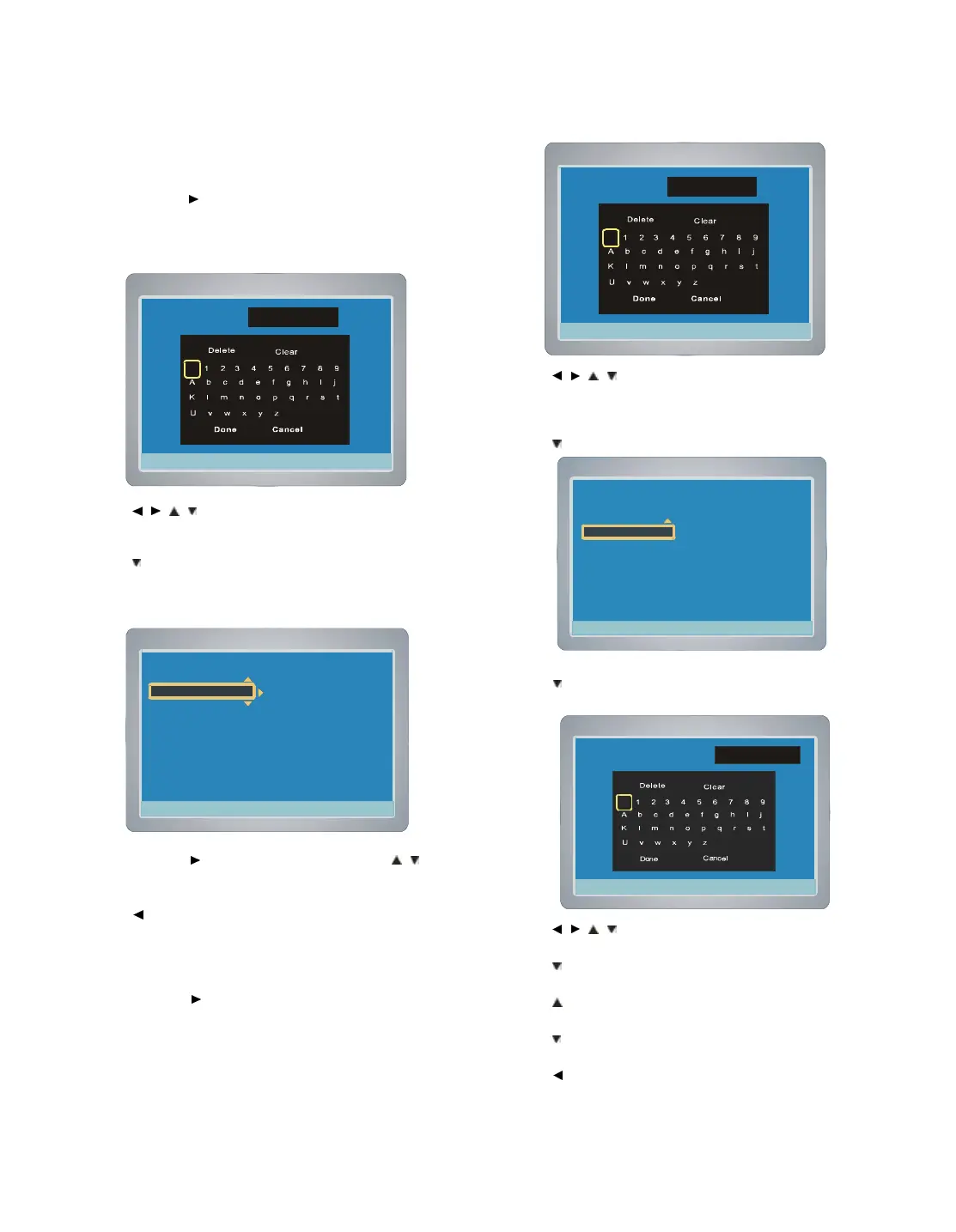
1. Select “Choose Rating ”.
2. Press ENTER or
, “Parental Control Set ”screen appears.
Note : If you want to cancel the setting, select “Back ”and press
ENTER, “DVD Control Setup ”screen returns.
3. Press
/ / / and press ENTER to enter the password.
Note : If you use this unit for first time, enter [3], [3], [0] and [8]. Because
the initial password is set to “3308 ” before shipping from the factory.
4. Press
repeatedly to select “Done ”.
5. Press ENTER , the Choose Rating screen appears.
6. Press ENTER or
to select the sub menu, then press / to
select the parental lock level.
7. Press ENTER, "V" appears.
8. Press
twice to return to “DVD Control Setup ”screen.
Set Password
1. Select “Set Password ”.
2. Press ENTER or
, “Parental Control Set ”screen appears.
3. Press
/ / / and press ENTER to enter the password.
Note : If you use this unit for first time, enter [3], [3], [0] and [8].
Because the initial password is set to “3308 ” before
shipping from the factory.
4. Press
repeatedly to select “Done ”.
5. Press ENTER , the parental lock level screen appears.
6. Press
to select “Set Password ”.
7. Press ENTER , the New Password screen appears.
8. Press
/ / / and press ENTER to enter the password.
(maximum 8 characters or numbers).
9. Press
repeatedly to select “Done ”.
10. Press ENTER , the Confirm Password screen appears.
11. Press
to return to the character list, then enter the same
password as above.
12. Press
repeatedly to select “Done ”, then press ENTER, the new
password is set.
13. Press
twice to return to “DVD Control Setup ”.screen.
14. To exit, press SETUP.



 To Next Page