7
1237910846511
12 13 14 15
16
FUNCTION OVERVIEW
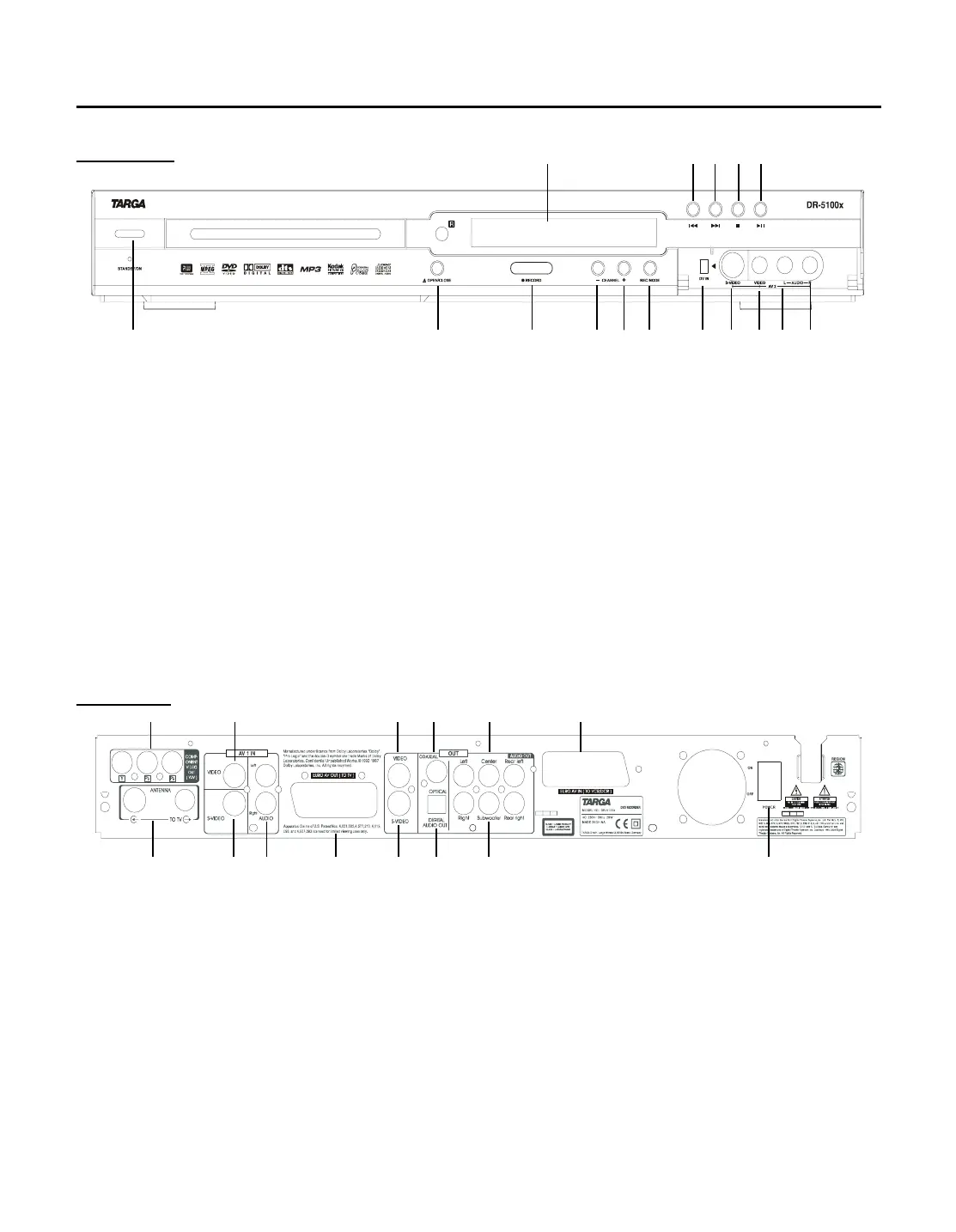
Front panel
1- POWER
To power the unit on or off.
This DVD recorder consumes power in stand-by mode. In order to
avoid any power consumption use the power switch on the back
side.
2- OPEN/CLOSE
Press to open/close disc tray.
3- RECORD
Press to record.
4- CHANNEL (-)
Press to select previous TV channel
5- CHANNEL (+)
Press to select next TV channel
6- REC MODE
Select the record mode
7- DV IN
Connect the audio/video(game console camcorder. etc)
8- S-VIDEO IN
S-video input jack
9- VIDEO IN (AV2 IN)
Video input jack
10- AUDIO IN (L)
Audio input jack(left channel)
11- AUDIO IN (R)
Audio input jack(right channel)
12- PREV
Press to select the previous track or chapter.
13- NEXT
Press to select the next track or chapter.
14- STOP
Press to stop playback except for timer recording.
15- PLAY/PAUSE
Press to play or pause the playback
16- VFD
VFD will display the unit present work condition.
Back panel
1- ANTENNA
Connect RT ANTENNA to TV set
2- S-VIDEO (IN)
S-video input jack
3- AUDIO IN (Left and Right)
Audio input jacks
4- EURO AV IN (TO TV)
Euro AV input jack
5- S-VIDEO (OUT)
S-video output jack
6- OPTICAL OUT
Optical digital audio output
7- SUBWOOFER
Connect the Amplifier Sub terminals
8- COMPONENT VIDEO OUT
Component video output jacks
9- VIDEO IN
Video input jack
10- VIDEO OUT
Video output jack
11- COAXIAL OUT
Coaxial digital audio output
12- AUDIO OUT
Connect the Amplifier Audio input
13- EURO AV IN (TO VCR/DSR)
Euro AV input jack
14- POWER (ON/OFF)
Power switch
213 574
13
6
8 9 10 11 12
14



 To Next Page