8
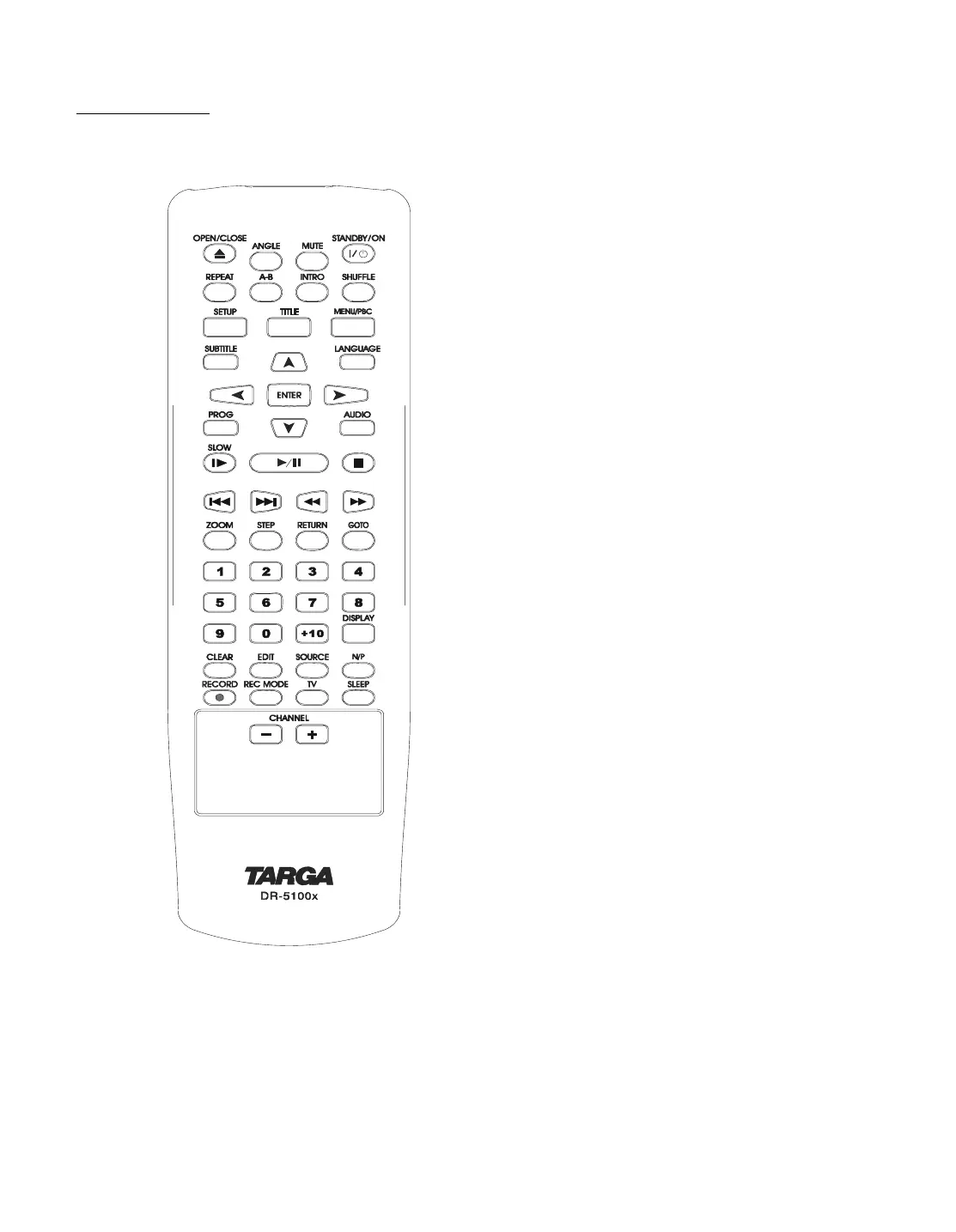
Remote control
OPEN/CLOSE: open or close the disc tray.
ANGLE: access various camera angles on DVD.
MUTE : press to shut off the sound or to restore the sound.
STANDBY/ON : switches the unit from between standby and on.
1)
REPEAT : allow you to repeat a title, a chapter, a song or all songs on
the disc (usually used on music discs).
A-B : repeat a certain segment between A and B.
INTRO : press to scan all the tracks with 10 seconds for each track(CD,
VCD only).
SHUFFLE : press to play the tracks at random.
SETUP : enter into the SETUP menu.
TITLE : displays the title menu if available (DVD only)
MENU/PBC : press to select the subtitle(root) menu.
SUBTITLE : access various subtitle language in DVD.
LANGUAGE :select a different Audio language or director narration.
Directional arrow buttons : select the item you want.
ENTER : press to enter a command or confirm a selection.
PROG : program the tracks in your own order (only VCD and CD)
AUDIO : changes the audio channels of a VCD or CD if available , or selects
stereo, left or right audio channel of a VCD disc.
SLOW : select the forward/backward slow speed playback.
PLAY/PAUSE : press to start or pause playback.
STOP : stops by momentarily or fully.
PREV SKIP: skip to previous chapter or track.
NEXT SKIP : skip to next chapter or track.
FAST BACKWARD: press to do fast backward search.
FAST FORWARD : press to do fast forward search.
ZOOM : press to enlarge the picture.
STEP : press to view playback frame by frame
RETURN : return back to the menu (VCD only).
GOTO: go to the desired starting title, chapter, track or time.
NUMBER KEYS : used in DVD menu and CD track selection.
DISPLAY : press to show the playing information about the disc.
CLEAR : press to clear what you select or input.
EDIT : press to edit what you record.
SOURCE : press to select your desired source.
N/P : press to switches between the PAL and NTSC system.
RECORD : press to start record.
REC MODE :press to select the record mode before recording.
TV : press to transfer to TV programmes.
SLEEP : To set the timer on the unit.
CHANNEL -/+ : press to select lower/upper TV program channel.
1) To power the unit on or off. This DVD recorder consumes power in stand-by mode. In order to avoid any power consumption use the power switch on
the back side.



 To Next Page