PREMIER SX USER MANUAL, MAINTENANCE GUIDE & LOG BOOK
Approved Document No: GLT.MAN-102T
PAGE 7
Issue: 1.1 Authorised: GH Date: 06/11/02
5. FIRE CONDITIONS
5.1 HOW AN ALARM IS INDICATED
32:(5
*(1),5(
*(1)$8/7
6833/< )/7
6<67(0 )/7
*(16&
'(/
*(1=21( 7(67
*(1',6$%/(0(17
),5( =21(6
=21$/ )$8/7 ',6$%/(0(17 7(67
(1*,1((5
672367$57 6,/(1&( 5(6(7 6&52//
/(' 7(67
)/7 721(
'(/$<
29(55,'(
)/7
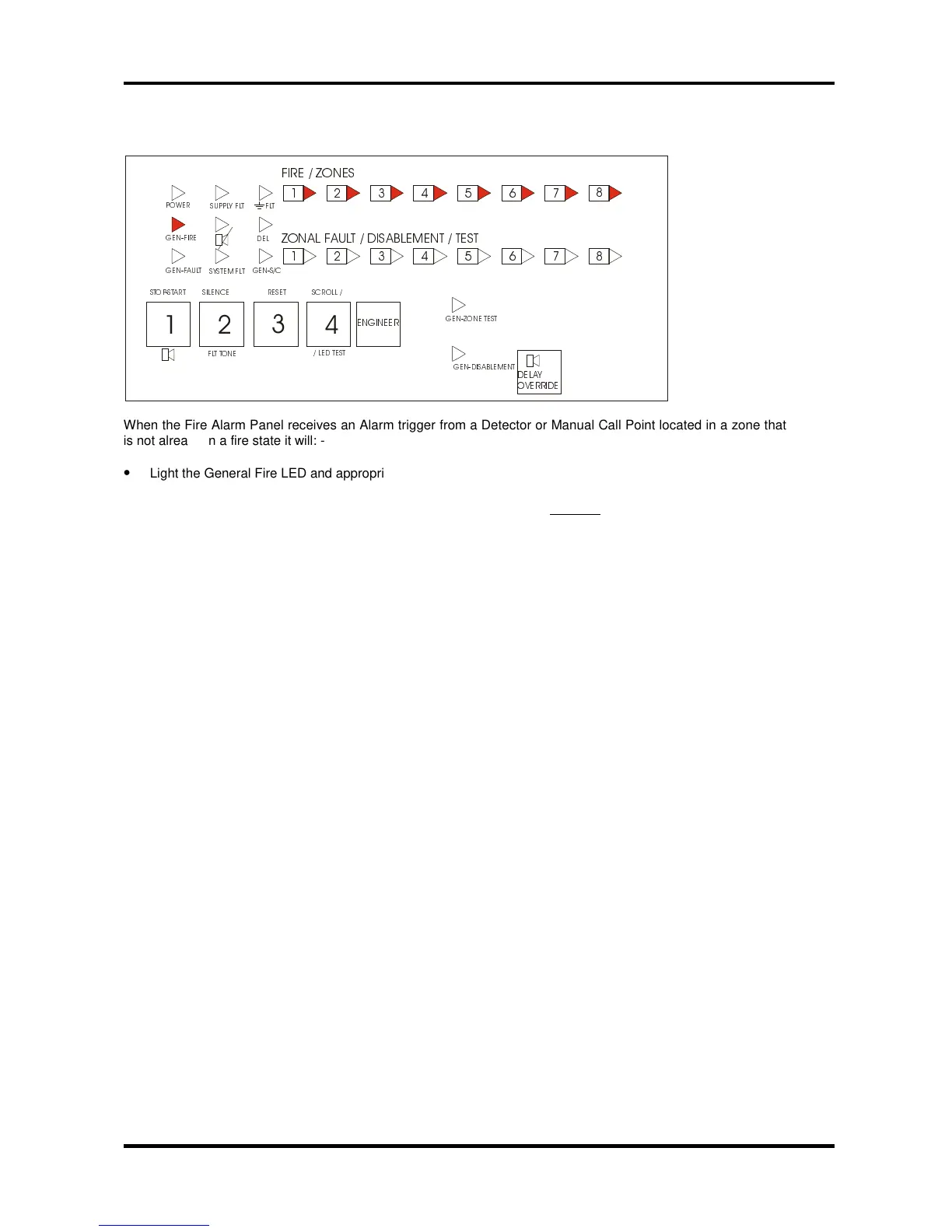
When the Fire Alarm Panel receives an Alarm trigger from a Detector or Manual Call Point located in a zone that
is not already in a fire state it will: -
•
Light the General Fire LED and appropriate Zone Fire LED(s) on the front of its enclosure
•
Sound Internal buzzer
•
Start the Alarm Sounder and Auxiliary output including, if enabled (provided there is no Delay applicable to
the sounders).
At this point the building’s fire management plan should be executed.
IMPORTANT NOTE
: Zones which have been disabled cannot be triggered into Alarm Condition (see page
10 for further information on Disablements).
5.2 SILENCING THE ALARM SOUNDERS
•
The Alarm Sounders may be silenced by turning the control key to “Control Enable” position and momentarily
pressing the Start/Stop button.
The Alarm Sounders and the Panel’s Internal buzzer will cease to sound but the light(s) for the Zone(s) in Alarm
and the red General Fire light will stay lit. All other Alarm outputs (i.e. the Auxiliary Fire Outputs) will remain
asserted.
5.3 NEW ZONE IN ALARM
Should a new Zone be triggered into Alarm whilst the Alarm Sounders have been silenced, the Panel will: -
•
Automatically reactive the Alarm Sounders
•
Light appropriate Zone Fire LED(s) for any new Zone(s) in alarm
•
Keep the light(s) for the previous Zone(s) in fire, and General Fire lit.
5.4 MANUALLY ACTIVATING THE ALARM SOUNDERS (I.E. TO EVACUATE THE BUILDING).
•
With the control key in “Controls Enabled” position, momentarily pressing the Start/Stop will cause the Alarm
sounders to sound.
Pressing the Start/Stop button again will Silence the Alarm Sounders.
NB: If the Alarm Sounders have been disabled, pressing the Stop/Start button will have no effect.
5.5 RESETTING THE PANEL
•
After the cause of the alarm has been investigated and cleared and the Alarm Sounders have been silenced,
the Panel can be reset by pressing the Control Panel Reset button.
The Zone fire and General fire alarm lights will go out to indicate the process is complete. If there are still
alarm triggers on any Zone the Panel will go back into alarm as before.



 To Next Page