PREMIER SX USER MANUAL, MAINTENANCE GUIDE & LOG BOOK
Approved Document No: GLT.MAN-102T
PAGE 8
Issue: 1.1 Authorised: GH Date: 06/11/02
6. FAULT CONDITIONS
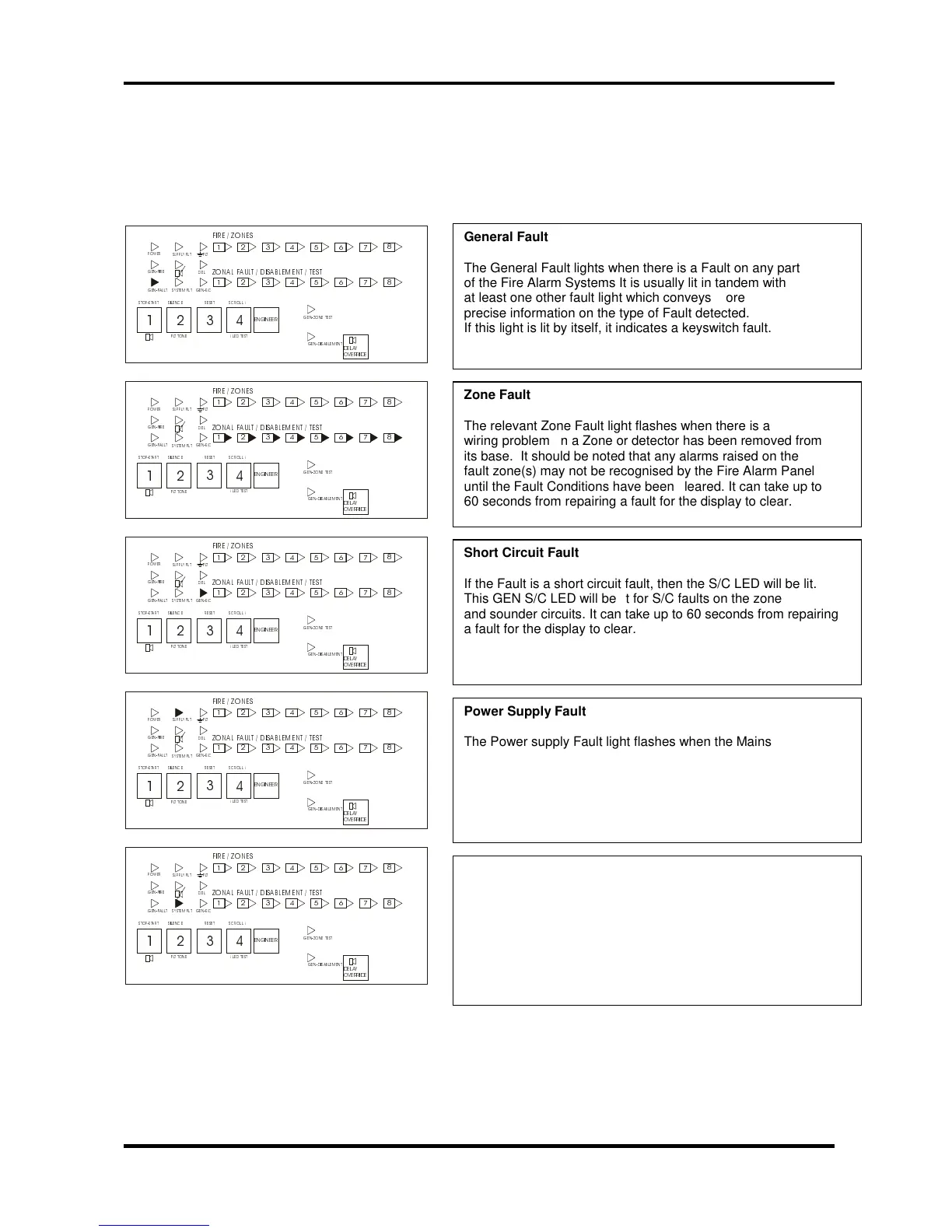
6.1 DIFFERENT TYPES OF FAULT
When a Fault occurs on a critical part of the Fire Alarm System, the Panel responds by activating its Internal buzzer and
illuminating the General Fault light and any other Fault light(s) relating to the Fault. The Panel’s Fault relay will also
activate. The types of Faults typically indicated at the Fire Alarm Panel are described below: -
32:(5
*(1),5(
*(1)$8/7
6833/< ) /7
6<67(0 )/7
*(16&
'(/
*(1=21( 7(67
*(1 ' ,6$%/ (0(17
),5( =2 1(6
=21$/ )$8/7 ',6$%/(0(17 7(67
(1*,1((5
672367$57 6,/(1&( 5(6(7 6&52//
/(' 7(67
)/7 721(
'(/$<
29(55,'(
)/7
32:(5
*(1),5(
*(1)$8/7
6833/< ) /7
6<67(0 )/7
*(16&
'(/
*(1=21( 7(67
*(1 ' ,6$%/ (0(17
),5( =2 1(6
=21$/ )$8/7 ',6$%/(0(17 7(67
(1*,1((5
672367$57 6,/(1&( 5(6(7 6&52//
/(' 7(67
)/7 721(
'(/$<
29(55,'(
)/7
32:(5
*(1),5(
*(1)$8/7
6833/< ) /7
6<67(0 )/7
*(16&
'(/
*(1=21( 7(67
*(1 ' ,6$%/ (0(17
),5( =2 1(6
=21$/ )$8/7 ',6$%/(0(17 7(67
(1*,1((5
672367$57 6,/(1&( 5(6(7 6&52//
/(' 7(67
)/7 721(
'(/$<
29(55,'(
)/7
32:(5
*(1),5(
*(1)$8/7
6833/< ) /7
6<67(0 )/7
*(16&
'(/
*(1=21( 7(67
*(1 ' ,6$%/ (0(17
),5( =2 1(6
=21$/ )$8/7 ',6$%/(0(17 7(67
(1*,1((5
672367$57 6,/(1&( 5(6(7 6&52//
/(' 7(67
)/7 721(
'(/$<
29(55,'(
)/7
32:(5
*(1),5(
*(1)$8/7
6833/< ) /7
6<67(0 )/7
*(16&
'(/
*(1=21( 7(67
*(1 ' ,6$%/ (0(17
),5( =2 1(6
=21$/ )$8/7 ',6$%/(0(17 7(67
(1*,1((5
672367$57 6,/(1&( 5(6(7 6&52//
/(' 7(67
)/7 721(
'(/$<
29(55,'(
)/7
he General Fault lights when there is a Fault on any part
f the Fire Alarm Systems It is usually lit in tandem with
t least one other fault light which conveys more
recise information on the type of Fault detected.
f this light is lit by itself, it indicates a keyswitch fault.
he relevant Zone Fault light flashes when there is a
iring problem on a Zone or detector has been removed from
ts base. It should be noted that any alarms raised on the
ault zone(s) may not be recognised by the Fire Alarm Panel
ntil the Fault Conditions have been cleared. It can take up to
0 seconds from repairing a fault for the display to clear.
f the Fault is a short circuit fault, then the S/C LED will be lit.
his GEN S/C LED will be lit for S/C faults on the zone
nd sounder circuits. It can take up to 60 seconds from repairing
fault for the display to clear.
he Power supply Fault light flashes when the Mains supply
as failed or the standby batteries or its charger is faulty. If
he mains supply fails, the panel will only operate for the
tandby period dictated by the size of the batteries fitted. If
he batteries or charger fails at the same time as the Mains,
he Panel will be inoperative.
he System Fault LED lights when the Panel’s micro-processor
as Reset, typically after excessive electrical interference, or if
he contents of its memory have been corrupted. This fault can
nly be cleared by turning the key switch from off position to
ontrol enable position and then turn key to off position again. If
he fault re-occurs within two minutes, this is indicative of a
orrupt memory and expert advice should be sought.



 To Next Page