10
+ Damaged or worn components may impair your safety and the lifespan of the
equipment. You should therefore immediately replace damaged or worn components.
Please contact your contract partner in such a case. The equipment should no longer be
used until it has been repaired. When needed, only use original Taurus spare parts.
+ Check the tightness of all screw connections once a month.
+ In order to be able to guarantee the constructively dened safety level of this equipment,
we recommend having the equipment regularly maintained (at least once a year) by
specialists (service technicians of your contract partner).
+ The equipment may be cleaned of dust, dirt and sweat using a damp cloth. The use of
solvents should be strictly avoided. Also, make sure that no liquids (e. g. sweat) get into
the openings of the equipment (e. g. console).
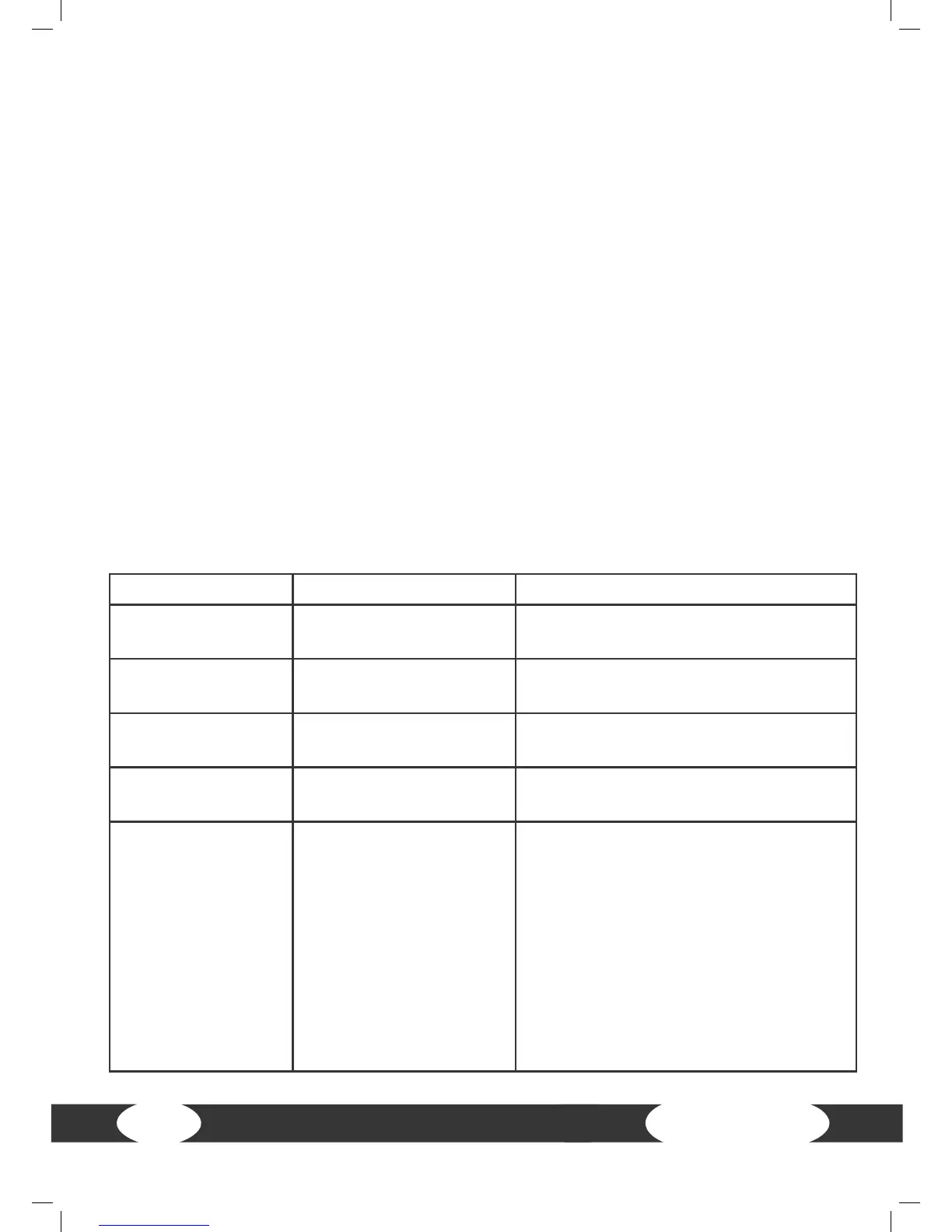
2.2 Faults and troubleshooting
The equipment runs through regular quality controls during production. Nevertheless,
errors or malfunctions on the equipment may occur. Individual parts are often the cause
of faults and replacement is usually sucient. Please use the following overview to see
the ve most common errors and how to repair them. If the equipment still does not work
properly, please contact your contract partner.
Problem Cause Solution
Crackling noise in
pedal area
Loose pedals Tighten the pedals
Equipment wobbles Equipment is not level Adjust the supporting feet
Handlebar/saddle
wobbles
Screws are loose Tighten screws
Display does not
turn on
Power is disconnected Check all plug connections and see if
the plug is plugged in
No pulse reading
• Sources of interference
in the room
• Using a chest strap:
- Unsuitable chest strap
- Chest strap is
incorrectly positioned
- Batteries are empty
• Eliminate sources of interference (e. g.
mobile phone, loudspeaker, etc.)
• Use a suitable chest strap (see
recommended accessories)
• Reposition the chest strap and/or
moisten the electrodes
• Charge the batteries


 To Next Page