Selecting VTX and CAM voltage
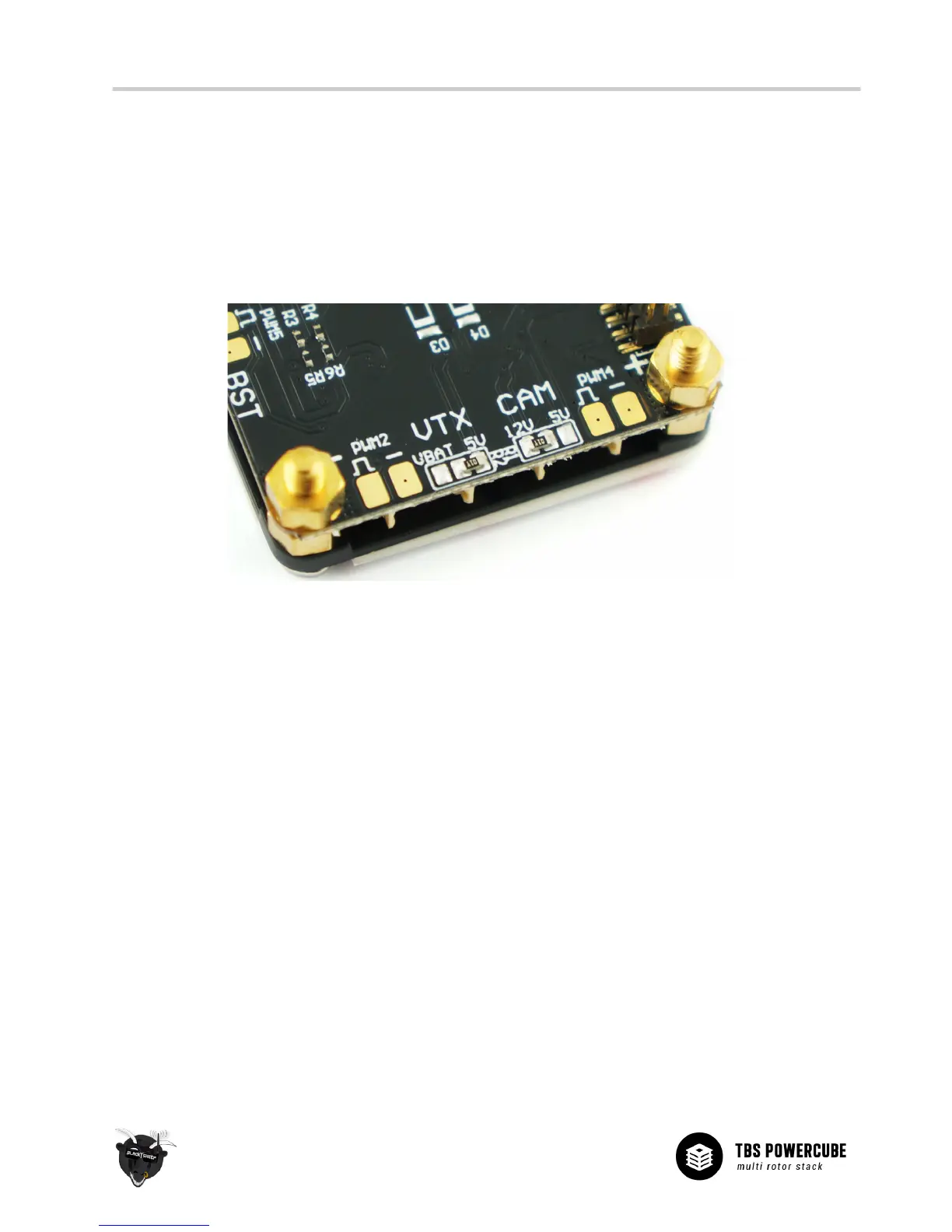
The output voltage for the VTX and CAM ports can be selectable on the PCB. By default is the CAM port set to
12V and the VTX set to 5V. If your equipment requires a different voltage (normally printed on the device or in
the specifications), you have to switch the solder jumper bridge to the right voltage (5V or 12V.) You can even
change the voltage for the VTX to VBatt if your video transmitter has an on-board regulator or requires more
power than the TBS DCDC board can provide.
If your are experienced with soldering you can make the change without disassembling the stack, but it is
recommended to disassemble the PDB layer to get direct access to the solder bridge.
To change the output voltage, perform the following steps:
1. Disassemble the stack to get access to the top of the PDB layer (remove flight controller and all the
ESC layers)
2. Desolder the bridge resistor and clean off any excess solder
3. Apply a small amount of solder to the center pad and the pad of the voltage you want to select.
4. Sweep across until the blobs join


 To Next Page