18
Settings
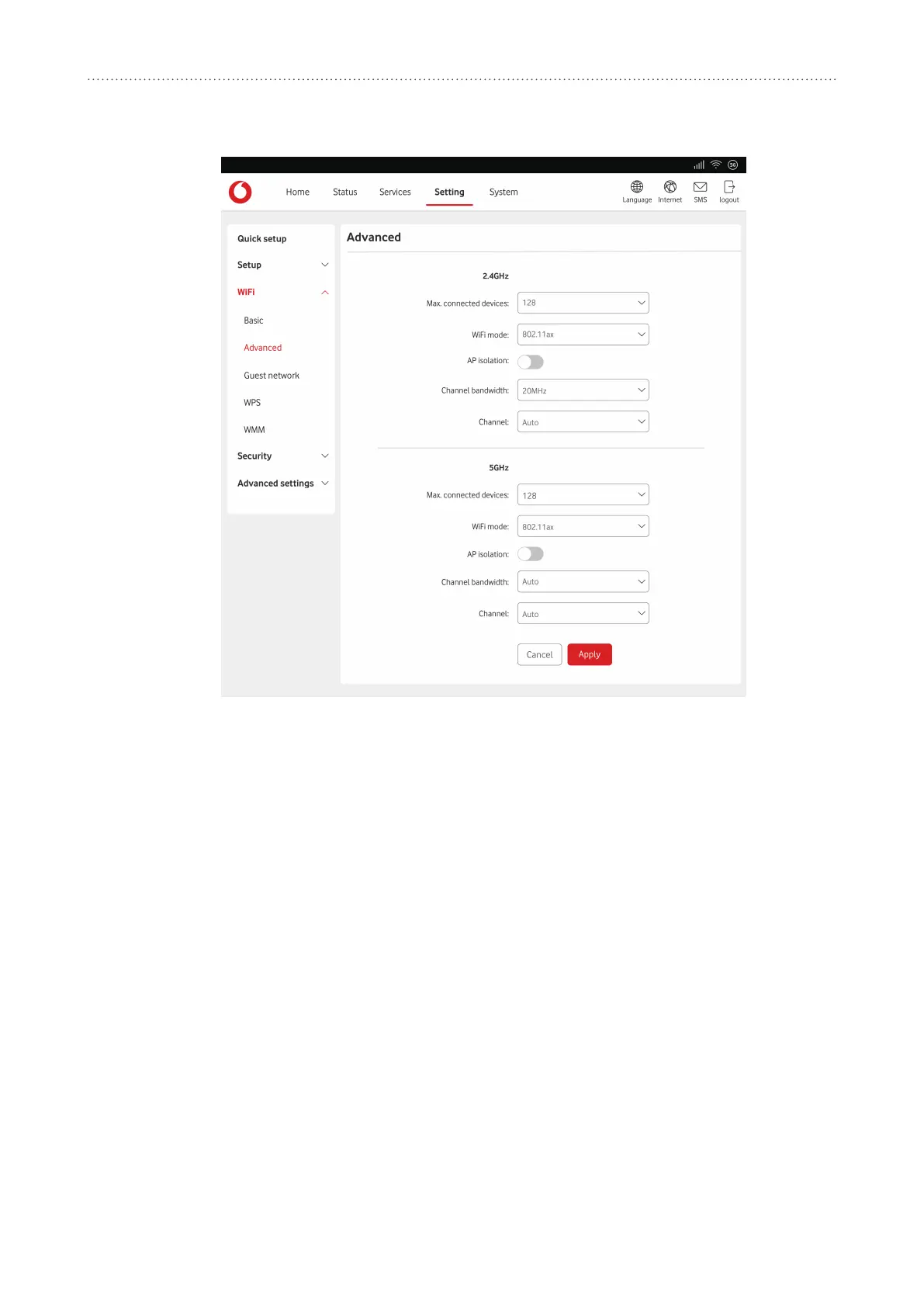
7.3.2 Advanced
y
youcansetthemaximumnumberofdevicesthatcanbeconnected
toyourdevicefromthedrop-downmenu.Thisissetto
128
bydefault.
y
youcanselectfromtheavailableoponsviathedrop-downmenu.Thisissetto
802.11ax
bydefault.
y
youcanenableordisablethisfuncon.Whenyouenableit,connecteddevices
cannotcommunicatewitheachotheronthesameSSID.
y
youcanselectfromtheavailableoponsviathedrop-downmenu.Itisset
to
20MHz
bydefaultfor2.4GHzandsetto
Auto
for5GHz.
y
select
Auto
andthedevicewillselectthebestchannelforyoutouseautomacally,or
youcanselectaWiFichannelmanually.
7.3.3 Guest network
Theguestnetworkisatemporarywirelessnetworkforguestusers.Youcansetaduration
youwantthenetworktotransmit.Devicesconnectedtotheguestnetworkwillnotbeableto
communicatewitheachother,butwillhavefullaccesstotheInternet.
y
thisisthenameoftheguestnetworkandisusedtoidenfy
yourguestnetwork.TheSSIDcanbebetween1and32characterslong.
y
youcansetthelengthofmeoftheguestnetworkthatclientscanuse.Thedefault
valueis1day.
y
youcanchoosethesecuritymode,availableoponsareWPA2,WPA/WPA2,WPA2/
WPA3,WPA3orDisabled.
y
settheWiFipasswordfortheguestnetwork.


 To Next Page
 Loading...