5.5.3 Output control continued
#
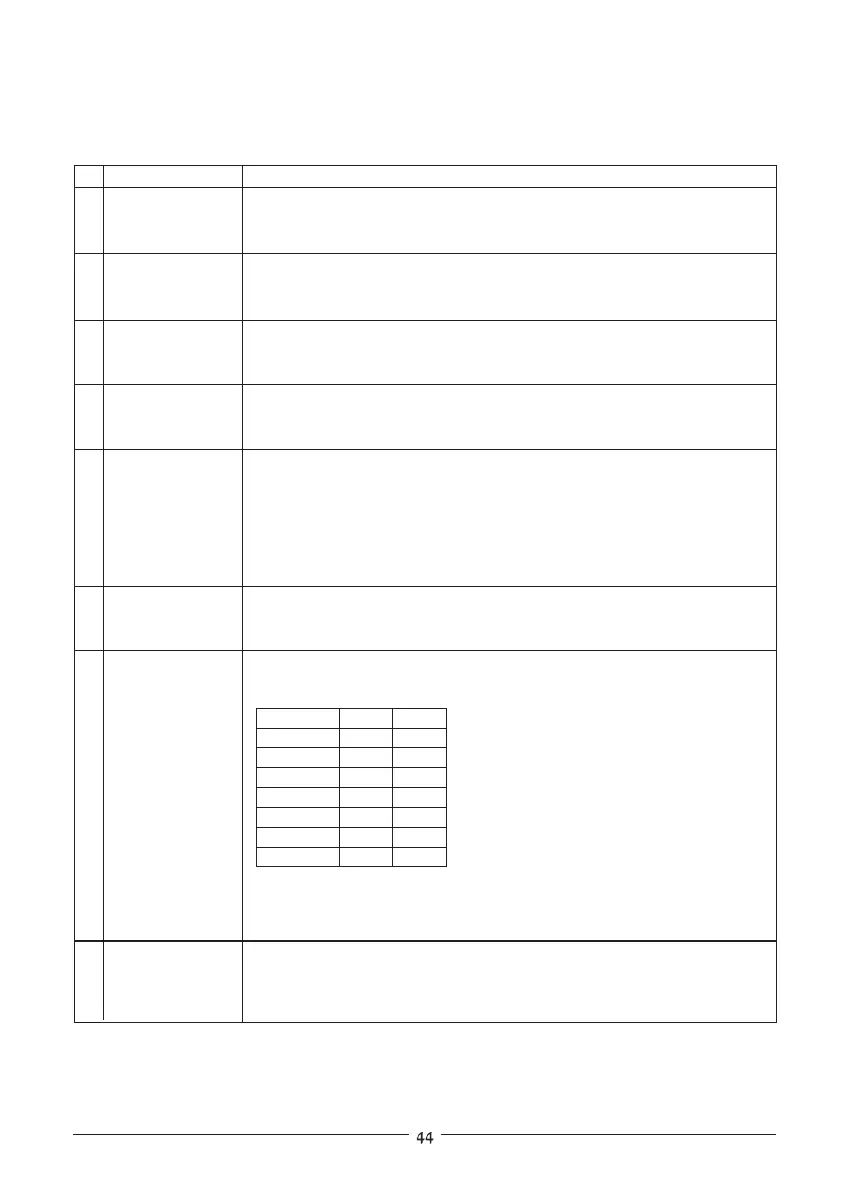
Commands
5 :CUR!;
6 :CUR?;
7 :OUTn;
8 :OUT?;
9 :FLDn;
10 :FLD?;
Description
Returns the string (Set Amper) followed by the present programmed
output current. The programmed value range is shown in table 5-2.
example- SA3.000 SA07.50
SA
Returns the string (Actual Amper) followed by the actual output current.
The actual current range is the same as the programming range.
example- AA3.000 AA07.50
AA
Sets the output to On or Off.
:OUT1;-Output On
:OUT0;-Output Off
Returns followed by the output On/Offstatus.
OT1-Output is On
OT0-Output is Off
OT
Sets the Foldback protection to On or Off.
:FLD1; Arm the foldback protection.
:FLD0; Release the foldback protection.
:FLD2; Cancel the foldback protection.
When the foldback protection is activated, :FLD0; will release the
protection and re-arm it while :FLD2; will cancel the protection. If the
protection has not been activated, both commands are the same.
Returns followed by the Foldback protection status.
FD1-Foldback is armed
FD0-Foldback is released
FD
11 :OVPn;
12 :OVP?;
Sets the over-voltage protection level in volts. Over-voltage range settings
are given in table 5-3:
Example-ZUP10-XY :OVP08.4;
Example- OP08.4
Returns the string followed by the present programmed over-voltage
protection value. The over-voltage range is given in table 5-3.
OP
Model MIN.
MAX.
ZUP6-XY 0.20
7.50
ZUP10-XY 00.5
13.0
ZUP20-XY 01.0
24.0
Table 5-3: Over-voltage programming range.
ZUP36-XY 01.8
40.0
ZUP60-XY 03.0
66.0
ZUP80-XY 04.0
88.0
ZUP120-XY
006.0
132.0











 To Next Page