EasyManua.ls Logo

Teac A-3300SX - Monitor, Line Control, and Input Level Checks

Teac A-3300SX
59 pages
Print Icon
To Next Page IconTo Next Page
To Previous Page IconTo Previous Page
Loading...
8-10
MONITOR
LEVEL
SETTING
OUTPUTSW..........
SOURCE
1.
Turn
LINE
controls
fully
clockwise.
2.
Apply
a
400
Hz
—18
dB
(97
mV)
signal
from
AF
oscil-
lator
to
LINE
IN
jacks.
3.
Adjust
VR-301/VR-304
for
—8
dB
(308
mV)
at
the
OUTPUT
jacks.
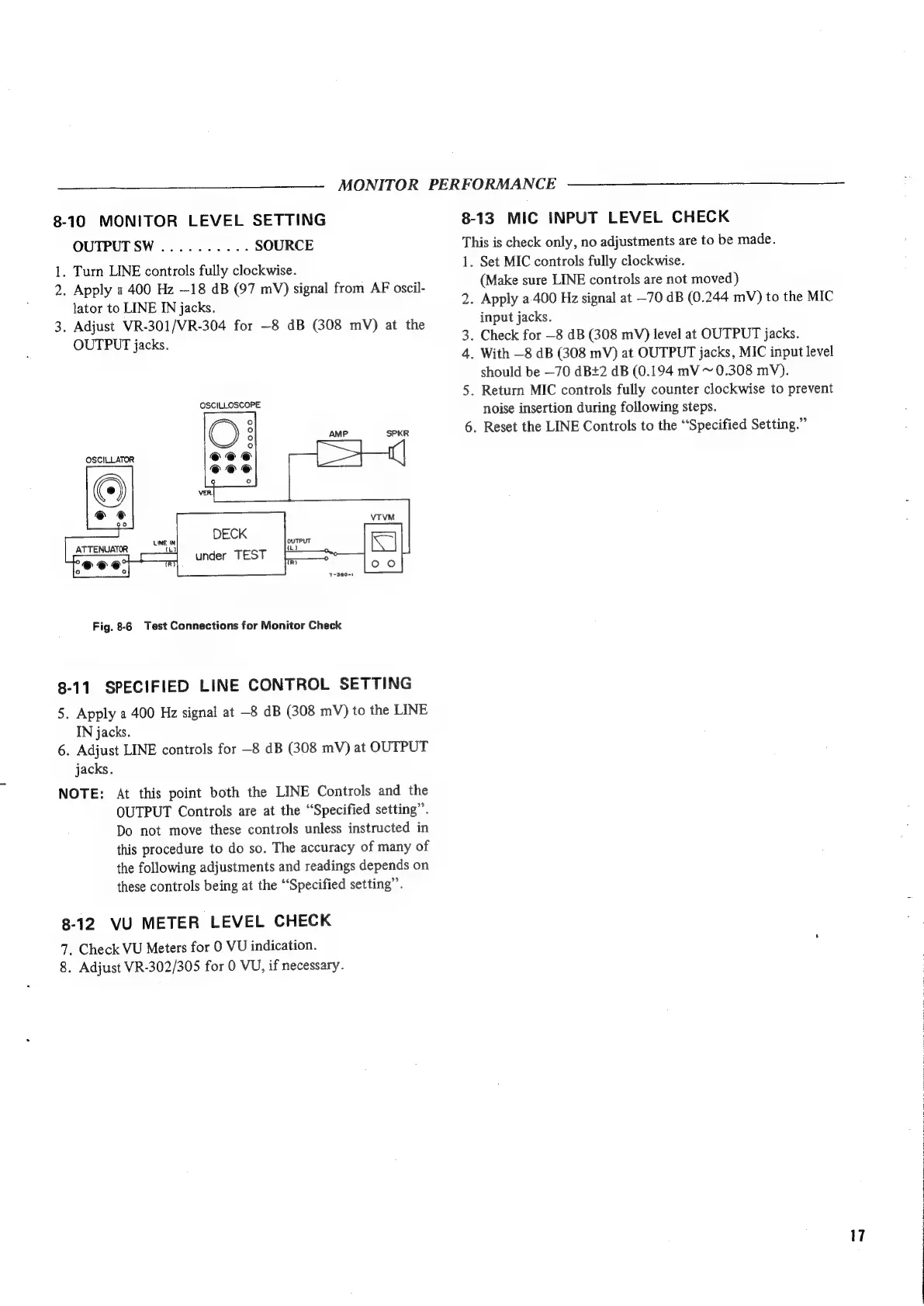
OSCILLOSCOPE
ATTENUATOR
Fig.
8-6
Test
Connections
for
Monitor
Check
8-11
SPECIFIED
LINE
CONTROL
SETTING
5.
Apply
a
400
Hz
signal
at
—8
dB
(308
mV)
to
the
LINE
IN
jacks.
6.
Adjust
LINE
controls
for
—8
dB
(308
mV)
at
OUTPUT
jacks.
NOTE:
At
this
point
both
the
LINE
Controls
and
the
OUTPUT
Controls
are
at
the
“Specified
setting”.
Do
not
move
these
controls
unless
instructed
in
this
procedure
to
do
so.
The
accuracy
of
many
of
the
following
adjustments
and
readings
depends
on
these
controls
being
at
the
“Specified
setting”.
8-12
VU
METER
LEVEL
CHECK
7.
Check
VU
Meters
for
0
VU
indication.
8.
Adjust
VR-302/305
for
0
VU,
if
necessary.
MONITOR
PERFORMANCE
8-13
MIC
INPUT
LEVEL
CHECK
This
is
check
only,
no
adjustments
are
to
be
made.
1.
Set
MIC
controls
fully
clockwise.
(Make
sure
LINE
controls
are
not
moved)
2.
Apply
a.
400
Hz
signal
at
—70
dB
(0.244
mV)
to
the
MIC
input
jacks.
3.
Check
for
—8 dB
(308
mV)
level
at
OUTPUT
jacks.
4.
With
—8
dB
(308
mV)
at
OUTPUT
jacks,
MIC
input
level
should
be
—70
dB+2
dB
(0.194
mV
~
0.308
mV).
5.
Return
MIC
controls
fully
counter
clockwise
to
prevent
noise
insertion
during
following
steps.
6.
Reset
the
LINE
Controls
to
the
“Specified
Setting.”

Other manuals for Teac A-3300SX

Related product manuals