EasyManua.ls Logo

Teac A-3440 - Monitor Performance Check -2; Monitor Level Check; Headphone Output Level Check; Record Performance Adj.

Teac A-3440
59 pages
Print Icon
To Next Page IconTo Next Page
To Previous Page IconTo Previous Page
Loading...
10-MONITOR
PERFORMANCE
CHECK
-2
10-1
MONITOR
LEVEL
CHECK
OUTPUT
SELECT
SW......
SOURCE
INPUT
SW
...............
LINE
IN
1.
Apply
a
400
Hz
—12
dB
(195
mV)
signal
from
the
oscil-
lator
to
the
LINE
IN
jack
1.
2.
Check
for
—8
dB
(308
mV)
at
the
OUTPUT
jack.
Also
check
for
0
VU
on
the
VU
METER.
10-2
HEADPHONE
OUTPUT
LEVEL
CHECK
MONITOR
CONTROL
VOLUME
...
Maximum
NOTE:
At
this
point
both
the
INPUT
control
and
the
OUTPUT
control
are
at
their
Specified
Settings.
3.
Connect
a
4
ohm
non-inductive
resistor
across
the
head-
phone
(PHONES)
jack
and
connect
the
VTVM
across
the
resistor.
4.
Depress
the
Headphone
Selector
Button
for
channel
1.
5.
The
VTVM
should
indicate
—19
dB
+1
dB
(77.5
mV
97.5
mV).
6.
Depress
the
buttons
for
channels
2,
3
and
4
so
that
all
4
are
depressed.
7.
The
VTVM
reading
should
increase
to
—6
dB
+2
dB
(308
mV
489
mV).
7
)
—_
D>
T-1366
Fig.
8-7
Test
Connections
for
Headphone
Output
Check
11-RECORD
PERFORMANCE
ADJ.
NOTE:
For
all
record
performance
measurements
and
adjustments
the
FUNCTION
SELECT
SW
should
be
ON
for
all
channels.
11-1
BIAS
TRAP
ADJUSTMENT
1.
Remove
all
Input
Signals.
<.
Thread
a
blank
tape
on
the
deck
and
depress
RECORD
and
PAUSE
buttons.
3.
Connect
a
VTVM
or
oscilloscope
to
Test
Point
(T.P.)
and
ground.
See
Fig.
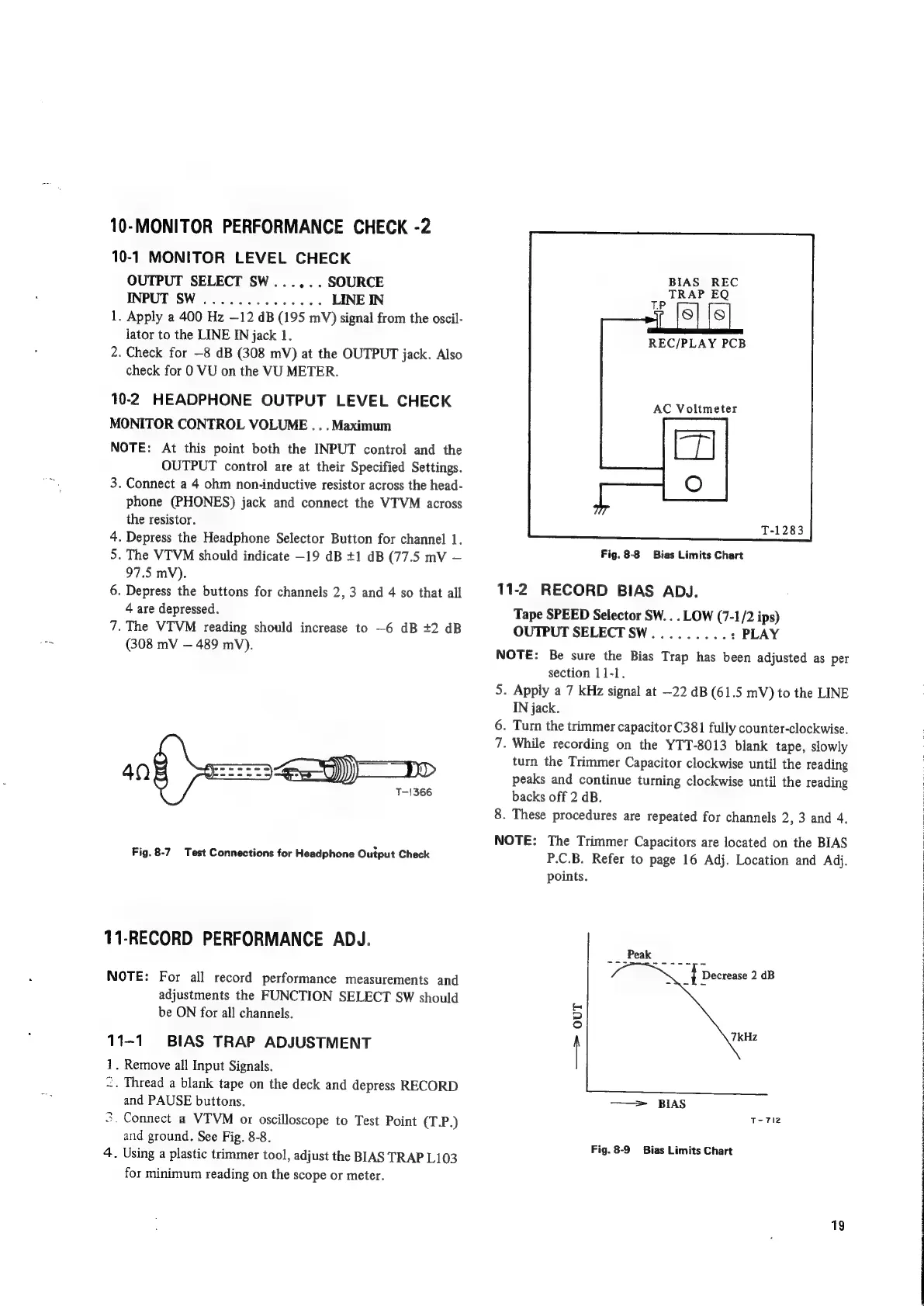
8-8.
4.
Using
a
plastic
trimmer
tool,
adjust
the
BIAS
TRAP
L103
for
minimum
reading
on
the
scope
or
meter.
BIAS
REC
TRAP
EQ
REC/PLAY
PCB
AC
Voltmeter
Fig.
8-8
Bias
Limits
Chart
11-2
RECORD
BIAS
ADJ.
Tape
SPEED
Selector
SW.
.
.
LOW
(7-1/2
ips)
OUTPUT
SELECTSW.........
:
PLAY
NOTE:
Be
sure
the
Bias
Trap
has
been
adjusted
as
per
section
11-1.
5.
Apply
a
7
kHz
signal
at
-22
dB
(61.5
mV)
to
the
LINE
IN
jack.
6.
Turn
the
trimmer
capacitor
C381
fully
counter-clockwise.
7.
While
recording
on
the
YTT-8013
blank
tape,
slowly
turn
the
Trimmer
Capacitor
clockwise
until
the
reading
peaks
and
continue
turning
clockwise
until
the
reading
backs
off
2
dB.
8.
These
procedures
are
repeated
for
channels
2,
3
and
4,
NOTE:
The
Trimmer
Capacitors
are
located
on
the
BIAS
P.C.B.
Refer
to
page
16
Adj.
Location
and
Adj.
points.
—~>
OUT
——>
BIAS
T-
712
Fig.
8-9
Bias
Limits
Chart
19
oS
a
PN
ROT
ON
RES
Ce
EAL
A
Oe
OEE
eer
TR
RTE
SET
ERED
CORR
Sen
ES
RE
ee
Sa
ae
Ve
CRC

Other manuals for Teac A-3440

Related product manuals