EasyManua.ls Logo

Teac A-3440 - Page 7

Teac A-3440
59 pages
Print Icon
To Next Page IconTo Next Page
To Previous Page IconTo Previous Page
Loading...
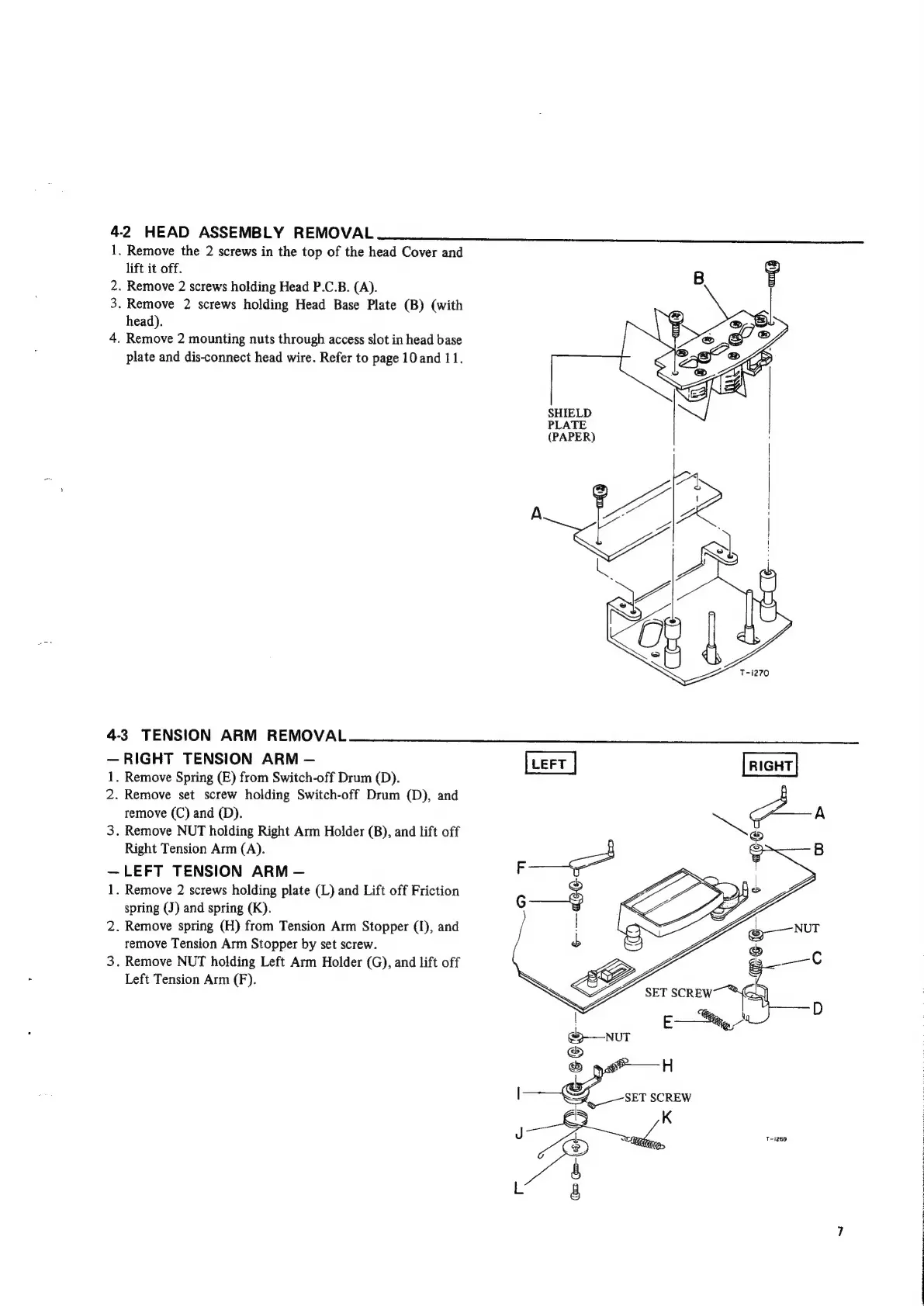
4-2
HEAD
ASSEMBLY
REMOVAL
.
Remove
the
2
screws
in
the
top
of
the
head
Cover
and
lift
it
off.
.
Remove
2
screws
holding
Head
P.C.B.
(A).
3.
Remove
2
screws
holding
Head
Base
Plate
(B)
(with
head).
4.
Remove
2
mounting
nuts
through
access
slot
in
head
base
plate
and
dis-connect
head
wire.
Refer
to
page
10
and
11.
nN
4-3
TENSION
ARM
REMOVAL
RIGHT
TENSION
ARM
1.
Remove
Spring
(E)
from
Switch-off
Drum
(D).
2.
Remove
set
screw
holding
Switch-off
Drum
(D),
and
remove
(C)
and
(D).
3.
Remove
NUT
holding
Right
Arm
Holder
(B),
and
lift
off
Right
Tension
Arm
(A).
LEFT
TENSION
ARM
1.
Remove
2
screws
holding
plate
(L)
and
Lift
off
Friction
spring
(J)
and
spring
(K).
2.
Remove
spring
(H)
from
Tension
Arm
Stopper
(I),
and
remove
Tension
Arm
Stopper
by
set
screw.
3.
Remove
NUT
holding
Left
Arm
Holder
(G),
and
lift
off
Left
Tension
Arm
(F).
SHIELD
PLATE
(PAPER)
Pox
a
a
;
b
2
~~
T-1269

Other manuals for Teac A-3440

Related product manuals