EasyManua.ls Logo

Teac A-450 - CASE;FRONT PANEL; MOTOR

Teac A-450
58 pages
Print Icon
To Next Page IconTo Next Page
To Previous Page IconTo Previous Page
Loading...
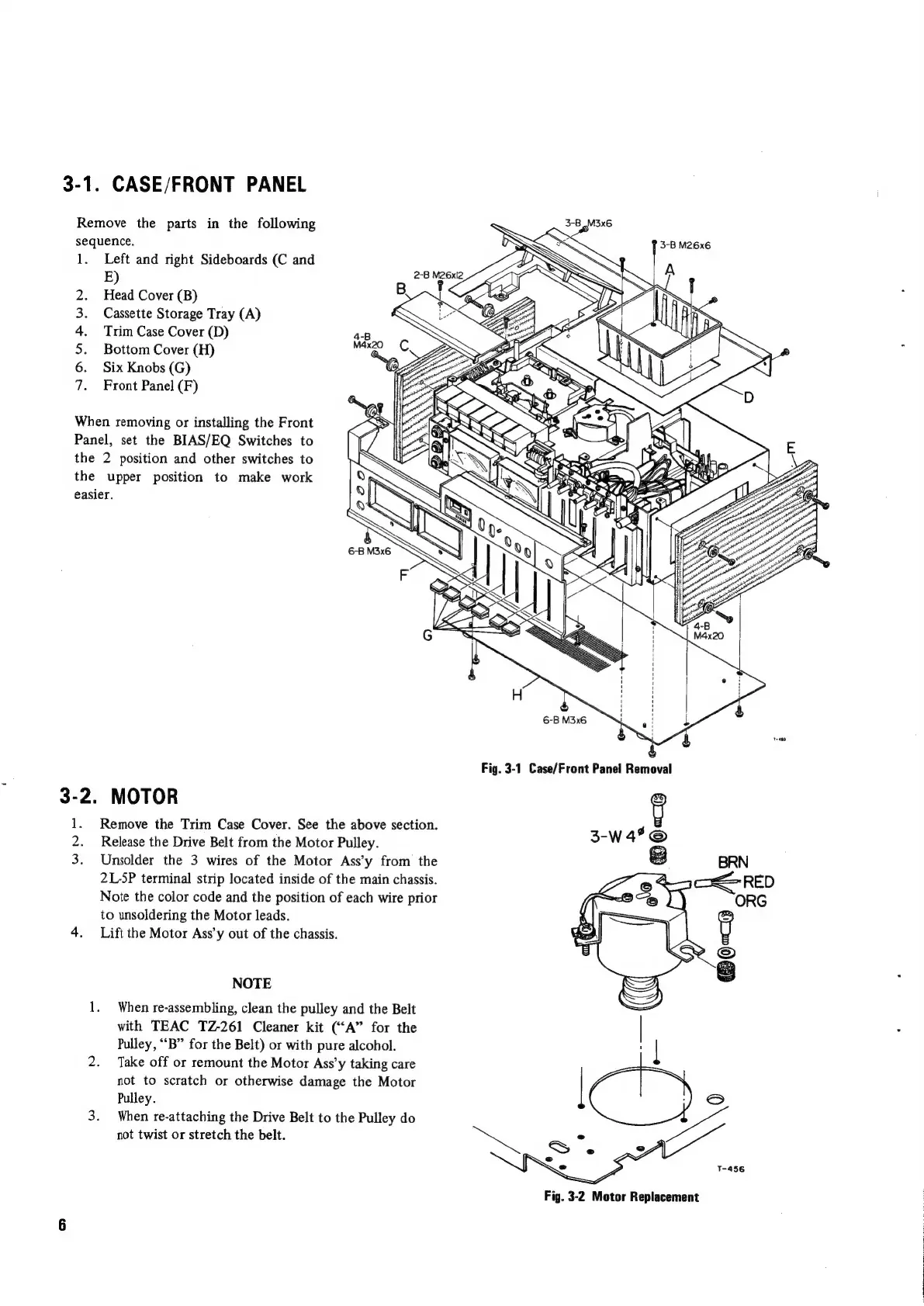
3-1.
Remove
the
parts
in
the
following
sequence.
1.
NDARWH
When
removing
or
installing
the
Front
Panel,
set
the
BIAS/EQ
Switches
to
the
the
easier.
3-2.
i
2.
3.
CASE/FRONT
PANEL
Left
and
right
Sideboards
(C
and
E)
Head
Cover
(B)
Cassette
Storage
Tray
(A)
Trim
Case
Cover
(D)
Bottom
Cover
(H)
Six
Knobs
(G)
Front
Panel
(F)
2
position
and
other
switches
to
upper
position
to
make
work
MOTOR
Remove
the
Trim
Case
Cover.
See
the
above
section.
Release
the
Drive
Belt
from
the
Motor
Pulley.
Unsolder
the
3
wires
of
the
Motor
Ass’y
from
the
2L-5P
terminal
strip
located
inside
of
the
main
chassis.
Note
the
color
code
and
the
position
of
each
wire
prior
to
unsoldering
the
Motor
leads.
Lift
the
Motor
Ass’y
out
of
the
chassis.
NOTE
When
re-assembling,
clean
the
pulley
and
the
Belt
with
TEAC
TZ-261
Cleaner
kit
(“‘A”
for
the
Pulley,
“B”
for
the
Belt)
or
with
pure
alcohol.
Take
off
or
remount
the
Motor
Ass’y
taking
care
not
to
scratch
or
otherwise
damage
the
Motor
Pulley.
When
re-attaching
the
Drive
Belt
to
the
Pulley
do
not
twist
or
stretch
the
belt.
3-B
_M3x6
ied
=
SS
P
3-BM26x6
.
2-B
M26xl2
ZS
e
B
SES
>
@
K
SP
J
]
S
Fig.
3-2
Motor
Replacement

Other manuals for Teac A-450

Related product manuals