EasyManua.ls Logo

Teac A-450 - CASSETTE HOLDER; HEAD;PINCH ROLLER

Teac A-450
58 pages
Print Icon
To Next Page IconTo Next Page
To Previous Page IconTo Previous Page
Loading...
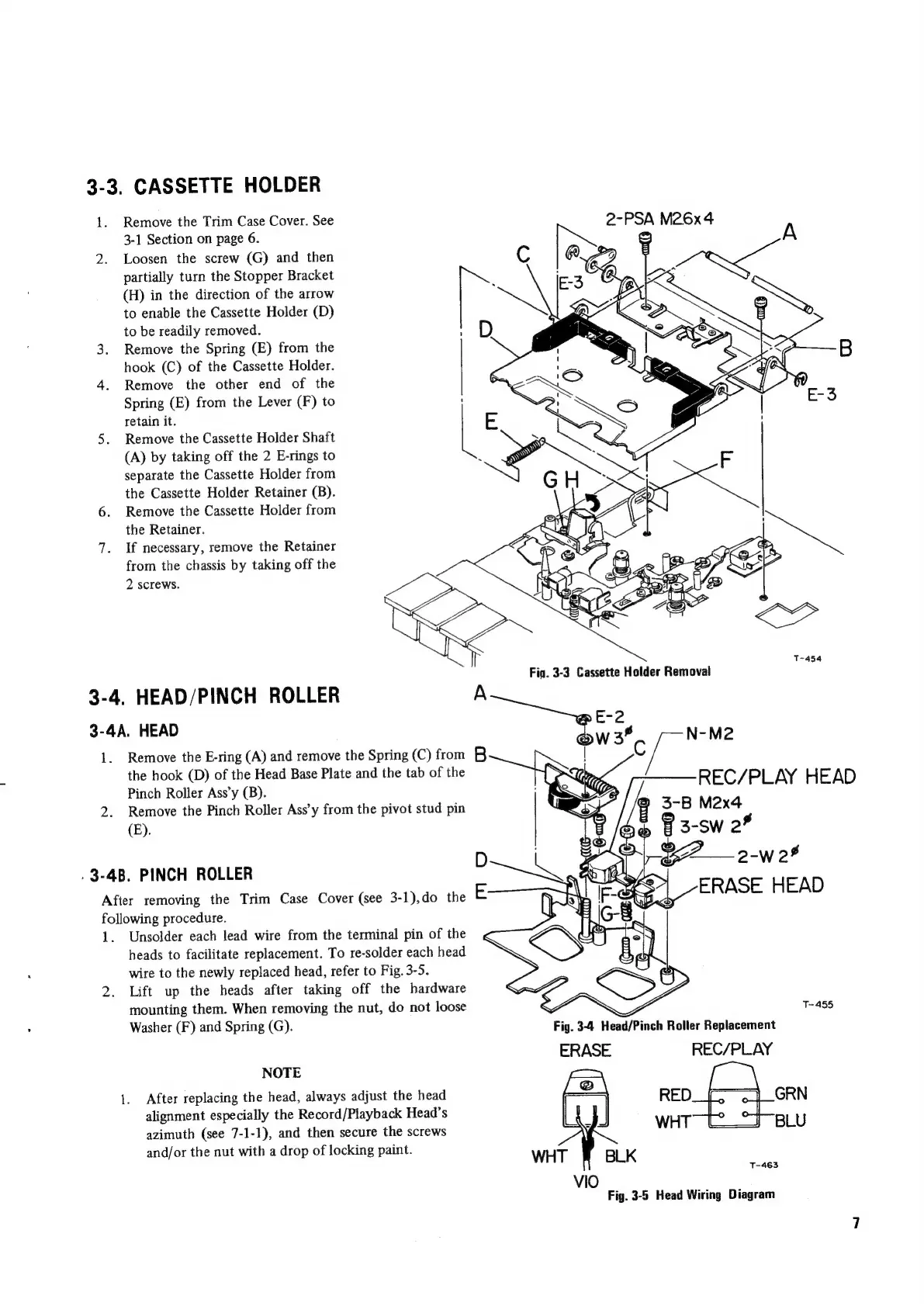
3-3.
CASSETTE
HOLDER
1.
Remove
the
Trim
Case
Cover.
See
2-PSA
M26x4
3-1
Section
on
page
6.
om
2.
Loosen
the
screw
(G)
and
then
C
0.9
-
ARR
artially
turn
the
Stopper
Bracket
:
G
-
partially
pp
c-3
Ba
kes
(H)
in
the
direction
of
the
arrow
to
enable
the
Cassette
Holder
(D)
to
be
readily
removed.
3.
Remove
the
Spring
(E)
from
the
hook
(C)
of
the
Cassette
Holder.
4.
Remove
the
other
end
of
the
Spring
(E)
from
the
Lever
(F)
to
retain
it.
5.
Remove
the
Cassette
Holder
Shaft
(A)
by
taking
off
the
2
E-rings
to
separate
the
Cassette
Holder
from
the
Cassette
Holder
Retainer
(B).
6.
Remove
the
Cassette
Holder
from
the
Retainer.
:
A
7.
If
necessary,
remove
the
Retainer
SY
Es
Pe
2
a
nS
from
the
chassis
by
taking
off
the
2
screws.
3-4.
HEAD/PINCH
ROLLER
A
3-4A.
HEAD
1.
Remove
the
E-ring
(A)
and
remove
the
Spring
(C)
from
B
the
hook
(D)
of
the
Head
Base
Plate
and
the
tab
of
the
Pinch
Roller
Ass’y
(B).
2.
Remove
the
Pinch
Roller
Ass’y
from
the
pivot
stud
pin
(E).
[
N-M2
REC/PLAY
HEAD
.
3-4B.
PINCH
ROLLER
After
removing
the
Trim
Case
Cover
(see
3-1),do
the
following
procedure.
1.
Unsolder
each
lead
wire
from
the
terminal
pin
of
the
heads
to
facilitate
replacement.
To
re-solder
each
head
wire
to
the
newly
replaced
head,
refer
to
Fig.
3-5.
2.
Lift
up
the
heads
after
taking
off
the
hardware
mounting
them.
When
removing
the
nut,
do
not
loose
T-455
Washer
(F)
and
Spring
(G).
Fig.
3-4
Head/Pinch
Roller
Replacement
ERASE
REC/PLAY
NOTE
1.
After
replacing
the
head,
always
adjust
the
head
GRN
alignment
especially
the
Record/Playback
Head’s
BLU
azimuth
(see
7-1-1),
and
then
secure
the
screws
and/or
the
nut
with
a
drop
of
locking
paint.
T-463
Fig.
3-5
Head
Wiring
Diagram

Other manuals for Teac A-450

Related product manuals