EasyManua.ls Logo

Teac A-6300 - Page 23

Teac A-6300
112 pages
Print Icon
To Next Page IconTo Next Page
To Previous Page IconTo Previous Page
Loading...
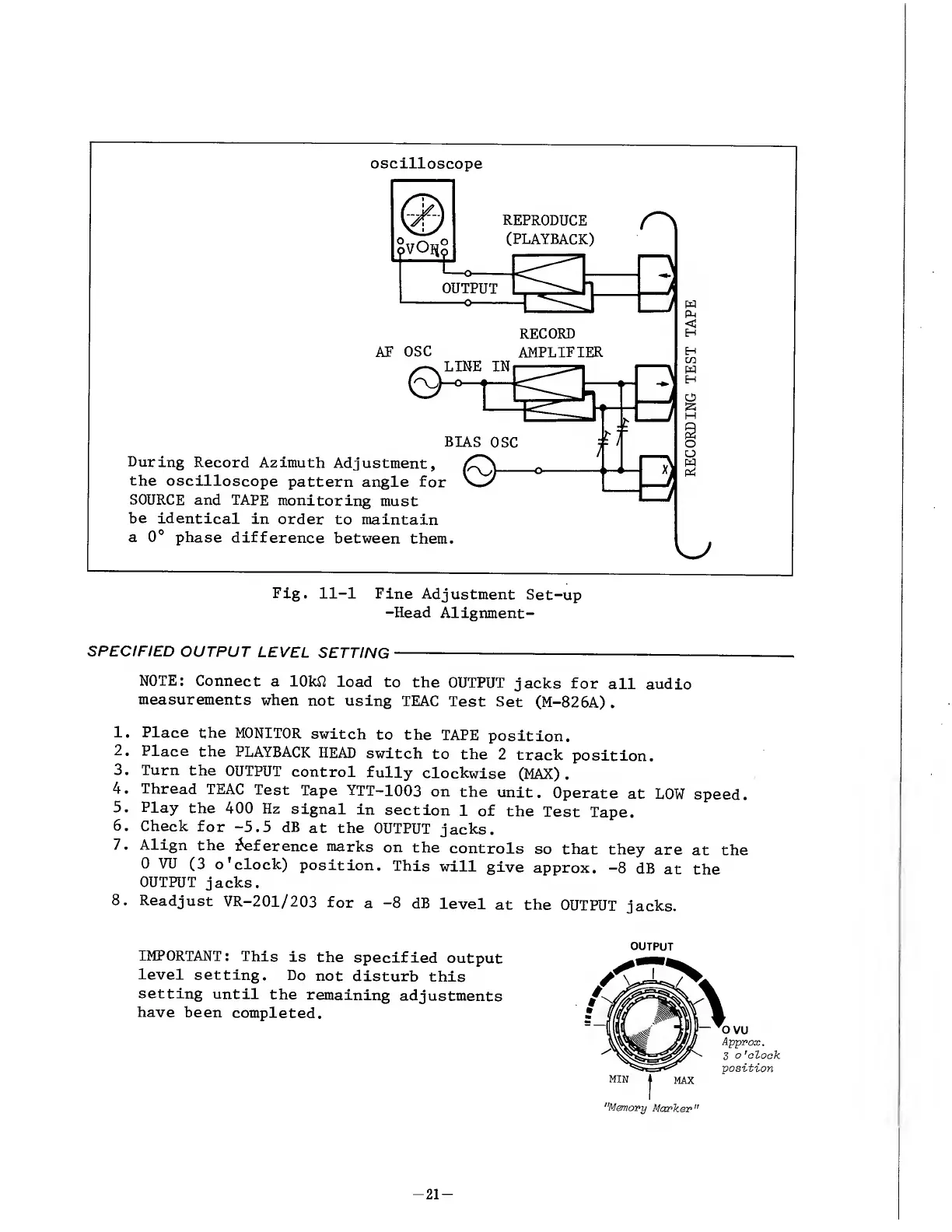
Fig.
11-1
Fine
Adjustment
Set-up
-Head
Alignment-
SPECIFIED
OUTPUT
LEVEL
SETTING
-
NOTE:
Connect
a
lOkft
load
to
the
OUTPUT
jacks
for
all
audio
measurements
when
not
using
TEAC
Test
Set
(M-826A).
1.
Place
the
MONITOR
switch
to
the
TAPE
position.
2.
Place
the
PLAYBACK
HEAD
switch
to
the
2
track
position.
3.
Turn
the
OUTPUT
control
fully
clockwise
(MAX).
4.
Thread
TEAC
Test
Tape
YTT-1003
on
the
unit.
Operate
at
LOW
speed.
5.
Play
the
400
Hz
signal
in
section
1
of
the
Test
Tape.
6
.
Check
for
-5.5
dB
at
the
OUTPUT
jacks.
7.
Align
the
Reference
marks
on
the
controls
so
that
they
are
at
the
0
VU
(3
o’clock)
position.
This
will
give
approx.
-8
dB
at
the
OUTPUT
jacks.
8
.
Readjust
VR-201/203
for
a
-8
dB
level
at
the
OUTPUT
jacks.
IMPORTANT:
This
is
the
specified
output
level
setting.
Do
not
disturb
this
setting
until
the
remaining
adjustments
have
been
completed.
OUTPUT
-
2
1
-

Other manuals for Teac A-6300

Related product manuals