4-3. How to the rmware of DVD-RW SATA Drive by Sony
Optiarc
4-3-1. Prepare
1. USB-SATA convert cable
2. SATA power cable
3. DC power supply
4. xxx.exe le for update
File name : AD7290H_TEAC_XXXX_Updater.exe
("XXXX" is shown the rmware version.)
5. PC with USB interface
4-3-2. Connect
1. Connect the Drive (AD-7250H/7290H) and PCwith
USB-SATA convert cable.
2. Connect SATA power cable to the Drive, and supply
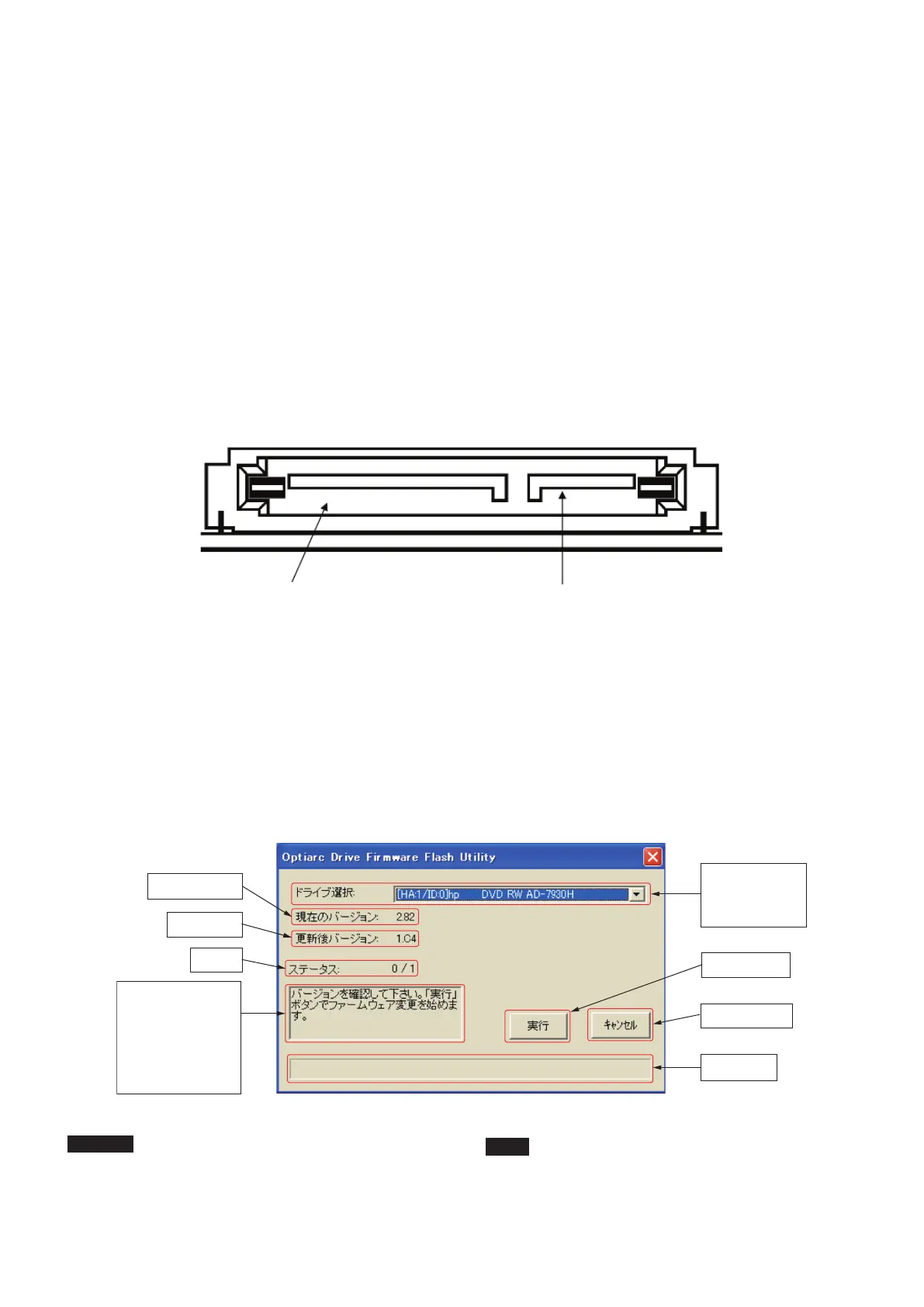
power (5V) to the Drive. (See the drawing below.)
4-3-3.Execution of update
TheleforupdateisperformedonPC.
1. Open the window of software that is "Optiarc Drive
Firmware Flash Utility".
2. After confirmed the firmware version for update, click
"Load" button.
3. Start the update, and progress bar is completed to the
right, the update nish. (See the picture below.)
CAUTION
It should select Drive exactly.
Select : AD-7250H or AD-7290H.
4-3.SonyOptiarc製DVD-RWsatadriveAD-7250H/7290H
のF/Wupdate手順
4-3-1.準備するもの
1.USB-SATA変換ケーブル
2.SATA電源ケーブル
3.DC電源
4.Drive製造元より供給される書き換え用ファイル
ファイル名:AD7290H_TEAC_XXXX_Updater.exe
("XXXX"はVersionを表す。)
5.USBI/F付きPC
4-3-2.接続
1.PCと書き換え対象DriveをUSB-SATA変換ケーブル
で接続する。
2.DriveにSATA電源ケーブルを接続する。(下図参照)
4-3-3.書き換えの実行
PC上で書き換え用ファイルを実行する。
1.ソ フ ト ウ ェ ア”OptoarcDriveFirmwareFlash
Utility”のウィンドウを開く。
2.アップデート用ファームウェアのバージョンを確
認後、”Load”ボタンをクリックする。
3.アップデートがスタートし、プログレスバーが右
端まで進めば終了。(下記参照)
注意
アップデートのソフトウェア上で、正確にアップデー
トするターゲットDrive(AD-7250H/7290H)を選択して
ください。
'9'5:6$7$'ULYH$'++
電源コネクター(5V)
3DUWRI3RZHU9
SATA-USB変換ケーブル用コネクター
3DUWRIVHULDO$7$VLJQDOFRQQHFWRU
Current Version
New Version
Status
Conrm the New
Version of Firmware.
Click "Load" button,
then start Firmware
update.
Drive select :
AD-7250H
or AD-7290H
"Load" button
"Cancel" button
Progress bar
- 10 -
TEAC AD-RW900/900E


 To Next Page