4. Updating of System Firmware
4-1. How to update of MCU rmware
4-1-1. Checking the firmware version Checking the firm-
ware version
Check the rmware version of AD-RW900/900E before starting
rmware updating procedures.
1) Turn the unit on.
2) Press the “COUNTER RESET” and “SOURCE” buttons at the
same time.
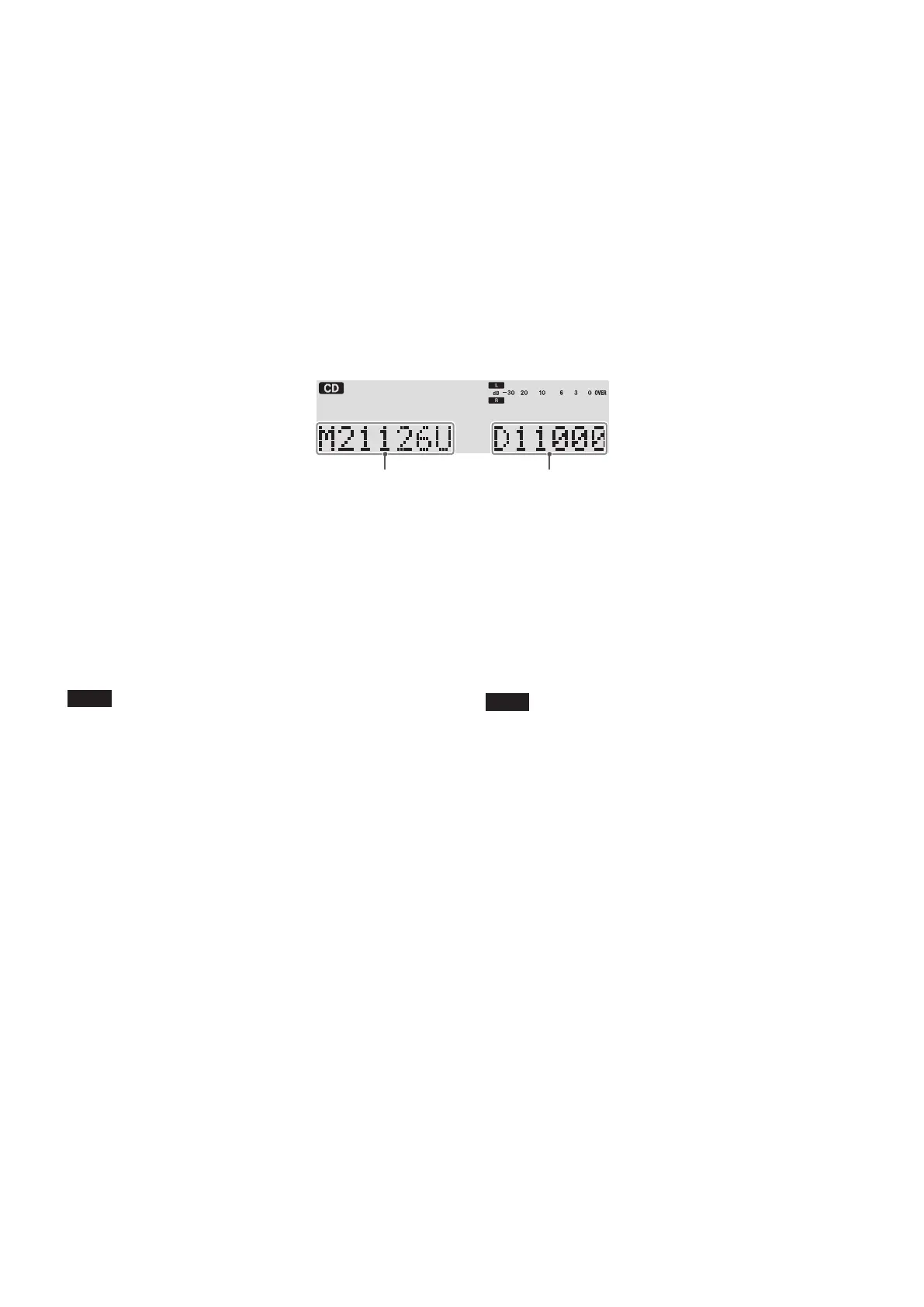
3) The current rmware version is shown at the bottom of the
display.
i
After checking the version, press the “COUNTER RESET”
and “SOURCE” buttons at the same time again to restore
the usual display contents. (You can also turn the unit off
and on again to restore the usual display contents.)
4-1-2. Firmware update procedures
Copy the “player.rom” updater le to an empty USB ash
drive in advance.
1) Set the SOURCE to “USB”.
2) After “No USB” appears on the display, connect the USB ash
drive that contains the “player.rom” updater le to the USB
port.
3) After “READING” appears on the display, “UPDATING” will
appear for about 30 seconds while the rmware is being up-
dated.
注意
Do not disconnect the power cord or turn the unit off while
“UPDATING” appears on the display.
4) After about 30 seconds, “COMPLETE” will appear on the dis-
play.
5) Disconnect the USB ash drive and turn the unit o.
6) When you turn the unit on again, it will be using the new
rmware version.
4-1.MCUファームウェアのアップデート
4-1-1.ファームウェアバージョンの確認
ファームウェアアップデート作業前に、AD-RW900/900E
のファームウェアバージョンを確認します。
1)本体の電源をオンにしてください。
2)本体の「COUNTERRESET」と「SOURCE」ボタンを同
時に押してください。
3)ディスプレー下側に現在のファームウェアバージョン
が表示されます。
i
確認後は、再度「COUNTERRESET」と「SOURCE」
ボタンを同時に押し、通常状態に戻してください。
(一度電源をオフにし、再度電源をオンにしても通
常状態に戻ります。)
4-1-2.ファームウェアアップデート手順
あらかじめ、書き換え用ファイル「player.rom」を空の
USBメモリーにコピーしておいてください。
1)SOURCEを「USB」にする。
2)「NOUSB」表示になったら、前面のUSB端子にUSBメ
モリーを挿入する。
3)「READING」表示後、「UPDATING」が表示され、約30
秒間書き換えを行います。
注意
「UPDATING」表示中は、電源コードを抜いたり、電源
をオフにしないでください。
4)約30秒経過後「COMPLETE」が表示されます。
5)USBメモリーを抜いて、電源をオフにします。
6)電源をオンにすると、新しいバージョンで起動します。
Firmware version Deck MCU Firmware version
- 5 -
TEAC AD-RW900/900E


 To Next Page